

LinkedIn AI Post Generator
Postli · Marketing
LinkedIn AI Post Generator is a free browser tool that turns a short prompt, a template, or a draft you already wrote into a formatted LinkedIn post.
About LinkedIn AI Post Generator
What Is LinkedIn AI Post Generator
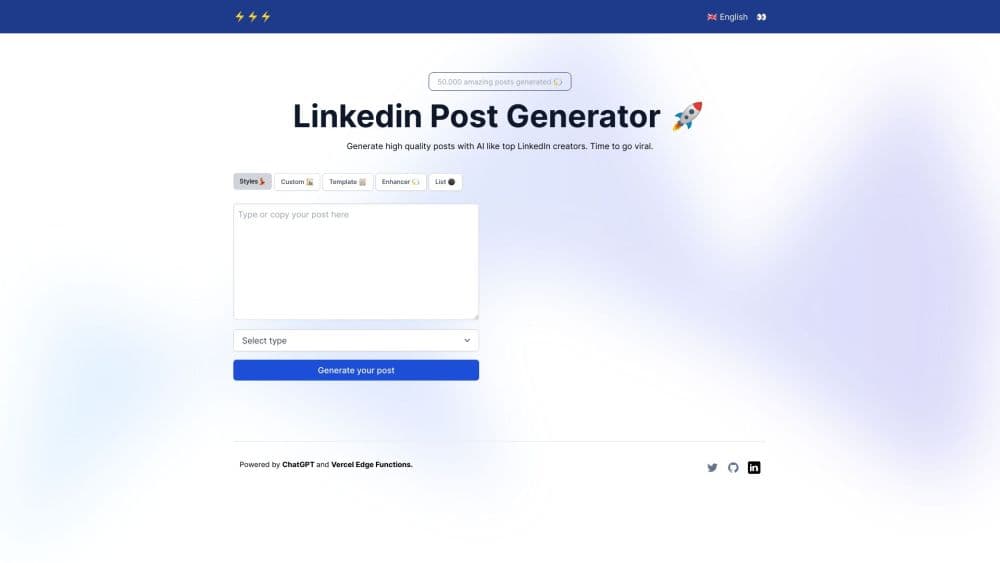
LinkedIn AI Post Generator is a free web page that writes LinkedIn posts on demand. You hand it a topic, an example, or a paragraph you already wrote, choose a style, and it returns a post shaped the way the feed rewards: a short opening line, one idea per line, a few emoji, three hashtags, and a question at the end to pull replies. It runs in the browser, so there's nothing to install and no card required to try it. The pitch is blunt: viral LinkedIn posts without the blank page.
The tool comes from Postli, a paid LinkedIn content app, and works as both a free LinkedIn post writer and the front door to that product. Five modes cover the usual ways people stall: a blank page, a borrowed structure, a flat draft, a list that needs assembling. The generator itself costs nothing and stays open without an account.
The limit is that it writes to a format, not to your expertise. It doesn't research your niche, verify figures, or know what happened at your company last quarter, so vague input produces a vague post. The interface is English-only and there's no API, which matters if you publish in bulk or in another language.
Getting Started
- Open postgenerator.app in any browser. No download, no extension, no signup screen in the way.
- Pick a mode from the top menu: Styles, Custom, Template, Enhancer, or List.
- Type your input. A one-line topic works for Styles and Custom, a pasted post for Template, and an existing draft for Enhancer.
- Choose a vibe where the mode offers one: Story, Crisp, List, Unpopular opinion, or Case Study.
- Tap Generate, read the result, then copy it into LinkedIn or into Postli if you want to schedule it.
Product Information
A quick look at LinkedIn AI Post Generator's pricing, supported platforms, and performance.
Best for
The users, tasks, and scenarios where this tool fits best.
Users
- Job seekers and candidates
- Founders and solo consultants
- Social media managers and ghostwriters
Tasks
- Turning a rough idea into a post
- Rescuing a draft that reads flat
- Building a list post
Scenarios
- Posting on a schedule
- Testing angles before you commit
- Repurposing longer content
Key features
Posts Written in the Style of Top Creators
The Styles mode generates a post using patterns pulled from creators who already get engagement on LinkedIn. You supply the subject, the tool supplies the cadence: short opening lines, numbered beats, white space between ideas. It's the closest thing here to copying a writer you admire without copying their words.
Five Vibes, Five Structures
Story, Crisp, List, Unpopular opinion, and Case Study each change how the post is built, not just its tone. Crisp keeps sentences clipped and the post short. Case Study pushes toward a problem, an action, and a result. Picking the wrong one is obvious within two lines, so testing is cheap. Each vibe also rewrites the opening, which matters because LinkedIn hooks carry most of the weight in the feed.
Custom Prompt Mode
Custom takes free text and follows it, which makes it the most flexible of the five. You can describe an audience, a constraint, or an angle in plain language and get something closer to a brief than a template fill. Output quality tracks the quality of the brief, as with any prompt-driven writer.
Template Mode for Proven Formats
LinkedIn post templates are the starting point here, not a topic. Paste a structure you've seen work, and the generator rewrites it around your subject while keeping the shape. Useful when you want the skeleton of a format without hunting for the original post again.
Draft Enhancer for Flat Writing
The Enhancer takes text you wrote and returns a tighter version. Options cover shortening, expanding, and grammar correction, plus an add-hashtags switch. It's the mode to reach for when the thinking is done and only the phrasing is weak.
Curated List Posts
List mode produces curated roundups: five books, seven tools, four companies. The format is one of the most reused on LinkedIn because it's easy to skim and easy to argue with in the comments, and this mode builds it without you counting bullets by hand.
Pros and cons
Pros
- Free to use in the browser, with no install, no extension, and no card before the first post.
- The five vibes produce visibly different structures, so one idea can yield several testable drafts.
- Formatting follows LinkedIn conventions automatically: short lines, emoji, hashtags, closing question.
- The Enhancer works on your own wording, which keeps your voice instead of replacing it.
Cons
- Posts inherit the genre's habits, emoji, one-line paragraphs, hashtag triplets, so heavy use makes your feed sound like everyone else's.
- No research layer. Every fact, name, and number has to come from your input, and nothing gets checked.
- English-only interface and no API. Teams publishing across languages or at volume will end up in Postli or another tool.
Frequently asked questions
Yes. The generator is free to use in a browser, and the site doesn't put a paywall or a signup form in front of the first post. Paid plans exist on Postli, the app behind the tool, starting at $19/mo for more generations and a template library.
Related content
Explore related tools, skills, and articles for LinkedIn AI Post Generator.
LinkedIn AI Post Generator Alternatives

Emailwritr
Emailwritr · Writing · MarketingEmailwritr is an AI email copywriting tool built for affiliates, course creators, and online businesses that want more revenue from the list they already own. Instead of blank pages or generic chatbot prompts, this AI email writer generates welcome sequences, launch campaigns, cart recovery emails, and promo series from frameworks modeled on well-known direct-response copywriters. You connect your autoresponder, answer a few questions about your offer, and it writes the copy for you.

Prosp
Prosp · Writing · Voice & Language · MarketingProsp is an AI LinkedIn outreach tool built for agencies and sales teams, and it writes the message and the voice note in your own voice for each prospect so they actually reply. You connect your accounts, find leads, and let the AI draft and send personalized messages at scale, all from one inbox. It's built for people running outbound at volume. That's the whole pitch. Every touchpoint still has to feel human.

On Model
On Model · Image · MarketingOn Model is an AI fashion model tool that places your clothing on virtual models so online stores can get on-model product photos without booking a photoshoot. It runs as a Shopify app, letting you swap the model in an existing image, change backgrounds, and generate faces for cropped or headless shots. The goal is simple: match your product photos to your customers and stand out from competitors using the same supplier images.