

LinkedIn Post Preview Generator
LinkedInPreview.com · Marketing
LinkedIn Post Preview Generator is a free web tool from LinkedInPreview.com for writing, formatting, and previewing a LinkedIn post before you publish it.
About LinkedIn Post Preview Generator
What Is LinkedIn Post Preview Generator
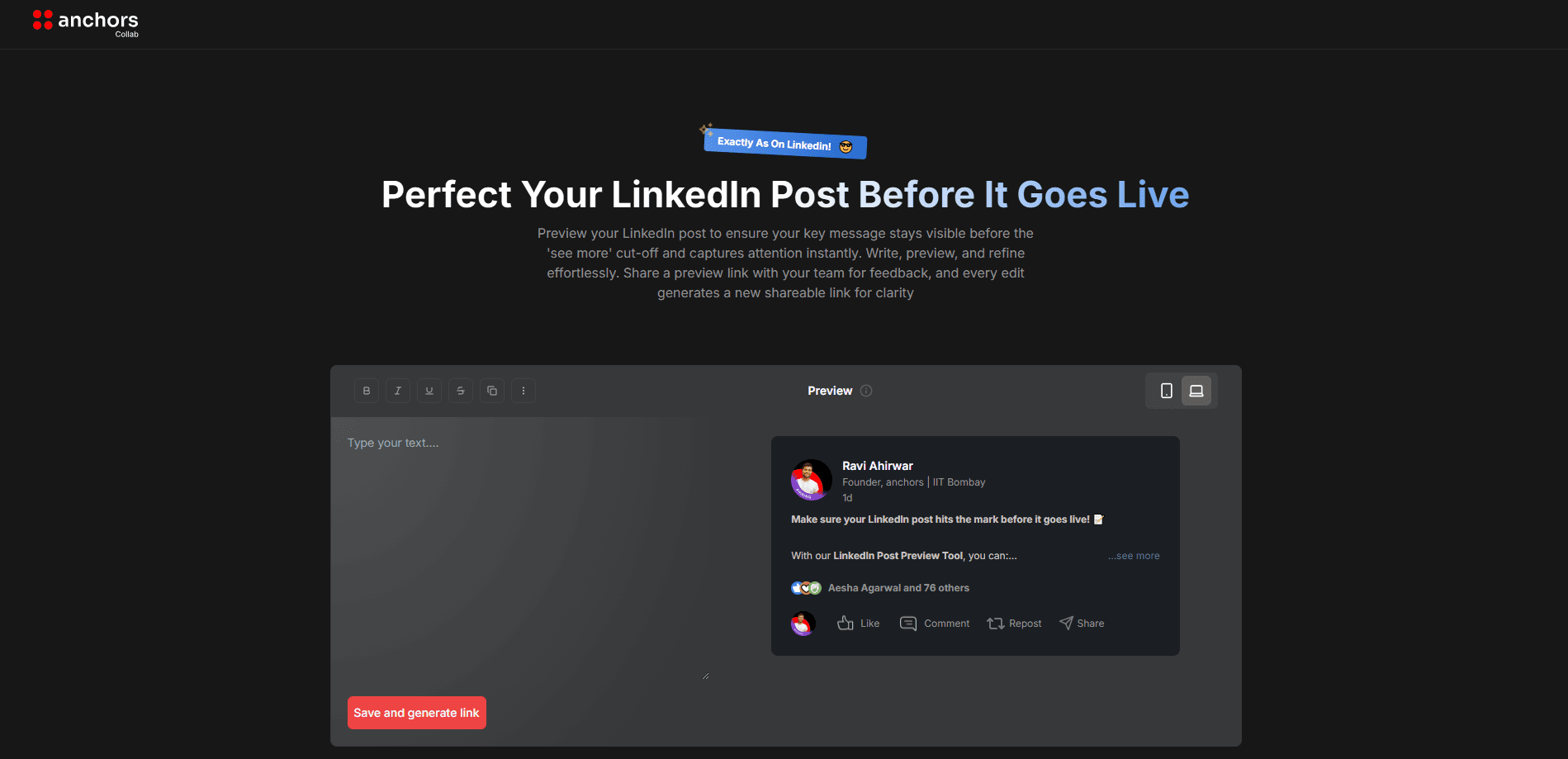
LinkedIn Post Preview Generator is a free online tool that lets you write, format, and preview a LinkedIn post before it goes live. You type or paste your text on one side of the screen and watch it render as a real feed post on the other, complete with your name, headline, and the Like, Comment, and Repost row underneath. The site is run by LinkedInPreview.com and is free to use, with no signup and no paywall.
The point is to remove guesswork. LinkedIn's own editor gives you a plain block of text and strips most styling, so people often discover a broken layout or a hidden hook only after posting. This tool shows you the feed version first, including where LinkedIn cuts your text off behind "see more," so you can fix the opening line before anyone scrolls past it.
Two things are worth knowing up front. The free tool handles a single post and doesn't save your work between visits, so a draft you close is gone. The site also sells a paid dashboard that connects to your profile, audits recent posts, and drafts a posting plan, and that part is separate from the free preview.
Getting Started
- Open linkedinpreview.com in your browser. There's no account to create.
- Type or paste your post into the editor on the left, or start from the built-in AI option.
- Apply formatting such as bold, italic, or lists, and watch the preview on the right update.
- Check the mobile and desktop views to see where "see more" truncates your text.
- Hit Copy Text, then paste into LinkedIn and publish.
Product Information
A quick look at LinkedIn Post Preview Generator's pricing, supported platforms, and performance.
Best for
The users, tasks, and scenarios where this tool fits best.
Users
- Job seekers and professionals
- Content creators and founders who post often
- Recruiters and marketers writing announcements
Tasks
- Preview a LinkedIn post before posting
- Format LinkedIn text
- Check post length and readability
Scenarios
- Polishing a high-stakes post
- Writing on a phone screen at a glance
- Drafting a quick post during a busy day
Key features
Side by side preview
The editor sits next to a live LinkedIn feed mockup. As you type, the preview updates to show your name, headline, and the engagement row, so what you see is close to what your network sees. It's the basic reason to use the tool over typing straight into LinkedIn.
"See more" truncation check
LinkedIn hides the rest of a post behind a "see more" link after a few lines. The preview marks where that cut lands on both desktop and mobile, which turns the first line into a deliberate choice rather than a surprise. Writers who care about their hook treat this as the main feature.
Text formatting tools
The editor adds bold, italic, and list styling that LinkedIn doesn't offer natively. Because LinkedIn keeps most of that formatting when you paste, the styled post carries over rather than reverting to plain text. It's the same trick a dedicated LinkedIn post formatter or LinkedIn post writer tool uses, wrapped into the preview.
Mobile and desktop views
A post that reads well on a laptop can wrap badly on a phone, where most people see it. The tool shows both layouts so you can spot an awkward line break or a buried hook before it reaches an audience. That check takes seconds here and can't be done inside LinkedIn.
Built-in AI drafting
The editor includes a Generate with AI option that produces a starting draft from a prompt. It's a way to get past a blank page, and the result drops straight into the same editor, so you format and preview it without copying anything between tools. You still edit the wording before it goes out.
Free, no signup, open source
There's no account, no paywall, and no email gate to use the preview, and the project is listed as open source. That lowers the bar for anyone who just wants to check a post once. The trade-off is that nothing is stored, so the tool fits a quick check rather than a saved drafting workflow.
Pros and cons
Pros
- Shows a realistic feed preview, including the exact "see more" cut point on desktop and mobile.
- Formats bold, italic, and lists that LinkedIn's own editor leaves out.
- Free to use with no signup, no paywall, and an open source listing.
- Runs in the browser, so there's nothing to install and no account to manage.
- Includes an AI drafting option to get past a blank page.
Cons
- It doesn't save drafts between visits, so work you close is lost.
- It previews one post at a time, which is slower if you're drafting a whole week.
- The preview is a close mockup, not LinkedIn's exact render, so tiny spacing differences can appear.
- The profile audit and posting plan live in a separate paid dashboard, not the free tool.
Frequently asked questions
It's a free web tool from LinkedInPreview.com that lets you write, format, and preview a LinkedIn post before publishing. You see the post as it would appear in the feed, including where LinkedIn truncates it behind "see more."
Related content
Explore related tools, skills, and articles for LinkedIn Post Preview Generator.
LinkedIn Post Preview Generator Alternatives

Emailwritr
Emailwritr · Writing · MarketingEmailwritr is an AI email copywriting tool built for affiliates, course creators, and online businesses that want more revenue from the list they already own. Instead of blank pages or generic chatbot prompts, this AI email writer generates welcome sequences, launch campaigns, cart recovery emails, and promo series from frameworks modeled on well-known direct-response copywriters. You connect your autoresponder, answer a few questions about your offer, and it writes the copy for you.

Prosp
Prosp · Writing · Voice & Language · MarketingProsp is an AI LinkedIn outreach tool built for agencies and sales teams, and it writes the message and the voice note in your own voice for each prospect so they actually reply. You connect your accounts, find leads, and let the AI draft and send personalized messages at scale, all from one inbox. It's built for people running outbound at volume. That's the whole pitch. Every touchpoint still has to feel human.

On Model
On Model · Image · MarketingOn Model is an AI fashion model tool that places your clothing on virtual models so online stores can get on-model product photos without booking a photoshoot. It runs as a Shopify app, letting you swap the model in an existing image, change backgrounds, and generate faces for cropped or headless shots. The goal is simple: match your product photos to your customers and stand out from competitors using the same supplier images.