

ListenMonster
Wooden Skull · Writing
ListenMonster is a browser transcription tool that turns audio and video files into text and subtitle files, with two free uploads a day and a paid plan for unlimited work.
About ListenMonster
What Is ListenMonster
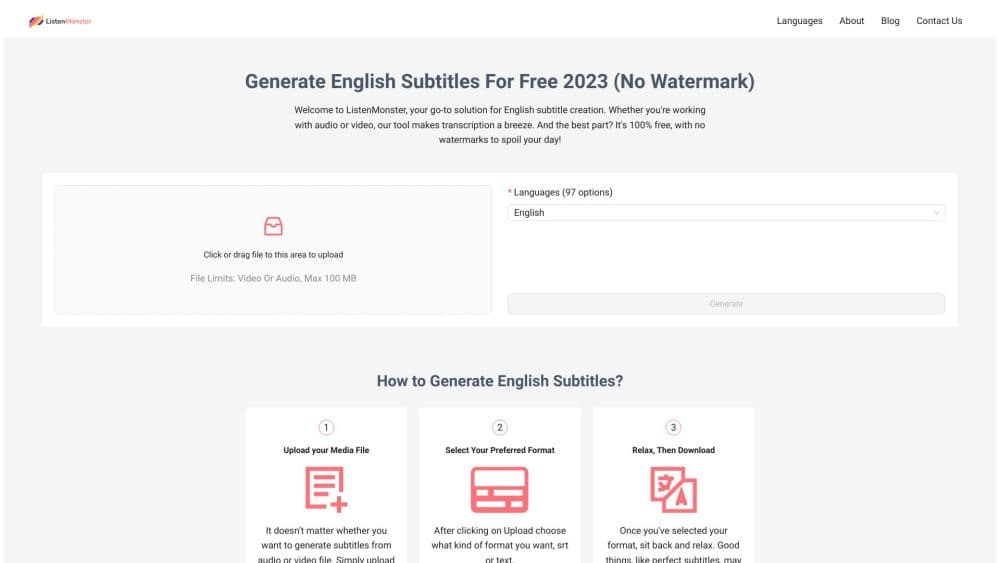
ListenMonster is an online audio to text converter and video to text tool in one box. You drop in a file, the service runs it through a speech recognition model, and you get back a written transcript plus subtitle files you can drop into a video editor. There's nothing to install and no account needed for a first test.
The engine behind it is Whisper, OpenAI's open speech model, which puts it in the same family as most AI transcription tools built in the last two years. ListenMonster leans on that choice in its marketing and quotes 99.8% accuracy, a figure that comes from the vendor rather than from independent testing. In practice, clean studio audio comes back close to perfect. A noisy phone call or a room with three people talking over each other needs a read-through before you publish it.
The site now forwards to FastTranscriber, which is the same service under a newer name. Older reviews, the Product Hunt launch page, and press coverage all point at ListenMonster, while the live pricing page and dashboard carry the FastTranscriber label. Support pages credit Wooden Skull as the company behind both. Nothing about the workflow changes, so the guides and reviews you find under either name still apply.
Where it stops is worth knowing up front. This is a transcription tool, not an editor. You get text files and subtitle files, and that's the end of the line. There's no built-in caption styling, no timeline, and no API for pushing jobs from your own app. If your work needs those pieces, you'll be pairing this with something else.
Getting Started
- Open listenmonster.com in a browser. The upload box sits on the homepage, so there's no signup wall in front of your first file.
- Drag in an audio or video file. The uploader takes MP3, WAV, M4A, FLAC, OGG, AAC, Opus, MP4, MOV, and WebM.
- Pick the spoken language if the automatic guess gets it wrong, then start the job. Short clips finish in seconds on the GPU queue.
- Read the transcript in the browser. Free runs show a 20-minute preview, which covers most interviews, lectures, and short podcast episodes.
- Export what you need. Copy the text, or download TXT for reading and SRT or VTT for subtitles. Pro users also get a saved history of every job in the dashboard.
Product Information
A quick look at ListenMonster's pricing, supported platforms, and performance.
Best for
The users, tasks, and scenarios where this tool fits best.
Users
- Students and researchers
- Content creators and podcasters
- Journalists and note takers
Tasks
- Turning a podcast episode into show notes
- Adding subtitles to a YouTube upload
- Transcribing research interviews
- Reading a video instead of watching it
Scenarios
- Working through a week of lecture recordings before an exam
- Producing captions for a client's social clips
- Cleaning up meeting notes after a call
Key features
Whisper-Powered Transcription Engine
Every job runs on Whisper, the speech model OpenAI released as open source. That matters for two reasons. The model handles accents, background music, and code switching better than the older generation of speech engines, and the vendor quotes 99.8% accuracy on clean audio. Treat that number as a claim, not a guarantee, but the underlying model is a solid pick for English speech.
Two Free Transcriptions Every Day
You get two uploads a day with no credit card and no watermark on the output. For a student working through one lecture at a time, or a creator captioning a single short video, that's a working free tier rather than a demo. The limits show up in two places: the daily count and a 20-minute preview of each transcript.
Subtitle Exports in SRT and VTT
Think of it as an SRT subtitle generator with a text export bolted on. The tool writes SRT and VTT files with timestamps already in place, and plain TXT when you just want the words. Those files are what most platforms expect when you upload automatic subtitles to YouTube or import them into an editor. That covers YouTube uploads, Premiere and CapCut imports, and any player that reads standard subtitle formats. There's no styling control, so font and position stay with your editor.
15 GB File Uploads on Pro
The paid plan raises the per-file ceiling to 15 GB and removes the minute limit, which is what you need for full-resolution source video or a multi-hour training call. Free uploads are meant for shorter clips, and the 20-minute preview is the practical stopping point there.
Speaker Recognition
The service labels who is talking in multi-person recordings, which turns a wall of dialogue into something you can follow. It's the feature that separates a usable meeting transcript from a block of text you have to untangle by hand. Accuracy drops when voices overlap or when someone talks from across the room, so spot-check the names before sharing.
Language Coverage and Translation
The site lists 98 or more languages, and the subtitle side includes translation for turning a finished transcript into another language. English output is the strongest, which is why the product page leads with English subtitles and transcripts.
Browser Workflow With Saved History
Everything happens in the browser tab. There's no desktop app to update and no plugin to maintain. On Pro, every completed job stays in the dashboard, so last month's interview is still there when a follow-up question comes in.
Pros and cons
Pros
- Free tier is genuinely usable: two uploads a day, full transcript access on short files, and no watermark on exports.
- Speed is the standout. GPU processing returns short clips in seconds, and the priority queue on Pro keeps long files from sitting behind a backlog.
- Standard exports. SRT, VTT, and TXT mean the output fits existing editing tools instead of locking you into one.
- 15 GB per file on Pro covers full-resolution video and multi-hour recordings, which many transcription services cap much lower.
- No install and no account required for the first run, so you can test the accuracy on your own audio before paying anything.
Cons
- The 20-minute preview on the free plan cuts off long recordings. A two-hour lecture needs Pro or a manual split into chunks.
- Speaker labels are the weakest part on messy audio. Overlapping voices and crosstalk produce mislabeled lines, which means manual cleanup on group interviews.
- No API and no integrations. You can't push jobs from your own app, and there's no Zapier hook or CMS plugin, so volume work stays manual.
- The rebrand confuses the paper trail. Tutorials and reviews reference ListenMonster while the live site says FastTranscriber, and some links and help pages still send you to the old name.
Frequently asked questions
It converts audio and video files into written transcripts and subtitle files in the browser. You upload a recording, the service runs speech recognition, and you export the result as TXT for reading or SRT and VTT for captions.
Related content
Explore related tools, skills, and articles for ListenMonster.
ListenMonster Alternatives

Emailwritr
Emailwritr · Writing · MarketingEmailwritr is an AI email copywriting tool built for affiliates, course creators, and online businesses that want more revenue from the list they already own. Instead of blank pages or generic chatbot prompts, this AI email writer generates welcome sequences, launch campaigns, cart recovery emails, and promo series from frameworks modeled on well-known direct-response copywriters. You connect your autoresponder, answer a few questions about your offer, and it writes the copy for you.

Swms
Swms AI · Writing · Productivity · BusinessSwms is an AI safety compliance tool that turns a plain description of a job into ready-to-use safety documents. Describe your project, trade, and known hazards, and it writes a safe work method statement, job hazard analysis, safe work procedure, RAMS, or safety data sheet in seconds. It also ships with Oscar, a chat assistant that answers workplace safety questions in any language. Teams in construction, mining, transport, and warehousing use it to cut the paperwork that usually eats into a workday.

Prosp
Prosp · Writing · Voice & Language · MarketingProsp is an AI LinkedIn outreach tool built for agencies and sales teams, and it writes the message and the voice note in your own voice for each prospect so they actually reply. You connect your accounts, find leads, and let the AI draft and send personalized messages at scale, all from one inbox. It's built for people running outbound at volume. That's the whole pitch. Every touchpoint still has to feel human.