

LLM Price Check
OpenL · Coding · Other
LLM Price Check is a free web tool that compares API prices for large language models from OpenAI, Anthropic, Google and others in one sortable table, plus a token cost calculator.
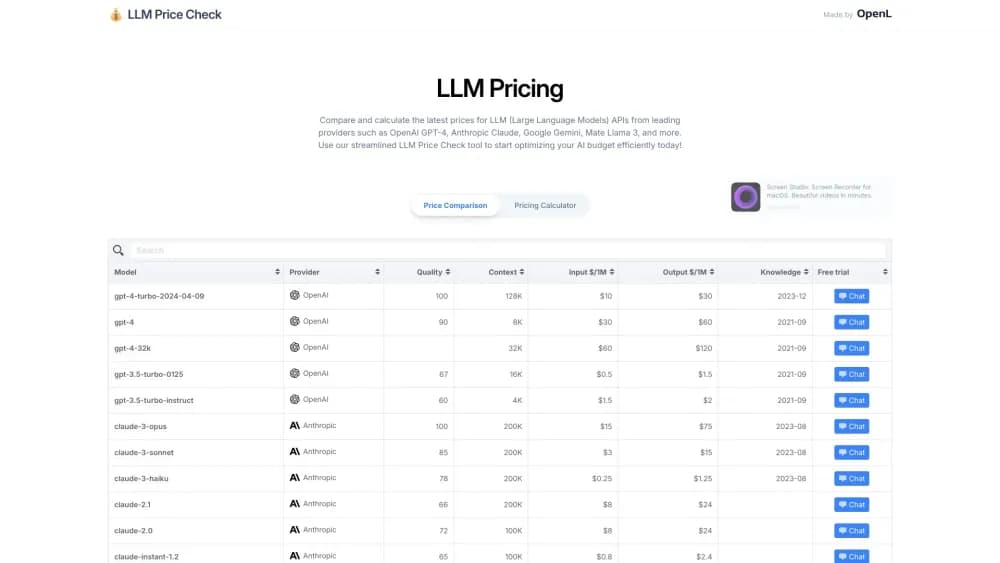
About LLM Price Check
What Is LLM Price Check
LLM Price Check is a browser based reference for LLM API pricing comparison. You get one table with per-million-token input and output rates, a context window figure, a quality score, and a link to each provider's own pricing page. It's built and maintained by OpenL, and it doesn't ask you to sign up before you look at anything.
The problem it solves is plain. Every lab lists its rates on a different page, in a different format, sometimes with cached and batch rates tucked into footnotes. Comparing three models means opening three browser tabs and doing the arithmetic yourself. LLM Price Check puts those numbers side by side and lets you sort by the column that matters to you.
Two limits matter before you start. The catalog is not a live feed, so rates can lag behind a price change on a provider's page. The quality score is pulled from the Artificial Analysis leaderboard rather than measured by this site, and it won't tell you how a model handles your specific workload. Treat the table as a starting point for a shortlist, then confirm the number on the vendor's own page.
Getting Started
- Open llmpricecheck.com. The comparison table loads right away, with no account or install.
- Sort by Input $/1M, Output $/1M, context window, or quality to surface the models that fit your budget and length needs.
- Use the search box to filter by model name or provider when the table gets long.
- Switch to the Pricing Calculator, enter your token counts and call volume, then read the per-call and total cost for each model.
- Check the Source links at the bottom for the provider pricing pages the data comes from, then confirm rates there before you commit to a model.
Product Information
A quick look at LLM Price Check's pricing, supported platforms, and performance.
Best for
The users, tasks, and scenarios where this tool fits best.
Users
- Indie developers shipping an AI feature
- Startup founders in budget planning
- Students and researchers on a fixed grant
Tasks
- Shortlisting models by budget
- Estimating monthly API spend
- Checking whether a model swap pays off
Scenarios
- Before a prototype demo
- Answering a client's cost question in a meeting
- Choosing a provider for a high-volume batch job
Key features
Sortable Price Comparison Table
Every AI model pricing entry in the catalog sits in one table with columns for model name, provider, quality score, context length, input and output price per million tokens, knowledge cutoff, and free trial status. Click any column header to sort, which is the fastest way to answer questions like which model under a dollar of input pricing still has a 128K context.
Token Pricing Calculator
The LLM pricing calculator takes your input tokens, output tokens, and number of API calls, then works out the cost per call and the total across every model in the table. You can enter the token counts yourself or switch to word and character entry if you're estimating from a prompt document.
Quality Scores Alongside Price
Each row carries a quality score borrowed from the Artificial Analysis model leaderboard. Price alone rarely settles a decision, so having a rough capability rating in the same row lets you spot the models that are cheap but weak.
Context Window and Knowledge Cutoff Data
The table lists how many tokens each model reads at once and roughly when its training data ends. That saves a separate lookup when you need a model that can hold a long contract or one that knows recent events.
Provider Coverage Beyond the Big Labs
The catalog stretches past OpenAI, Anthropic and Google to include Mistral, Cohere, Groq, Amazon Bedrock, Replicate, Deepinfra, Cloudflare and Perplexity. For anyone comparing a hosted API with an open-weight model on a third party host, that matters.
Free Access With No Account
There's no login wall, no seat limit, and no paid plan. You open the site, read the table, and leave. That also means there's no saved workspace, so your comparison doesn't persist between visits.
Pros and cons
Pros
- The whole catalog fits one sortable table, so comparing input and output rates across labs takes seconds instead of tab switching.
- The calculator turns per-token rates into a monthly dollar figure, which is the number most budget conversations actually need.
- Quality scores sit in the same row as prices, giving a rough sense of what you're giving up for a cheaper model.
- No account required, so you can check a price mid meeting without a signup detour.
- Provider coverage goes well beyond the four biggest labs, including open-weight hosts like Deepinfra and Replicate.
Cons
- The catalog lags current releases, so newer models may be missing and listed prices can be out of date, which risks a stale budget estimate if you rely on it alone.
- Quality scores come from a third party leaderboard and don't reflect your own task or data.
- No API access means you can't pull the pricing into a spreadsheet or internal cost model automatically.
- There's no saved comparison view, so a multi-model shortlist has to be rebuilt each visit.
Frequently asked questions
It's a free tool to compare LLM prices. You use it to line up per-token input and output rates, context windows, and quality scores from different providers, then estimate what a specific workload would cost.
Related content
Explore related tools, skills, and articles for LLM Price Check.
LLM Price Check Alternatives

Base Code
Base44 (Wix) · Coding · ProductivityBase Code is a shared cloud development environment from Base44. Teammates describe changes to an existing GitHub codebase in chat, preview them live and send them back as pull requests.

Google EmbeddingGemma 2
Google DeepMind · Writing · Image · CodingGoogle EmbeddingGemma 2 is a 740M-parameter open model that turns text, code, images, audio, and video frames into vectors in one 768-dimension space, running on phones and laptops.

GitGlow
GitGlow · Coding · ProductivityGitGlow is a local-first desktop Git client that lets independent developers review their own code and their AI agents' changes in one place before shipping.