

Locbi
Locbi · Marketing
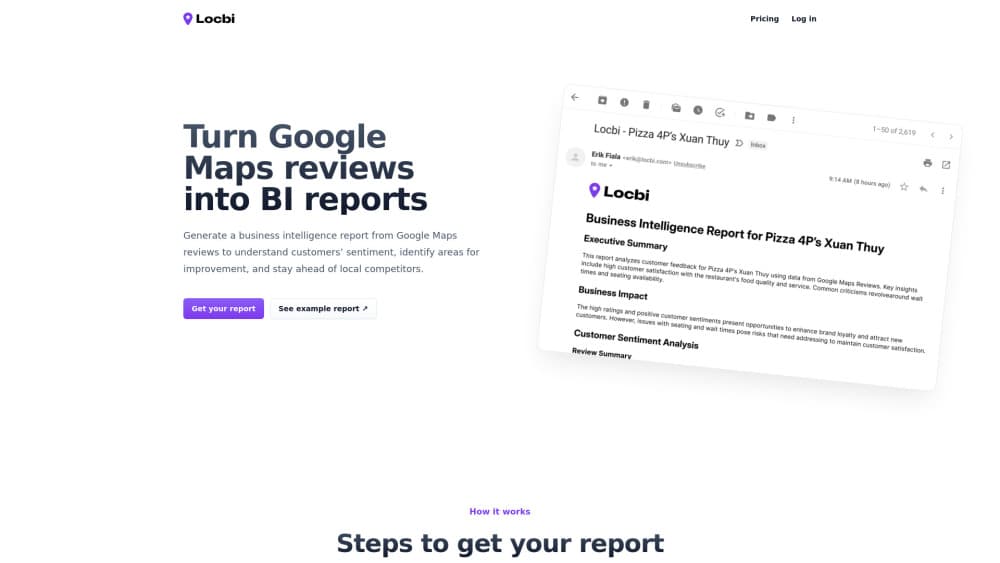
Locbi turns Google Maps reviews into business intelligence reports, so local businesses can track customer sentiment analysis and see what to fix next.
About Locbi
What Is Locbi
Locbi is a review analytics service that reads the Google Maps reviews your business already collects and turns them into structured reports. Instead of scrolling through hundreds of comments by hand, you get a summary of how customers actually feel and which problems keep coming up.
The pitch is simple: your reviews are already a free focus group, and most owners never mine them properly. Locbi is built for that job. It's aimed at local businesses, multi-location brands, and the agencies that manage reputation for them.
The main limit is scope. Locbi works from public Google Maps review data, so it can't tell you why a customer stayed quiet or reach people who never left a review. That's a real gap, and it won't replace talking to customers directly. Treat it as a fast way to spot patterns, not a full picture of your business. Want review monitoring that also covers private feedback? You'll need another tool for that.
Getting Started
- Create an account on the Locbi site and connect the business locations you want tracked.
- Let Locbi pull in the Google Maps reviews for each location.
- Run your first analysis to generate a sentiment and topics report.
- Read the report, flag the recurring complaints, and decide which ones to act on.
- Set a recurring schedule so new reviews get analyzed as they come in.
Product Information
A quick look at Locbi's pricing, supported platforms, and performance.
Best for
The users, tasks, and scenarios where this tool fits best.
Users
- Local business owners
- Multi-location brands
- Marketing and reputation agencies
Tasks
- Spotting recurring complaints
- Tracking sentiment over time
- Preparing client reports
Scenarios
- A restaurant with a slipping rating wants to know if the kitchen or the service is the problem.
- A chain wants to compare how each branch is perceived before deciding where to invest.
- An agency onboarding a new client needs a quick read on reputation before proposing a plan.
Key features
Google Maps Review Analysis
Locbi pulls in the reviews attached to your Google Maps listings and analyzes them as a set. You get a view of what customers mention most often, not just the star average. That matters because a 4.2 rating can hide the same complaint repeated fifty times. The star score lies. The text doesn't.
Customer Sentiment Reports
The service summarizes how people feel about your business in plain terms. Positive and negative themes are separated so you can see what's working alongside what isn't. Reports are built to be read quickly, not decoded. For a busy owner checking in between shifts, that speed matters more than a fancy dashboard.
Issue and Topic Detection
Beyond a single sentiment score, Locbi groups feedback into topics, so a complaint about slow service stays separate from one about price. This is where it earns its keep for owners who need to know which specific thing to fix. Generic "customers are unhappy" reports are useless. Naming the problem is the whole job.
Multi-Location Tracking
If you run more than one location, Locbi keeps the reports separate so you can compare them side by side, which makes it easier to spot a branch that's drifting before it drags your overall rating down. One weak location can sink a whole brand's reputation. Catching it early is cheaper than fixing it late.
Recurring Reports
You can set the analysis to run on a schedule, so new reviews get folded in without another manual pass, which is handy if review volume is steady and you'd rather check a summary than the raw feed. This is also where local SEO insights start to show up, since sentiment trends often mirror what shows in search.
Pros and cons
Pros
- Turns piles of Google Maps reviews into a short report you can act on.
- Sentiment and topic breakdown helps separate one-off gripes from real patterns.
- Multi-location support suits chains and agencies managing several clients.
- Reports are written for non-analysts, so no data background is needed.
Cons
- Only works with public Google Maps review data, so it misses private feedback and non-reviewer customers who never bothered to post.
- Pricing isn't published on the site, so you have to ask for a quote before you can judge the cost.
- No clear public API documentation, which makes it harder to plug into your own dashboard.
Frequently asked questions
It analyzes the Google Maps reviews for your business and turns them into reports about customer sentiment and the issues that keep coming up. You get a summary instead of a raw review feed.
Related content
Explore related tools, skills, and articles for Locbi.
Locbi Alternatives

ngram 2.0
ngram · Video · Marketingngram 2.0 is an AI video generator for teams. It turns a prompt, a screen recording, or a product URL into a narrated explainer, product demo, or AI avatar video, and every scene stays editable.

shippedit.me
Krawlup · Marketing · Businessshippedit.me now redirects to Krawlup, a web platform that audits SEO, AEO and page speed every week, then hands the fixes to AI coding agents over MCP.

MePersona
MePersona, Inc. · Writing · Productivity · MarketingMePersona is an AI unified inbox for creators. It learns your voice, drafts replies to fan messages from 12 platforms, and sends only what you approve.