

LoveGPT: Enhance Your Romantic Relationships with AI-powered Conversational Support
Asambhav · AI Assistant
LoveGPT is a free web app for AI relationship advice. It writes letters, pickup lines, and openers, then suggests replies and conversation starters for dating chats.
About LoveGPT: Enhance Your Romantic Relationships with AI-powered Conversational Support
What Is LoveGPT
LoveGPT is a browser based AI dating assistant from Asambhav, a small studio that runs it at lovegpt.co.in. The site is labeled beta. You describe a situation, pick a format, and get a short block of text you can send as is or edit.
The product covers three jobs. It writes the first move: an opener, a pickup line, a love letter, or an invitation to coffee, a movie, or a drive. It rescues stalled threads by turning the other person's message into two or three reply options. And it keeps a chat alive with a bank of questions and follow-up topics when the small talk dries up.
There's also an open advice chat where you can talk through a dating problem in plain language, plus a blog with posts on communication and confidence. The free tier is the whole product. LoveGPT publishes no paid plan, no credit system, and no usage cap, which is unusual for a tool in this category and worth checking again later because the beta label suggests the offer can change.
The limits are real. The interface is English only, there's no iOS or Android app, and no public API. LoveGPT doesn't say which model runs behind it, so you can't compare versions or check model docs. Everything you type leaves your browser, and the privacy page is a standard template rather than a detailed data policy.
Getting Started
- Open lovegpt.co.in in a desktop or mobile browser. No install is needed.
- Pick a task on the home screen: write a message, ask someone out, or answer a message you received.
- Add the details that matter, such as the person's name, what they said, and the tone you want. More context produces a less generic result.
- Copy the draft, adjust a line or two so it sounds like you, then send it in your own chat app.
Product Information
A quick look at LoveGPT: Enhance Your Romantic Relationships with AI-powered Conversational Support's pricing, supported platforms, and performance.
Best for
The users, tasks, and scenarios where this tool fits best.
Users
- Shy texters
- App daters
- Couples in a rut
Tasks
- Answering a one word reply
- Writing a first message
- Asking someone out
- Drafting a longer letter
Scenarios
- Right after a match
- After an awkward silence
- Before a hard conversation
Key features
Seven Message Formats
The composer offers a fixed set of outputs: love letter, proposal letter, pickup line, coffee invitation, movie invitation, drive invitation, and a flirty opening line for a photo. Each format asks for a name and a little context, then writes in a different register, so a proposal letter doesn't read like a pickup line. The narrow menu is the point. You don't have to write a prompt from scratch.
Reply Generator
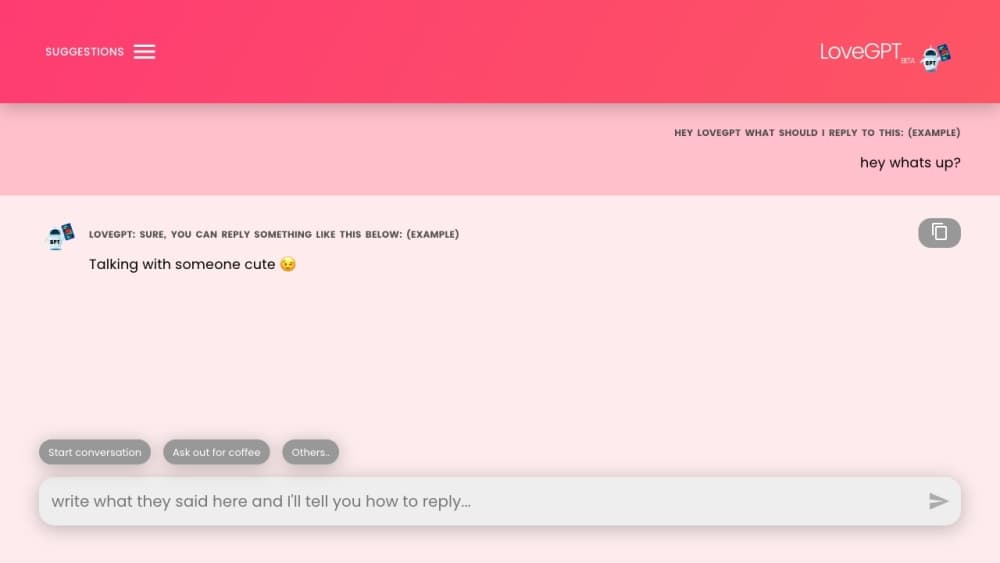
You paste what the other person said and ask LoveGPT what to send back. The tool returns a suggestion with a short explanation of why it works, which is the useful part when you're unsure whether a joke will land. A retry button produces a different option if the first one sounds stiff, and a copy button moves the text to your clipboard.
Short Reply Handling
The site openly targets the dead end of "hmm", "ok", or "lol". Instead of generating another one word answer, it offers questions and statements that give the other person something to respond to. This is where an AI wingman earns its place: the hard part of texting isn't writing, it's finding a reason to keep going.
Conversation Starters and Follow-Up Topics
A question bank covers weekends, work, pets, travel, bucket lists, five year goals, first impressions, and family. You can ask for alternate follow-up topics when the first suggestion feels too heavy for the stage you're at. The questions lean personal, so they work better with someone you've talked to before than with a stranger.
Relationship Advice Chat
A separate chat window takes longer questions: how to handle a partner who went quiet, whether to bring up an ex, how to end things kindly. Answers read like advice from a friend who has read a few books on communication, not like therapy. The site states plainly that it isn't a substitute for professional help, and that disclaimer is the right one to take seriously.
Blog Library
Roughly a dozen posts sit behind an All Blogs link, covering digital outreach, perfectionism, time management, and how people talk about love. The writing is long form and only loosely tied to the tool, so treat it as background reading rather than product documentation.
Pros and cons
Pros
- The whole product is free, with no credits, trial clock, or paywalled formats listed on the site.
- It runs in a browser with no install, so you can use it on a phone or a laptop in under a minute.
- Seven formats cover the common cases, from a two line opener to a full love letter.
- The reply generator handles dry replies, which is the exact moment most people give up on a chat.
- The advice chat and the question bank sit in the same place, so you don't need three separate tools.
Cons
- The beta label, missing changelog, and unpublished model mean you can't judge output quality before you try it.
- No mobile app and no public API, so the tool stays a manual copy and paste step in your workflow.
- Output can read generic unless you supply names, quotes, and tone, and generic lines are the ones people spot fastest.
- The privacy page is a template, so avoid pasting addresses, passwords, or anything you wouldn't want stored.
Frequently asked questions
LoveGPT writes dating messages and answers them. You can generate an opener, a love letter, or an invitation, paste a message you received to get reply options, and pull conversation starters when a chat stalls.
Related content
Explore related tools, skills, and articles for LoveGPT: Enhance Your Romantic Relationships with AI-powered Conversational Support.
LoveGPT: Enhance Your Romantic Relationships with AI-powered Conversational Support Alternatives

Hark
Hark · Productivity · AI Assistant · China AIHark is a personal AI assistant that books, buys, and organizes things for you. It runs on web, iOS, and Android, remembers your preferences, and hands bigger jobs to a computer-use agent.

Rhem Labs
Rhem Labs · AI Assistant · China AIRhem is a tabletop health assistant robot from Rhem Labs that takes blood pressure and other wellness readings, runs reminders, makes calls, and sends fall alerts to family.

Wabi
Wabi, Inc. · Productivity · AI Assistant · ChatbotWabi is a messenger-style AI assistant for iOS, Android and Mac. It sorts your life into shared threads, builds small apps inside each one, and handles email, calendar and errands after you approve.