

Lovevoice AI Voice Generator
Lovevoice · Voice & Language
Lovevoice AI Voice Generator turns written text into lifelike speech with nearly 300 voices across 70+ languages, aimed at creators who need quick voiceovers.
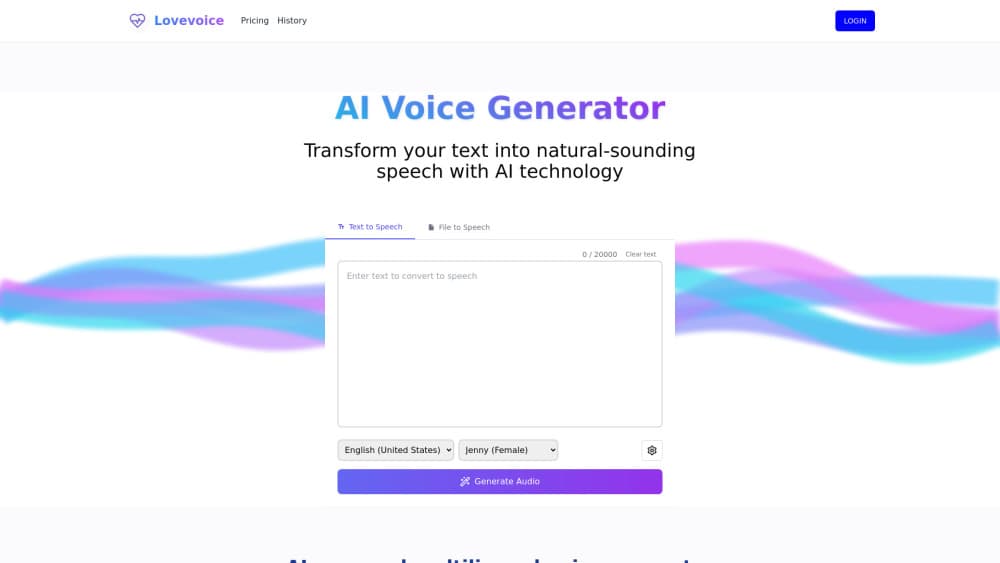
About Lovevoice AI Voice Generator
What Is Lovevoice AI Voice Generator
Lovevoice AI Voice Generator is a web-based text-to-speech tool. You paste text, pick a voice, and download an MP3. That's the whole loop, and it covers nearly 300 voices spread across more than 70 languages. As a multilingual voice generator, it leans on well-known voice styles like Jenny, Guy, Aria, and Xiaoxiao, which will feel familiar if you've used other speech platforms.
This TTS tool targets people who produce audio faster than they can record it. Podcasters use it to draft narration, video editors use it for scratch tracks, and accessibility teams use it to give articles a spoken version. It also transcribes uploaded files in formats such as PDF, TXT, and DOC, so you can feed a document instead of pasting paragraphs by hand.
The main limit is control. You adjust speed, volume, and pitch, but there's no voice cloning and no fine-grained emotion tuning here, which means a voice that sounds exactly like a specific real person simply isn't something this platform can produce for you today.
Getting Started
- Open lovevoice.ai in your browser. No download or install is needed.
- Paste your script into the text box, or upload a PDF, TXT, or DOC file.
- Choose the language and a voice from the library. Preview a few to compare tone.
- Tweak speed, volume, and pitch until the delivery sounds right.
- Hit Submit, wait for processing, then download the finished MP3.
Product Information
A quick look at Lovevoice AI Voice Generator's pricing, supported platforms, and performance.
Best for
The users, tasks, and scenarios where this tool fits best.
Users
- Content creators
- Podcasters
- Accessibility teams
Tasks
- Auto-narrating blog posts
- Dubbing short videos
- Converting study notes
Scenarios
- Drafting a video voiceover before you commit to a paid actor.
- Adding an audio version to a newsletter so readers can listen instead of read.
- Producing quick multilingual announcements for a small online community.
Key features
Nearly 300 voices in 70+ languages
The voice library is the core draw, and it gives you a mix of female, male, and multilingual voices so you can match tone and accent to whatever audience you're actually trying to reach. For a creator working across regions, this cuts the need to juggle several separate speech tools at once.
Customizable speed, volume, and pitch
Basic delivery controls let you slow down a dense explainer or speed up a casual clip. It won't reshape emotion or accent, but it covers the everyday tweaks most voiceovers need. Good enough, most of the time.
File transcription and long text support
You can upload PDF, TXT, or DOC files instead of pasting text by hand, and the tool handles conversions up to roughly 20,000 characters, which is enough for a full article or a chapter-length script to go through in one single pass.
MP3 download
Every conversion lands as a high-quality MP3 that's ready for your editing software, which means no extra converter step gets in the way when you're pushing content out on a tight deadline.
Browser-based workflow
Everything runs in the browser. There's nothing to install, so you can start on a laptop and finish on the same account later without any setup friction at all.
Pros and cons
Pros
- Large voice library: nearly 300 voices make it easy to find a tone that fits.
- Wide language coverage: 70+ languages cover most global content needs.
- Simple workflow: text in, MP3 out, with no software install.
- Long text support: roughly 20,000 characters per conversion suits full articles.
Cons
- No voice cloning means you can't replicate a specific real person's voice.
- Emotion control is limited to pitch, speed, and volume, so dramatic reads come out flat.
- Pricing details aren't clearly published, which makes cost hard to judge upfront.
Frequently asked questions
It converts written text into spoken audio. You paste or upload text, pick a voice, and download the result as an MP3 file.
Related content
Explore related tools, skills, and articles for Lovevoice AI Voice Generator.
Lovevoice AI Voice Generator Alternatives

Off the Record
Weird Machines · Voice & Language · ProductivityOff the Record is a macOS app from Weird Machines that reshapes your voice in real time to block AI transcription, so people hear you normally and notetakers get nothing usable.
Cekura Bench
Cekura · Voice & Language · BusinessCekura Bench is a public benchmark that runs speech-to-speech models and deployed voice agents through 82 simulated phone calls, three times each, then publishes pass rates, latency and cost.
Griffin by Tavus
Tavus · Voice & Language · Video · ChatbotGriffin by Tavus is the first Human Interaction Model: a full-duplex, video-to-video system that watches, listens, and answers during a live video call in real time.