

Learn Languages - Lucida AI
Lucida AI · Leaning
Learn Languages - Lucida AI is an AI speaking coach that helps you practice English and five other languages out loud, with instant feedback on how you sound.
About Learn Languages - Lucida AI
What Is Learn Languages - Lucida AI
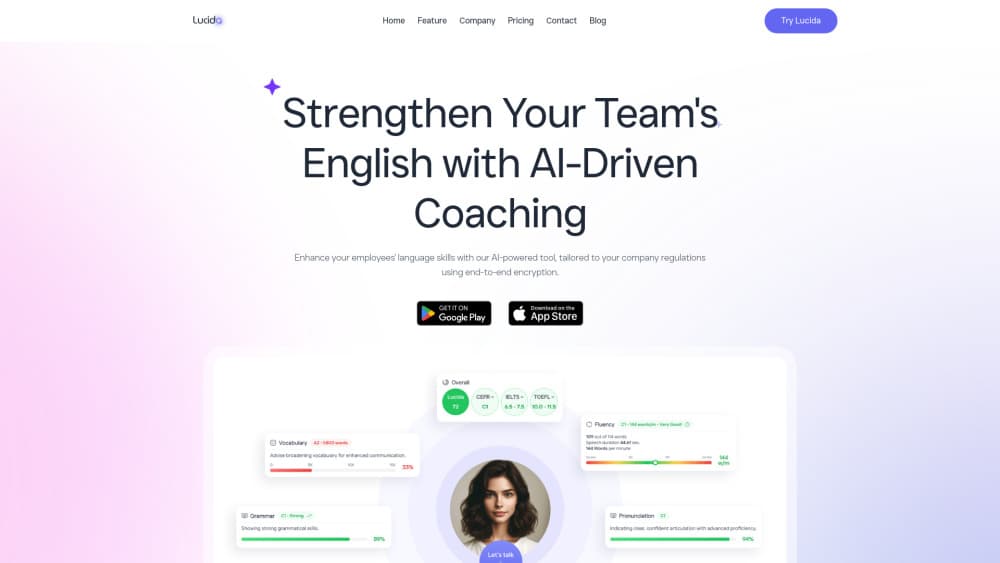
Learn Languages - Lucida AI is an AI language tutor built around one idea: you get fluent by speaking, not by tapping multiple choice answers. Inside the app you hold real conversations with Lucy, an AI tutor, and get corrections as you talk. Feedback covers pronunciation, tone, pace, vocabulary, grammar and even filler words. What sets it apart is the loop. You speak, the app flags what went wrong, and you try again seconds later. No waiting for a human teacher to grade you.
The app teaches six languages: English, Spanish, Portuguese, French, German and Arabic. Feedback comes back in your own native language, so a Brazilian learning English hears the notes in Portuguese. Less decoding, more doing. Sessions adapt to your level, goals and interests, and speaking scores are CEFR-aligned and tracked over time, which gives you a way to see actual movement instead of guessing whether any of it's working.
The main limits are worth knowing before you download. Prices change by country. That's the catch. The number that applies to you is shown on the plan screen in the app before you pay. It runs on iPhone and Android only, so there's no desktop version for now. And while Lucida for Business adds team dashboards and per-employee assessments, that side is priced separately from the app stores.
Getting Started
- Download Learn Languages - Lucida AI from the App Store or Google Play and open it.
- Pick the language you want to practice, then set your level and goals.
- Start a conversation with Lucy on any topic, from small talk to a job interview.
- Speak out loud and read the feedback on pronunciation, grammar and vocabulary.
- Review your CEFR-aligned scores, then run another session to push them up.
Product Information
A quick look at Learn Languages - Lucida AI's pricing, supported platforms, and performance.
Best for
The users, tasks, and scenarios where this tool fits best.
Users
- Job seekers preparing for interviews in a second language
- Professionals who work with international teams
- Learners stuck at an intermediate plateau
Tasks
- Practicing pronunciation out loud
- Fixing filler words and hesitation
- Building vocabulary for work
Scenarios
- A morning commute practice session
- Preparing for a presentation
- Keeping a language alive
Key features
Real Conversations With an AI Tutor
Lucida centers on talking, not drills. You open a session and hold a spoken conversation with Lucy, the in-app tutor, on everyday or work topics. The tutor keeps the exchange going and adapts to how you speak. A beginner and an advanced learner get different pressure from the same scenario.
Live Feedback on Pronunciation and Fluency
Feedback lands while you're still talking. The app marks pronunciation, tone, pace, vocabulary, grammar and filler words. It does this in your native language so you don't have to decode corrections in the language you're still learning. That real-time loop is the part that speeds up improvement.
Scenarios Built for Real Situations
You pick a context and practice it. Meetings, presentations, job interviews and small talk are all covered. The sessions go as specific as you need. A nurse rehearsing patient intake and a founder prepping a pitch can both find a scenario that fits.
Personalized Learning Paths
The app builds a path around your goals, current skills and learning style rather than locking everyone into one curriculum. Sessions shift as you improve. The difficulty tracks your actual level. CEFR-aligned speaking scores are stored, which turns vague progress into something you can watch move.
Six Languages, Native-Language Feedback
Learn Languages - Lucida AI teaches English, Spanish, Portuguese, French, German and Arabic. Whichever you pick, corrections come back in your own native language. It suits learners who already have one language down and want another for work.
Safety and Data Handling
The app runs on a closed language model rather than a public one, and user data is encrypted end to end. Companies can host it on their own premises. Recordings never leave their network. That setup matters if you're practicing internal meetings or client calls.
Pros and cons
Pros
- Instant feedback on pronunciation, grammar and fluency means you correct mistakes in the moment instead of days later.
- Six languages with feedback delivered in your native language lowers the barrier for beginners.
- Flexible practice with no scheduling, so you can run a session whenever you have ten spare minutes.
- CEFR-aligned scores tracked over time give you a concrete way to measure progress.
- Lucida for Business adds team dashboards and per-employee assessments for companies.
Cons
- No desktop version, so practice is tied to your phone, which is awkward if you prefer a laptop for longer sessions.
- Pricing varies by country and store and isn't published as one figure, so you have to open the app to see what you'd pay.
- It's a speaking coach, not a full course, so learners who want structured grammar lessons will need another language practice app alongside it.
Frequently asked questions
It's an AI language tutor that works through spoken conversation. You talk with Lucy, an in-app AI coach, and get feedback on pronunciation, tone, pace, vocabulary, grammar and fluency as you speak. It runs on iPhone and Android.
Related content
Explore related tools, skills, and articles for Learn Languages - Lucida AI.
Learn Languages - Lucida AI Alternatives

Kaggle AI
Google · Coding · LeaningKaggle AI is a community platform where people build, test, and compare machine learning models against shared data. It combines data science competitions, tens of thousands of public datasets, and free cloud notebooks with GPU and TPU access, so anyone with a browser can train a model without buying hardware. Google owns the platform, and joining costs nothing.

Bunch
Bunch AI · Leaning · BusinessBunch is an AI leadership coaching app that turns a few spare minutes a day into real management practice. It hands you one short, personalized tip each day, tracks how you respond, and lets you compare notes with peers inside private groups. The pitch is simple: you lead better by practicing a little, often, instead of sitting through a weekend seminar. Think of it as a leadership training app you actually open.

AI Mock Interview
SQLPad · Coding · LeaningAI Mock Interview is a practice tool built into SQLPad that simulates real job interviews and gives you instant feedback on both what you say and how you say it. You pick a role template or upload a job description, answer questions out loud in real time, and then review a transcript with notes on structure, clarity, and grammar. It's aimed at data professionals prepping for SQL, Python, data engineering, machine learning, and system design roles, and it works entirely in the browser. No install needed.