
Lucky Robots
Lucky Robots · Other
Lucky Robots makes Lucky Engine, a MuJoCo-powered robotics simulation engine that records labeled training episodes at 10,000 Hz and exports them for LeRobot.
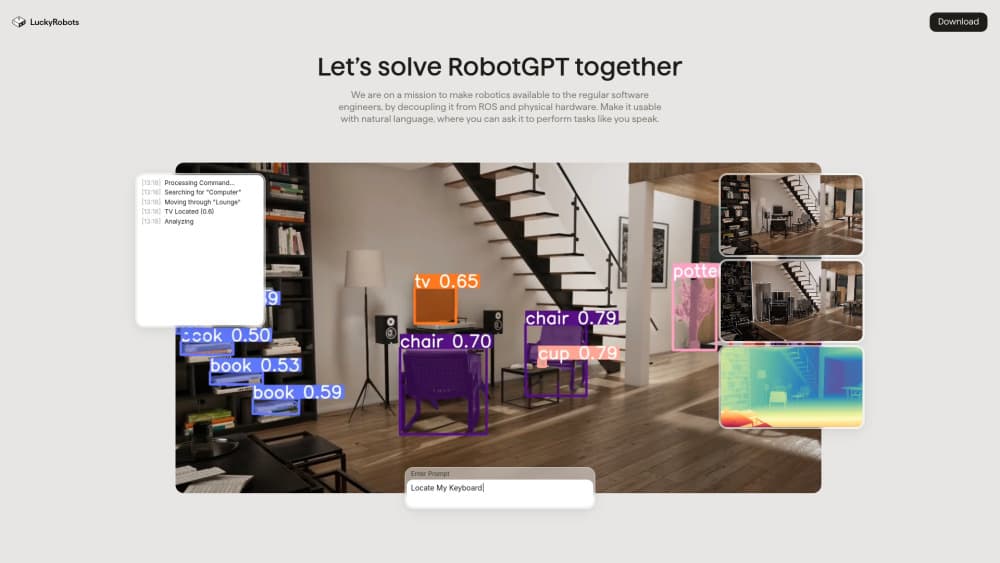
About Lucky Robots
What Is Lucky Robots
Lucky Robots is a small engineering team building the simulation layer for embodied AI. Its main product, Lucky Engine, is a game engine written for robots instead of players. MuJoCo handles contact, friction and dynamics underneath, Vulkan handles rendering, and a Python SDK talks to the engine over gRPC.
The pitch is easy to follow. Hardware time is expensive, and a policy that fails on a real arm can burn a motor or a week of repairs. A robot training simulator lets the same policy fail a million times at no cost, then carry the learned grasp onto the real machine. Lucky Robots puts that saving at around 90% less time and budget than training on physical hardware. That figure comes from the company, so treat it as a claim rather than a measured result.
The limits matter too. This is a young platform from a small team, and Lucky Hub, the cloud workspace, still marks several pieces as coming soon. Running the engine locally wants a recent desktop GPU. Teams that prefer a stack with a decade of tutorials and forum answers will find gaps here.
Synthetic data generation for robotics sits at the center of the product, and the team pitches the engine as a robot learning platform rather than a rendering demo. You build a scene, drop in a robot, script a task, then record what happens as labeled episodes. The output is aimed at imitation learning and policy training, not at pretty renders.
Getting Started
- Download LuckyEngine from the GitHub releases page for Linux, macOS or Windows.
- Set LUCKYENGINE_PATH to the executable, or LUCKYENGINE_HOME to the folder that holds it.
- Install the client with
pip install luckyrobots. - Open a scene in the editor, start the gRPC server panel, then connect from Python with a Session, or launch a scene and robot programmatically.
- Record episodes, then export them as LeRobot 3.0 datasets for training.
Product Information
A quick look at Lucky Robots's pricing, supported platforms, and performance.
Best for
The users, tasks, and scenarios where this tool fits best.
Users
- Robotics researchers
- Robot learning engineers
- Small robotics teams
Tasks
- Collecting demonstration data without booking lab time
- Stress testing a policy before it touches hardware
- Checking sim-to-real transfer
- Training drones and arms on one stack
Scenarios
- Overnight dataset generation before a training run
- A university lab with two arms and a queue of students
- Reproducible experiments for a paper
Key features
MuJoCo Physics Under a Real-Time Engine
Lucky Engine runs industry-standard MuJoCo contact, friction and dynamics as its physical core, so a grasp learned in simulation has a real chance of holding on a physical gripper. The engine wraps that solver in a real-time loop with accurate clocks, which keeps recorded timestamps aligned with the physics steps. For training runs that stretch over days, that consistency matters more than raw speed.
Rasterized or Path-Traced Camera Feeds
Rendering runs on Vulkan and offers two modes. Rasterized output is fast and good enough for geometry-heavy scenes. Path tracing produces camera feeds close to what a real sensor sees, which is the difference between a vision model that transfers and one that collapses on the first real frame. You pick per scene, so a quick data run does not have to pay for photorealism.
High-Rate Episode Recording and LeRobot Export
Every motion logs camera frames, joint states and sensor streams as a labeled episode. The engine can record at 10,000 Hz and encode video on the GPU, which keeps large batches manageable. Episodes land in LeRobot 3.0 format, so Hugging Face tooling and existing training scripts read them without a conversion step.
Python SDK and gRPC Control
The luckyrobots package mirrors the engine's gRPC surface: robots, policies, joints, actuators, IK, telemetry, cameras and viewports. A low-level client sends actions and reads observations in a single call, while a Gymnasium environment wraps the same loop for reinforcement learning. Everything is discoverable at runtime, so you can list robots and joints instead of guessing names from docs.
Scene Building with C# and Procedural Assets
The editor follows game industry conventions: place objects, rig props, script behavior in C#, and generate meshes and materials procedurally when a scene needs variety. Rigged fridges, cabinets and grills let a policy learn to manipulate a room rather than just look at it. Any MuJoCo XML drops in, with built-in support for Unitree, Franka and Hello Robot hardware.
AI Agents and Cloud Runs on Lucky Hub
Lucky Hub adds a shared workspace for projects, datasets, models and runs, and it lets an AI agent drive the engine. Point Claude, Codex or another agent at a project and it can build scenes and record data through the same interfaces a person uses. Cloud runs bill by sim minutes and episodes, which suits teams that need a million episodes without owning the hardware to produce them.
Pros and cons
Pros
- Physics and rendering share one engine, so camera frames and joint data come from the same simulation step.
- LeRobot 3.0 output removes the usual export and conversion work before training.
- The Python SDK and gRPC API cover RL, imitation learning and plain teleop recording without extra glue code.
- Any MuJoCo XML model loads, which covers most research arms and quadrupeds out of the box.
- The MIT licensed client and a free tier make a first experiment cheap.
Cons
- The community is small, so unusual errors are likely to need a direct answer from the team rather than a forum thread.
- Lucky Hub features such as team billing and hosted credits were still marked coming soon at the time of writing, which limits cloud use for now.
- Local runs need a desktop GPU and a manual engine download, so setup is heavier than a pip install alone.
- Documentation leans toward API reference, which leaves beginners to learn MuJoCo concepts elsewhere.
Frequently asked questions
Lucky Robots is used to train and test robot policies in simulation before they run on real hardware. Teams build a scene, record labeled episodes and export the data for imitation learning.
Related content
Explore related tools, skills, and articles for Lucky Robots.
Lucky Robots Alternatives

Odyssey 3
Odyssey · OtherOdyssey-3 is Odyssey's foundation world model. It simulates physics in real time, turns a prompt into an interactive environment, and adapts to robots, cars and games.

JarvisCore
Prescott Data · Coding · Productivity · OtherJarvisCore is an open source Python runtime where AI agents work as equal peers on an agent mesh, claim tasks from a shared ledger, and reach external services through a zero-trust broker.
Clef
Cloudflare · Business · OtherClef is Cloudflare's open-source decision model for Workers AI. It returns calibrated probabilities for typed questions, not generated text, so agents can classify, route, and act fast.