

Mai
Devon Crebbin (dcrebbin) · Voice & Language
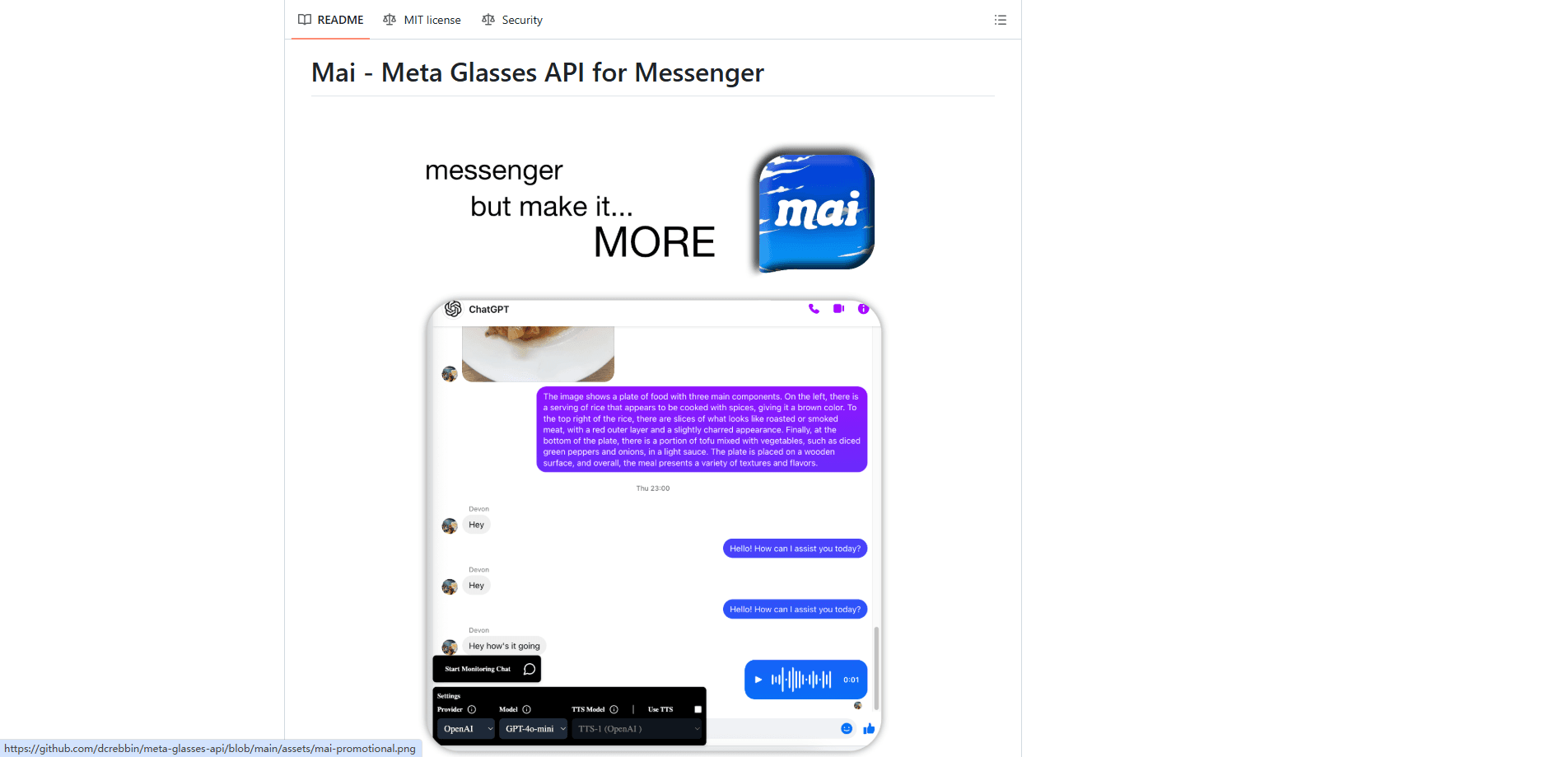
Mai is a free, open-source browser extension that connects Meta Ray-Ban smart glasses to ChatGPT, Claude, or Perplexity over Messenger. It needs your own API key to run.
About Mai
What Is Mai
Mai is a hobby project by developer Devon Crebbin that adds custom AI bots to Messenger so your Meta Ray-Ban glasses can talk to them. The glasses only know how to send messages and photos to your Messenger contacts, so Mai bends that one feature into a general purpose AI hook.
Think of it as a translator sitting between three things you already own: the glasses, a throwaway Facebook account, and an AI provider. You speak a command, the glasses send it to a Messenger chat, and the extension quietly passes it to ChatGPT, Claude, or Perplexity before reading the answer back.
The catch is that this is a workaround, not a product. Crebbin calls it "hacky" in the project's own README, and it depends on Messenger behavior Meta never designed to be scripted. If Meta changes how chat names or group resyncs work, Mai can break. The author hopes Meta Reality Labs ships a real SDK one day so builds like this stop being hacks.
Getting Started
- Install the extension from source by running
bun install, thenbun run dev:chrome(ordev:brave,dev:firefox). - Open the extension's API settings tab and paste in the API keys you want to use, such as an OpenAI, Claude, or Perplexity key.
- Create a Messenger group chat with two spare Facebook accounts, remove one, rename the chat to your bot's name, and set a nickname and photo so it looks legit to the glasses.
- In the Meta View app, disconnect and reconnect your Messenger account so the glasses pick up the new chat.
- Sign into the spare account on facebook.com/messages, open that chat, and start monitoring. Voice and text messages now flow to your chosen AI, which replies in the same thread.
Product Information
A quick look at Mai's pricing, supported platforms, and performance.
Best for
The users, tasks, and scenarios where this tool fits best.
Users
- Meta Ray-Ban owners who already pay for ChatGPT, Claude, or Perplexity and want to reach those models by voice while wearing the glasses.
- Tinkerers comfortable running commands like `bun run dev
- Developers studying how to improvise an AI layer on top of a locked-down device before an official SDK exists.
Tasks
- Hands-free question answering
- Photo logging
- Video call monitoring
Scenarios
- Cooking or driving when your hands are busy and you'd rather not pull out a phone.
- A casual experimenter's weekend project, where a second Facebook account and a few dollars of API credit are fair trade for a working demo.
- A lab or study setup for testing how AI assistants behave when they're pinned to a wearable instead of a screen.
Key features
Voice Commands Through Messenger
The core trick is a renamed group chat. The glasses treat it like any friend, so "Hey Meta send a message to ChatGPT" works without any official integration. Everything you say or send lands in that thread and gets forwarded to your AI provider.
Multiple AI Providers
Mai isn't tied to one model. You can point it at OpenAI, Claude, or Perplexity, and swap keys in the settings tab whenever you want to compare answers. Perplexity is handy when you want cited results, and image requests lean on models with vision.
Photo and Image Requests
Send a picture from the glasses and Mai hands it to a model that can read images, then posts the description back. The food log demo shows the idea: snap a meal, get it recognized and recorded without typing a word.
Video Call Monitoring
During a call, you can push screenshots to your chosen provider and collect the output in a log viewer. It's a rough version of live assistance, useful for anyone who wants a running AI note-taker on a call.
Audio Replies
With OpenAI's text to speech turned on, Mai turns each answer into a short audio clip and sends it back to the chat. You hear the response without reading a screen, which matters most when your phone is in a pocket.
Open Source and Self-Hosted
The project is MIT licensed and written in TypeScript, so you can read every line, fork it, or strip out the parts you don't want. Your API keys stay in your own browser extension rather than on someone else's server.
Pros and cons
Pros
- Costs nothing to install; you only pay for the AI provider you already use, and keys stay local.
- Works with ChatGPT, Claude, and Perplexity instead of locking you to one assistant.
- Voice and photo commands make the glasses useful for models Meta's own assistant can't reach.
- Open source, so you can audit it, modify it, or learn from how it hooks into Messenger.
Cons
- Setup is fiddly: a second Facebook account, a hand-built group chat, and a Messenger disconnect are all required before it works.
- It's an unofficial hack, so a change on Meta's side can break it with no warning and no fix beyond a repo update.
- There's no real API, so you can't build a clean integration on top of it.
- You have to run it from source; there's no packaged extension in a browser store.
Frequently asked questions
No. Mai is an independent hobby project by developer Devon Crebbin. It reuses Messenger in a way Meta didn't design for, and the author openly calls it a hack. That means it can stop working if Meta changes anything.
Related content
Explore related tools, skills, and articles for Mai.
Mai Alternatives

Foley
Hanamori Labs, LLC · Voice & Language · Productivity · AI AssistantFoley is a voice to-do list that turns a spoken sentence into a filed task, complete with project, date and time, then helps you plan the day around what is already there.

HireKey
HireKey · Voice & Language · Productivity · LeaningHireKey is an AI job search copilot built by a former tech recruiter. It checks role fit, tailors resumes, runs interview practice and tracks every application.

Fluence
Yay Software (Yannick Huchard) · Writing · Voice & Language · ProductivityFluence is an Android app that reads PDFs, EPUBs, Word files and web articles aloud, follows each sentence as it speaks, and answers questions about the text on the phone itself.