
Mailchimp
Intuit · Marketing
Mailchimp is an AI email marketing and automation platform for small businesses. It builds campaigns, sends automated flows, and reports on revenue from one account.
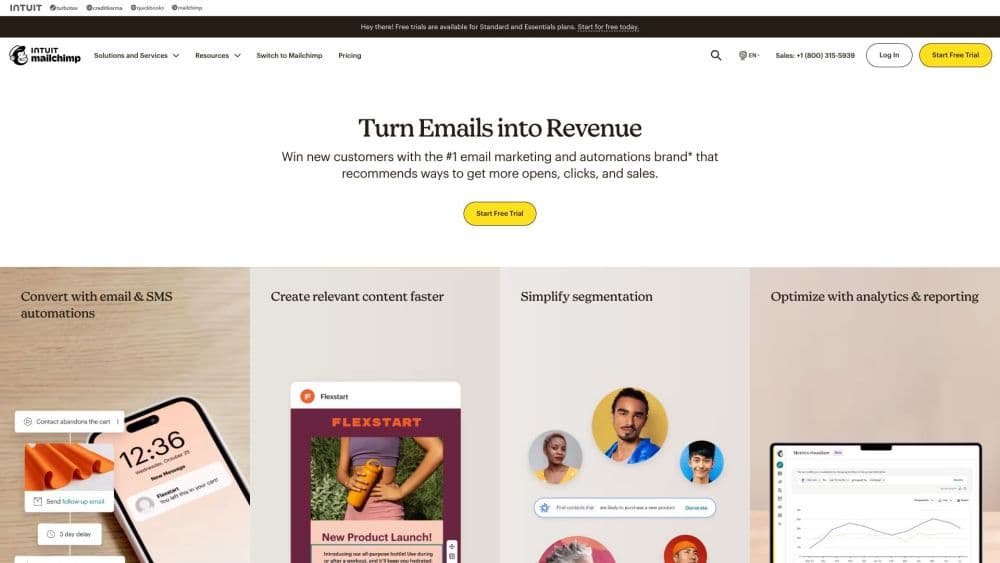
About Mailchimp
What Is Mailchimp
Mailchimp is a marketing platform centered on email. You add contacts, design a campaign with a drag-and-drop editor, and send it to a segment of your audience. Beyond single sends, it runs automated flows that trigger on behavior, such as a welcome series or a win-back email when someone stops opening. Social posts, landing pages, forms, and revenue reporting sit in the same dashboard, so you manage email, ads, and audience data without juggling separate subscriptions.
The AI layer, now branded Mailchimp with Intuit Intelligence, handles the tedious parts. It writes subject lines and body copy, predicts which subscribers are likely to buy, and recommends send times. Analytics AI explains which campaigns are actually moving revenue and why, in plain language.
Two things define where it fits. It rewards you for a defined audience: the pricing scales with contact count, so a bloated list costs more. And it's built for marketers, not developers. If you want to wire up custom sending logic, you'll live in the API, not the dashboard. For a small team that wants email, automation, and reporting in one place, it's a mature default.
Getting Started
- Create a free account at mailchimp.com. You get core email tools up to 500 contacts and 1,000 sends a month, with a monthly cap of 500 sends or 250 a day.
- Import your contacts. Upload a CSV, connect a store, or sync through one of the 300+ integrations.
- Build your first campaign. Pick a template, drag blocks into place, and let the AI draft or polish the copy.
- Choose an audience and schedule the send. Segment by behavior or purchase history rather than mailing the whole list.
- Set up an automated flow. Start with a welcome series, then add follow-ups for purchases or abandoned carts.
- Watch the reports. Opens, clicks, and attributed revenue roll up in the dashboard so you can double down on what works.
Product Information
A quick look at Mailchimp's pricing, supported platforms, and performance.
Best for
The users, tasks, and scenarios where this tool fits best.
Users
- Small business owners
- Solo creators and freelancers
- Marketing teams at growing companies
Tasks
- Sending a newsletter to a growing list
- Automating a welcome series
- Recovering abandoned carts
- Growing an audience with forms and landing pages
- Tracking which campaigns make money
Scenarios
- Launching a small online store
- Running email and SMS together
- Testing a campaign idea before committing budget
Key features
AI Content and Send Optimization
Mailchimp with Intuit Intelligence writes and refines your copy, suggests subject lines, and recommends the best day and time to send based on when your specific audience engages. Predicted attributes flag which contacts are likely to buy, so you can personalize beyond a first name. The value is time saved on the blank-page problem. The output still needs a human pass before it ships.
Marketing Automation Flows
Flows send emails on a trigger rather than on your schedule. A welcome series fires when someone joins, a follow-up fires after a purchase, and a win-back email fires when a subscriber goes quiet. Paid plans allow up to 200 flows with multiple steps. This is the feature that separates a real email program from occasional blasts, and it's the one most small businesses underuse.
Email Campaign Builder
The editor is drag-and-drop with pre-built templates, so you don't need a developer or a designer. You can save your own branded templates, use custom-coded ones on higher plans, and pull in dynamic content that changes per recipient. For anyone who has hand-coded HTML emails, the difference in time per send is hard to overstate.
Audience Segmentation and CRM
Contacts live in the platform's audience tools, where you can group them by behavior, purchase history, or predicted value. Tags and segments let you send a relevant message to one slice instead of one message to everyone. Deeper segmentation sits on paid plans, which matters once your list outgrows a single broadcast.
Reporting and Revenue Attribution
Opens, clicks, and unsubscribes are table stakes. The useful part is attributed revenue: Mailchimp connects campaigns and automations to sales in your connected store, then Analytics AI explains in plain language which ones are driving it. That turns a vague sense of what's working into a specific list of what to keep and what to drop.
Integrations and Marketing API
Mailchimp connects to over 300 tools, from ecommerce platforms to CRMs to ad networks, and exposes a Marketing API plus Transactional email through the API or SMTP. If you need to sync custom data or send event-driven messages, the API is where that happens. It's aimed at developers and integration partners rather than everyday users.
Pros and cons
Pros
- Email, automation, forms, landing pages, and reporting come in one account, so you're not stitching tools together.
- The free plan covers up to 500 contacts with core tools, which is enough to test whether the platform fits.
- AI writing and send-time suggestions cut the busywork out of building a campaign.
- Over 300 integrations and a documented API mean it fits into an existing stack instead of replacing it.
- Revenue attribution connects campaigns to actual sales, not just opens and clicks.
Cons
- Pricing scales with contact count, so a large or unmanaged list gets expensive fast.
- Several capabilities, including advanced segmentation and multivariate testing, are locked behind higher tiers.
- Deep customization of sends requires the API. The dashboard covers common cases but not unusual ones.
- The free plan's send limits are tight. You need a paid plan once you're mailing regularly.
Frequently asked questions
Mailchimp is used to run email marketing and automation. You build campaigns, send automated flows like welcome series and abandoned-cart reminders, grow an audience with forms and landing pages, and track the revenue those emails generate.
Related content
Explore related tools, skills, and articles for Mailchimp.
Mailchimp Alternatives

ngram 2.0
ngram · Video · Marketingngram 2.0 is an AI video generator for teams. It turns a prompt, a screen recording, or a product URL into a narrated explainer, product demo, or AI avatar video, and every scene stays editable.

shippedit.me
Krawlup · Marketing · Businessshippedit.me now redirects to Krawlup, a web platform that audits SEO, AEO and page speed every week, then hands the fixes to AI coding agents over MCP.

MePersona
MePersona, Inc. · Writing · Productivity · MarketingMePersona is an AI unified inbox for creators. It learns your voice, drafts replies to fan messages from 12 platforms, and sends only what you approve.