

MailSnitch
DTILE GmbH · Writing · Marketing
MailSnitch is a free Chrome extension that tags your email address per site, so when spam arrives you can trace which signup leaked it.
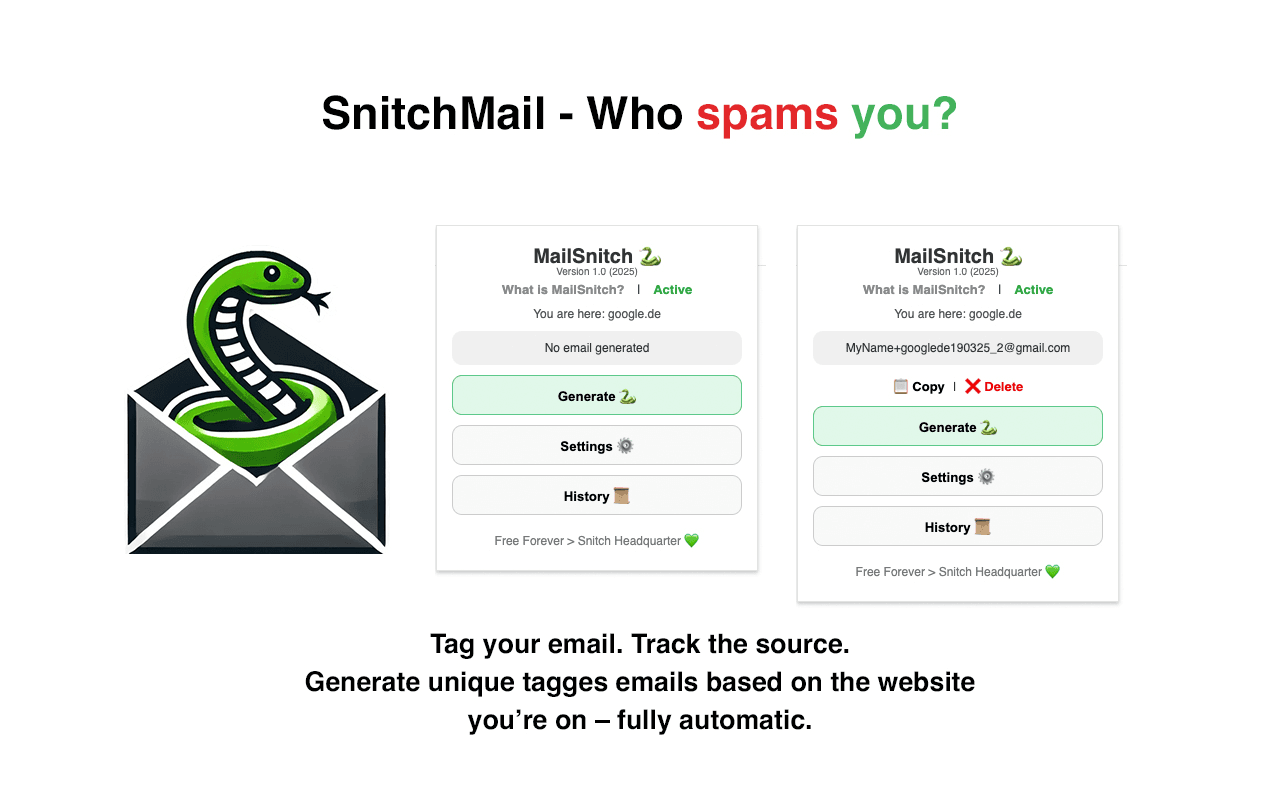
About MailSnitch
What Is MailSnitch
MailSnitch is a browser extension for Chrome that tags your email address every time you sign up somewhere. Instead of handing the same address to every site, you generate a unique version for each one, so a spam message later points back to whoever sold or leaked your data.
The trick is plus-addressing. Most providers treat [email protected] as an alias that still lands in your normal inbox. MailSnitch generates that suffix for you, based on the site you're on, and saves each one to a history list you can export. In short, it's an email tagging extension built to find who sold your email.
The limit is that plus-addressing only helps if the recipient keeps the tag intact. Some sites and data brokers strip everything after the plus sign. For those cases MailSnitch offers a catch-all email mode, but it needs a custom domain, so it's not for everyone. Used this way, it doubles as a spam source tracker for everything that reaches your inbox.
Getting Started
- Install the extension from the Chrome Web Store and open its settings.
- Enter your base email, such as [email protected], then choose how tags are built, using a set number of letters from the site name plus either a date or a running number.
- Click the extension icon to check it's active, then hit Generate to create a tagged address for the site you're on. You can edit it before copying.
- Paste the tagged address into the signup form, or let MailSnitch auto-fill it. Each one is saved to history, where you can copy, delete, or export the full list as CSV.
Product Information
A quick look at MailSnitch's pricing, supported platforms, and performance.
Best for
The users, tasks, and scenarios where this tool fits best.
Users
- Privacy-conscious signup hoarders
- Gmail and Outlook users
- Small business owners with a domain
Tasks
- Tracing a spam source
- Cutting signup noise
- Testing a site's data habits
Scenarios
- Signing up for a free trial you plan to abandon
- Managing a personal domain
- Auditing an inbox that's drowning in junk
Key features
One-Click Email Tagging
MailSnitch builds a tagged address for the site you're on with a single click. You set how many letters come from the site name and whether the suffix uses a date or a number, then generate the address and copy it. It works with Gmail, Outlook, Fastmail, Mailfence, and ProtonMail, with no separate inbox to manage. As an email tracker Chrome extension, it keeps every tag in sight without touching your mail.
Plus-Addressing and Catch-All Modes
The default mode appends a plus tag, so a signup on google.com becomes [email protected] and still arrives in your normal inbox. Catch-all mode is for people with their own domain and creates clean prefixes like [email protected]. That matters because some sites and data brokers strip out anything after the plus sign, leaving plus tags useless.
History and Export
Every tagged address you generate lands in a history list. From there you can copy a single entry, delete one you no longer need, or export the whole list as plain text, email, or a CSV file. That record is what turns a spam message into a lead about who leaked your address.
Auto-Fill on Signup Forms
When you click into an email field, MailSnitch offers to generate a fresh tagged address and drop it straight into the form. It's optional, so you can still edit the tag by hand before it's saved to history.
Editable Tags Before Use
Generated addresses stay editable, so you can rename a tag to something you'll recognize later, such as the exact store or service, rather than relying on MailSnitch's automatic naming.
No Account, No Tracking
There's no sign-up, no paywall, and no tracking built in. The extension declares that it doesn't collect or use your data, and it keeps everything local to your browser.
Pros and cons
Pros
- Free forever, with no account or payment required to tag addresses.
- Traces spam back to the exact signup that exposed your address.
- Works with most major email providers, including Gmail, Outlook, and Fastmail.
- Catch-all mode survives data brokers that strip everything after the plus sign.
- Exportable history turns guesswork into a record you can check later.
Cons
- Plus-addressing fails on sites that strip the plus sign, the exact trick the tool relies on.
- Catch-all mode needs a custom domain, so it's not an option for everyone.
- It only helps if you remember to generate a tag at signup, which is easy to skip in a hurry.
- The project is young and still on its first versions, so features are thinner than mature inbox tools.
Frequently asked questions
MailSnitch is a free Chrome extension that tags your email address for each site you use. When spam arrives, the tag tells you which signup leaked or sold your address, so you can stop guessing who's behind the junk.
Related content
Explore related tools, skills, and articles for MailSnitch.
MailSnitch Alternatives

Google EmbeddingGemma 2
Google DeepMind · Writing · Image · CodingGoogle EmbeddingGemma 2 is a 740M-parameter open model that turns text, code, images, audio, and video frames into vectors in one 768-dimension space, running on phones and laptops.

MePersona
MePersona, Inc. · Writing · Productivity · MarketingMePersona is an AI unified inbox for creators. It learns your voice, drafts replies to fan messages from 12 platforms, and sends only what you approve.

Fluence
Yay Software (Yannick Huchard) · Writing · Voice & Language · ProductivityFluence is an Android app that reads PDFs, EPUBs, Word files and web articles aloud, follows each sentence as it speaks, and answers questions about the text on the phone itself.