

Makeaudio
MakeAudio · Voice & Language
MakeAudio is a browser-based audio toolkit whose text to speech engine reads text aloud in 14 languages with 9 AI voices, then exports MP3, WAV, FLAC or PCM files.
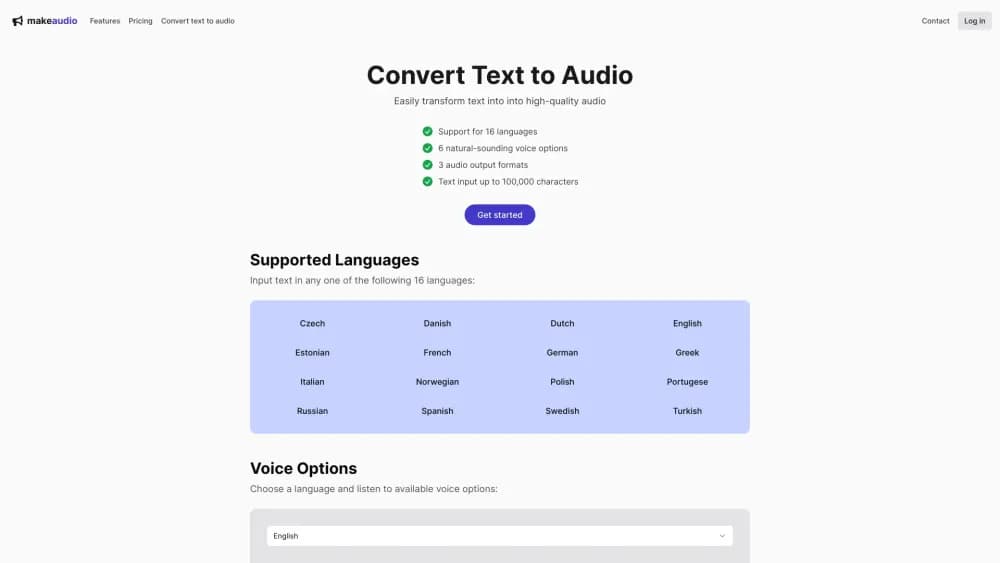
About Makeaudio
What Is MakeAudio
MakeAudio is a web app that bundles two kinds of utility. The headline tool is a text to speech engine that turns written text into spoken audio using cloud-hosted AI voices. The rest of the site is a long list of audio and video converters, players, and test-tone generators, and most of those run inside your browser rather than on a server.
That split matters more than it first sounds. Convert a video to MP3 or check a file's sample rate and the file never leaves your device, so nothing gets uploaded and nothing waits in a queue. Text to speech is the exception. The voices live in the cloud, so the text you paste does go to MakeAudio's servers for processing.
The limits are worth knowing up front. There's no voice cloning, no emotion slider, and no multi-speaker dialogue builder. You pick one of nine preset voices, set the language, and export. For narration, accessibility reads, and quick prototypes that's enough. For podcast production with distinct characters, it isn't.
Getting Started
- Open makeaudio.app and sign in with a Google account or a one-time code sent to your email.
- Go to the text to speech page, paste or type your script, and pick one of the 14 input languages.
- Choose a voice from the nine options and listen to a short preview before committing to the full read.
- Export in MP3, WAV, AAC, Opus, FLAC, or PCM. The file downloads straight to your device.
- Upgrade only if the two free daily conversions run out. A single month costs $9, and pay-as-you-go credits are sold separately at $1 per 15,000 characters.
Product Information
A quick look at Makeaudio's pricing, supported platforms, and performance.
Best for
The users, tasks, and scenarios where this tool fits best.
Users
- Writers and bloggers
- Teachers and course creators
- Developers and QA testers
Tasks
- Narrating a video
- Producing an audiobook sample or voice-over demo
- Making a document listenable
- Converting audio between formats
Scenarios
- Publishing a multilingual product update
- Adding audio to a site without a media budget
- Checking a file before sending it to a client
Key features
Text to Speech in 14 Languages
MakeAudio accepts input in English, Spanish, Portuguese, French, German, Italian, Dutch, Danish, Norwegian, Swedish, Turkish, Chinese, Japanese, and Korean. You write in the language you know and pick the voice that fits it. Accents stay consistent within a single file, which is the part that usually breaks when you stitch together clips from different tools.
Nine Preset AI Voices
The voice list runs from Alloy and Nova to Onyx, Fable, and Shimmer, with a mix of male and female options. Each one is a fixed character rather than a clone of your own voice. That keeps the setup to a single click, and it also means you can't fine-tune tone beyond picking a different voice. For a product demo or a narrated slide deck, the presets land close enough on the first try.
Six Audio Export Formats
Conversions can be downloaded as MP3, WAV, AAC, Opus, FLAC, or PCM. MP3 is the everyday choice, WAV suits editing, FLAC keeps a lossless master at a smaller size than WAV, Opus is built for streaming and calls, and PCM gives developers raw audio for their own pipelines. Having all six in one place saves a trip to a separate audio converter.
Long-Form Input up to 200,000 Characters
A single conversion accepts up to 200,000 characters, which is roughly a novella or a couple of hours of speech. Most competing tools cap free input at a few thousand characters and force you to chunk long documents by hand. Here the limit is high enough that a full report or a book chapter goes in as one piece, and the voice stays the same across the whole file.
Browser-Based Audio and Video Utilities
Beyond text to speech, the site hosts converters, players, and test-tone pages for sample rates from 8,000 Hz to 19,000 Hz. These run on your own machine, so files aren't uploaded and there's no file size ceiling beyond your device's memory. If you handle client recordings or unreleased material, that's a real difference from the usual upload-and-wait converter.
Flat Pricing With a Free Daily Allowance
Every tool is free for two uses a day, with no file size limit. Paid access removes the daily cap and comes as a one-off term rather than a recurring subscription: $9 for a month, $49 for six months, $99 for a year, or $299 for lifetime access. Text to speech also sells credits at $1 per 15,000 characters, with a $5 minimum and a one-year expiry. Short projects can stay on credits; steady use favors the term plans.
Pros and cons
Pros
- Text to speech and a broad set of converters sit behind one login, so you're not juggling five tabs from different sites.
- Two free conversions a day with no file size limit is enough to test the output properly before paying.
- Lifetime access at $299 avoids the subscription creep that most AI voice tools build in.
- Most converters run locally in the browser, which keeps private recordings off any server.
- The 200,000 character input limit handles long documents without manual splitting.
Cons
- Nine fixed voices with no cloning and no emotion controls. You can't match a specific speaker or direct a performance.
- Text to speech needs a connection because the voices run in the cloud. Offline use is out.
- Credit pricing is only worth it for small jobs. At one credit per character, a 100,000 character book costs several dollars per pass.
- There's no public API or documented developer access, so you can't wire the voice engine into an app.
Frequently asked questions
MakeAudio converts text into spoken audio and handles common audio and video file conversions. The text to speech side covers 14 languages and nine voices, while the converter pages handle format changes like AAC to MP3 or WAV to FLAC.
Related content
Explore related tools, skills, and articles for Makeaudio.
Makeaudio Alternatives

Foley
Hanamori Labs, LLC · Voice & Language · Productivity · AI AssistantFoley is a voice to-do list that turns a spoken sentence into a filed task, complete with project, date and time, then helps you plan the day around what is already there.

HireKey
HireKey · Voice & Language · Productivity · LeaningHireKey is an AI job search copilot built by a former tech recruiter. It checks role fit, tailors resumes, runs interview practice and tracks every application.

Fluence
Yay Software (Yannick Huchard) · Writing · Voice & Language · ProductivityFluence is an Android app that reads PDFs, EPUBs, Word files and web articles aloud, follows each sentence as it speaks, and answers questions about the text on the phone itself.