

MashApp Music
MashApp · Voice & Language
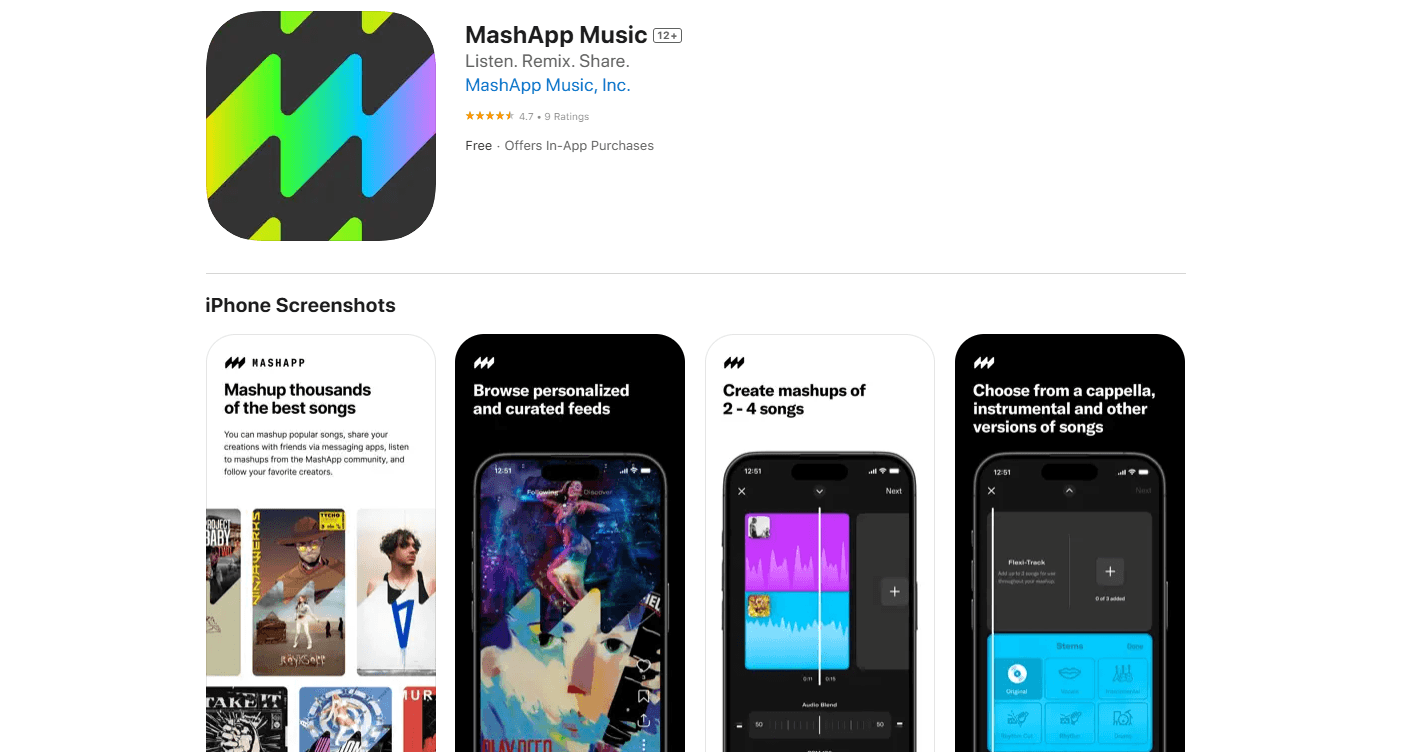
MashApp Music is an AI mashup app for iOS that lets you blend parts of popular songs, then share what you make with friends.
About MashApp Music
What Is MashApp Music
MashApp Music is an AI mashup maker built around one idea: turning the mashup, a mix of two or more songs stitched together, into something anyone can make on a phone. You search for songs by title, artist, or genre, pull the pieces you want, and combine them into a track. No DJ deck. No desktop software.
The appeal is how low the barrier sits. Mashups used to take hours in a DAW and a decent ear for tempo matching. MashApp leans on AI to handle that grunt work, so the fun part, picking songs that shouldn't work together and finding out that they do, is all that's left. Want to create mashups from a phone on the bus? That's the whole pitch. You can also browse what other people made and share your own, which turns the app into a small social space as much as a tool.
The catch is reach. MashApp Music is an iPhone app, full stop. There's no Android build, no web editor, and no desktop version, so if you're on anything but an iPhone, you're out of luck for now. It also launched in 2024, which means it's young: expect a smaller song library and a thinner community than the big-name music tools. The free version covers the basics, and the subscription adds more.
Getting Started
- Download MashApp Music from the App Store and open it on your iPhone.
- Sign up or start browsing, then search for a song by title, artist, or genre.
- Pick the tracks you want to combine and choose which parts of each one to keep.
- Let the app build the mashup, then tweak it until the blend sounds right.
- Save your mashup and share it with friends, or explore what other users have posted.
Product Information
A quick look at MashApp Music's pricing, supported platforms, and performance.
Best for
The users, tasks, and scenarios where this tool fits best.
Users
- Casual music fans
- Aspiring DJs and remixers
- Social creators
Tasks
- Building a mashup from two songs
- Searching for source material
- Sharing audio edits with friends
- Discovering other people's mixes
Scenarios
- A long commute when you want to kill time making something instead of just listening.
- A group chat where a joke mashup of two mismatched songs lands better than a text reply.
- Late-night experimenting with pairing a pop chorus against a completely different backing track.
Key features
AI-assisted mashup creation
The app does the technical heavy lifting. You choose the songs and, to a degree, which parts to use, and MashApp handles the blending that normally needs tempo and key matching by hand. That's what makes it usable for people who've never touched a DAW. The tradeoff is control: you get a result fast, but a skilled editor will still out-tune it.
Song search by title, artist, or genre
Finding source material is a search box, not a crate dig. You can look up a track by name, filter by the artist, or browse a genre when you only know the mood you're after. It's the front door to everything else in the app, and it keeps the flow from idea to output short. Type, tap, done.
Share and discover community mashups
Every mashup can be shared, and you can browse what other users have made. This is where the app stops being a solo tool. Seeing how someone else paired two unlikely tracks is often a faster creative nudge than staring at an empty project. The community is small so far, given the 2024 launch, but it grows with use.
Free tier with a paid upgrade
MashApp Music is free to download and use, with a subscription version that unlocks more functionality. For anyone curious, the free version is enough to make a few mashups and decide whether the workflow clicks. Heavy users who hit the limits are the ones the paid tier is aimed at.
iPhone-first design
The whole experience is built for one device: the iPhone. That focus means the controls, the sharing, and the playback all live where you'd actually use them. It also means there's nothing for Android or desktop users, which is the clearest limitation of the product. So what happens if you're on Android? Nothing, yet.
Pros and cons
Pros
- Lowers the bar for making mashups, so you don't need production experience or expensive software.
- AI handles the technical blending that usually kills the fun for beginners.
- Search by title, artist, or genre keeps you moving from idea to result quickly.
- Free to start, with a subscription only when you want more.
- Sharing and discovery turn it into a social space, not just a solo editor.
Cons
- iPhone only. There's no Android or web version, so non-Apple users can't use it at all.
- It launched in 2024, so the song library and community are smaller than those of established music tools.
- The AI does the heavy lifting, which means less fine-grained control than a full editing suite for anyone who wants precise mixes.
Frequently asked questions
It's an iOS app for creating, sharing, and discovering music mashups. You search for popular songs and combine parts of them into a new track, with AI handling the technical blending.
Related content
Explore related tools, skills, and articles for MashApp Music.
MashApp Music Alternatives

Prosp
Prosp · Writing · Voice & Language · MarketingProsp is an AI LinkedIn outreach tool built for agencies and sales teams, and it writes the message and the voice note in your own voice for each prospect so they actually reply. You connect your accounts, find leads, and let the AI draft and send personalized messages at scale, all from one inbox. It's built for people running outbound at volume. That's the whole pitch. Every touchpoint still has to feel human.

Wordly AI Translation
Wordly · Voice & Language · ProductivityWordly AI Translation is a real-time AI translation and captioning platform built for meetings, conferences, and events. It delivers live translation, captions, transcripts, and summaries in more than 60 languages, and attendees join by scanning a QR code or opening a link instead of using dedicated headsets. The platform works with Zoom, Microsoft Teams, Google Meet, and Webex, and it's designed for organizations that want multilingual access without hiring human interpreters for every session. Simple as that.
Musicful
Musicful AI · Voice & Language · VideoMusicful is an AI music generator and AI music video maker that turns text to music in minutes. Give it a text prompt, a set of lyrics, or a hummed melody and it returns a finished track with vocals and instruments. It also doubles as an AI song generator, produces music videos from the songs you create, and offers an AI cover tool plus a developer API. The platform runs in a web browser and through an Android app, so you can start a song on desktop and pick it up on your phone.