

MavTools
MavTools · Other
MavTools is a curated directory where solopreneurs and first-time founders search, bookmark, and review AI tools, SaaS apps, and business software in one place.
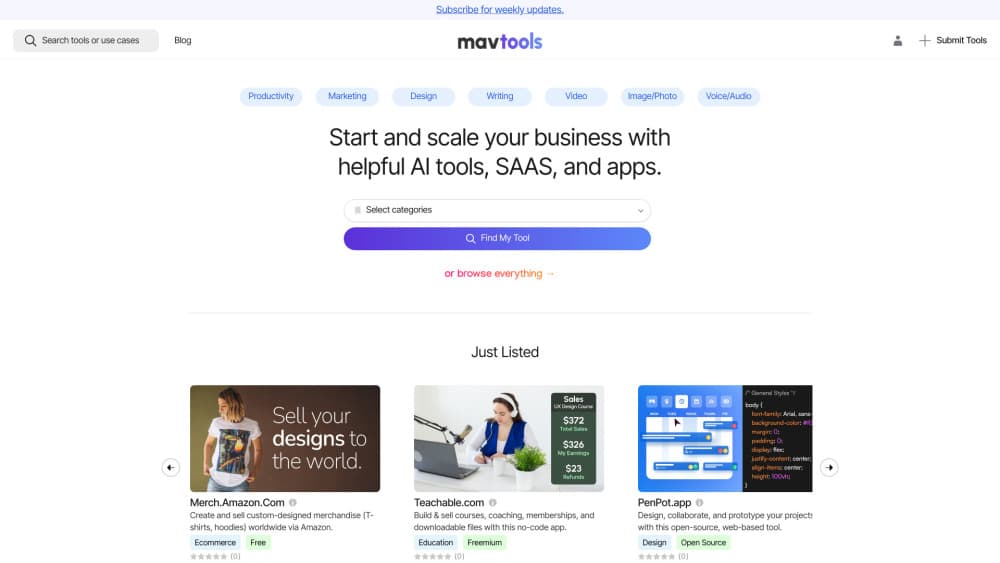
About MavTools
What Is MavTools
MavTools is an AI tool directory built for people starting or running a small business. Instead of scrolling through launch feeds and sponsored lists, you browse tools sorted by what they do: AI writing assistants, meeting recorders, sales outreach software, design apps, and the rest of the stack a one-person company ends up needing.
The point is narrowing the field fast. Each listing gives you a short description, pricing starting point, category tags, and links to the vendor, so you can rule a tool out in seconds rather than reading a full review first. You can save anything promising into a collection and come back when you're ready to pay.
The tradeoff is depth. MavTools works as an AI tool discovery platform, not a testing lab, so treat it as a starting point rather than a verdict. Descriptions lean on what vendors publish, and there are no benchmark runs or long-term trials behind each entry. Treat it as a shortlist builder, then check the tool yourself before you commit a monthly fee.
Getting Started
- Open mavtools.com and use the search bar or the category menu to pick a job you need done, like "AI Chatbots" or "Writing Assistant."
- Read the short profile for each result: what the tool does, what it costs to start, and which platforms it runs on.
- Sign in to save a tool to a collection, so your shortlist lives in one place instead of a browser bookmarks folder.
- Click through to the vendor's site and start a free tier where one exists.
- If you run a tool of your own, use Submit a Tool to submit an AI tool for a listing.
Product Information
A quick look at MavTools's pricing, supported platforms, and performance.
Best for
The users, tasks, and scenarios where this tool fits best.
Users
- Solopreneurs
- First-time founders
- Content creators
- Small business owners without a technical team
Tasks
- Building a shortlist before a purchase
- Finding an AI tool for one specific job
- Pricing checks across a stack
- Getting your own tool discovered
Scenarios
- Planning a first paid subscription
- Replacing a tool that stopped fitting
- Quiet weeks between launches
Key features
Curated Tool Catalog
Every entry gets a profile with a short summary, pricing starting point, category tags, and a link to the vendor. The catalog covers AI systems, chatbots, writing assistants, sales tools, and general business apps, so you aren't jumping between five different directories.
Category and Search Browsing
You can start from a job instead of a product name. Categories map to real tasks, like writing, meetings, or customer outreach, which is useful when you know the problem but not the market. Search handles the other direction for when you already have a name in mind.
Collections and Bookmarks
Saved tools go into collections you name yourself, so a shortlist for "invoicing" doesn't get mixed up with the one for "video editing." It's the feature that turns a browse session into something you can act on two weeks later.
Reviews and Ratings
Listings carry community ratings and written reviews, which give you a second opinion beyond the vendor's own copy. Read them for the complaints rather than the praise, since the gripes usually tell you whether a tool fits a small team.
Vendor Submissions
Anyone selling a tool can submit it for listing. That keeps the catalog growing without a full editorial team, and it means smaller indie tools show up next to the well-funded ones.
Budget-Based Pricing Views
Pricing pages group tools by band, including a dedicated freemium view, so you can start from what you can afford this month. Each view shows what the tier includes and how far the free option goes before you hit a paywall.
Pros and cons
Pros
- Free to browse, with no account needed to read listings or compare categories, which matters when you're comparing dozens of AI tools for small business use.
- Organized by the job you need done, which suits founders who don't yet know product names.
- Saved collections keep a shortlist intact between research sessions.
- Covers AI tools and ordinary SaaS in the same place, which suits AI tools for small business budgets where one purchase has to cover several jobs.
- Vendor submissions keep the catalog current, including tools from small independent makers.
Cons
- Listings rely on vendor and public details rather than hands-on testing, so quality claims need your own trial.
- The catalog is smaller than the biggest directories, which means some niche categories stay thin.
- Prices and plan details change at the vendor level, so a listing can go stale before it's updated.
- Web only. There's no mobile app, and no way to track a tool's pricing history.
Frequently asked questions
MavTools is a web directory of AI tools, SaaS products, and business apps aimed at solopreneurs, creators, and first-time founders. You browse by category, read short profiles, and save the ones worth trialing.
Related content
Explore related tools, skills, and articles for MavTools.
MavTools Alternatives

Odyssey 3
Odyssey · OtherOdyssey-3 is Odyssey's foundation world model. It simulates physics in real time, turns a prompt into an interactive environment, and adapts to robots, cars and games.

JarvisCore
Prescott Data · Coding · Productivity · OtherJarvisCore is an open source Python runtime where AI agents work as equal peers on an agent mesh, claim tasks from a shared ledger, and reach external services through a zero-trust broker.
Clef
Cloudflare · Business · OtherClef is Cloudflare's open-source decision model for Workers AI. It returns calibrated probabilities for typed questions, not generated text, so agents can classify, route, and act fast.