

Melodisco - AI Music Player
Melodisco (all-in-aigc / idoubi) · Voice & Language
Melodisco is a web-based AI music player and generator where you can stream AI-generated songs by Suno, save favorites, and turn a short description or your own lyrics into a new track.
About Melodisco - AI Music Player
What Is Melodisco
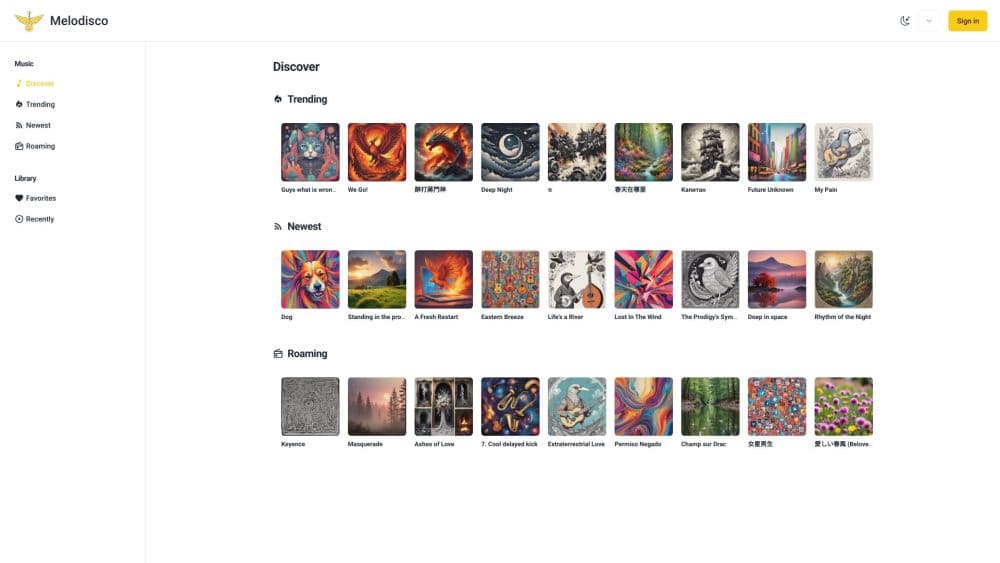
Melodisco is a browser app that plays music nobody recorded. Its song library holds tracks made with Suno, the text-to-music service, and the player sorts that library into trending, newest, and random picks so you can find something in a few taps.
The interesting part sits next to the player. A built-in generator lets you describe a song or paste lyrics, pick a style, and ask for a new track. So the same site covers both sides of AI music: listening to what other people made and using it to create AI songs of your own.
The catch is the cost structure. Playback is open to anyone, but generating songs runs on credits you buy with a one-time payment. Credits run out. There's no subscription, and there's no free daily allowance that we could find in the product's own code.
It also looks dated, at least in the open-source version. The public repository was last touched in August 2024, and it still builds on Suno's older chirp-v3-0 model. Treat Melodisco as a light discovery player with a small creation tool attached, not as a full music studio.
Getting Started
- Open melodisco in a browser and browse the Discover page, which splits songs into Trending, Newest, and Roaming lists.
- Sign in with your Google account when you want to save songs or generate your own.
- Open Create Music and pick a mode. Quick Mode takes a plain description, while Custom Mode asks for a title, lyrics, and up to five style tags.
- Buy a credit pack before your first generation. Each song request costs at least one credit, and no purchase means the generator stays locked.
- Play what comes back, mark the tracks you like as favorites, and share a song page with its own link.
Product Information
A quick look at Melodisco - AI Music Player's pricing, supported platforms, and performance.
Best for
The users, tasks, and scenarios where this tool fits best.
Users
- AI music fans who want a lighter way to sample AI tracks than scrolling Suno's own feed. You can listen without paying, and you only need an account to save songs.
- People experimenting with lyrics. Custom Mode takes your own words and a short style list, which suits writers who have a hook but no arrangement.
- Learners and tinkerers curious about how a music app is built. The source is public, so you can read the code, run it on your own server, or swap in another API.
Tasks
- Discovering AI songs without a search query
- Turning a one-line idea into a demo
- Making instrumental beds
- Keeping a shortlist of tracks you like
Scenarios
- Background music while you work
- Sharing a song with friends
- Trying a genre you don't usually write in
- Reading the code before you trust it
Key features
Trending, Newest, and Random Feeds
The Discover page runs three lists side by side. Trending shows the top 50 songs by popularity, Newest serves the latest uploads, and Roaming hands you 50 random tracks. It's a simple setup, and it does the one job it has: finding something to play without typing a search.
Suno-Backed Song Library
Every track in the library came out of Suno. Melodisco pulls the audio, cover art, tags, and lyrics into its own pages, so you get a consistent layout instead of juggling links. Song pages also show duration and style tags, which makes skimming a list quicker.
AI Song Generator with Two Modes
Quick Mode takes a plain sentence such as "a song about driving on the road" and handles lyrics, melody, and vocals. Custom Mode puts you in charge of the title, lyrics, and style tags, and it includes a No Lyrics switch for instrumentals. Both modes accept five style tags at most, which keeps the request focused.
Player with Queue Controls
The bottom player handles the basics: play and pause, skip forward and back, seek by clicking the progress bar, and a volume slider. Playback runs in sequence, loop, or shuffle mode. There's no crossfade and no equalizer. It's a plain player, and for a discovery app that's usually enough.
Favorites, Recently Played, and Creations
Signed-in users get their own shelves. Favorites holds what you starred, Recently keeps your last plays, and Creations lists the songs you generated. Library views turn a casual listen into something you can return to, which the public lists alone can't do.
Google Sign-In and Shareable Song Pages
Google is the main door. Sign-in takes one tap, and the same account keeps your favorites across devices. Song pages carry their own public URL through a share base setting, so posting a track is a copy and paste job.
Pros and cons
Pros
- Playback needs no payment, so you can sample the whole library before buying credits.
- The generator and the player share one account, which keeps your creations next to the songs you listen to.
- Style tags and a no-lyrics switch cover both songwriting and background music in one form.
- The code is open, and a Docker or Vercel deploy takes one command, so self-hosting is realistic.
- Share links for single songs make it easy to pass a track around.
Cons
- Generation is pay-per-credit with no free allowance, and the cheaper $9.9 pack only covers a short run of songs.
- Current pricing limits downloads on the basic pack, so a track you like can stay inside the site.
- The open repository hasn't been updated since August 2024, which means older Suno models and no public roadmap.
- There's no YouTube or TikTok import, no stem export, and no editing tools for a finished song.
Frequently asked questions
Listening is free. You can browse trending, newest, and random lists without paying. Generating your own songs is not free, because each request spends credits from a purchased pack.
Related content
Explore related tools, skills, and articles for Melodisco - AI Music Player.
Melodisco - AI Music Player Alternatives

Foley
Hanamori Labs, LLC · Voice & Language · Productivity · AI AssistantFoley is a voice to-do list that turns a spoken sentence into a filed task, complete with project, date and time, then helps you plan the day around what is already there.

HireKey
HireKey · Voice & Language · Productivity · LeaningHireKey is an AI job search copilot built by a former tech recruiter. It checks role fit, tailors resumes, runs interview practice and tracks every application.

Fluence
Yay Software (Yannick Huchard) · Writing · Voice & Language · ProductivityFluence is an Android app that reads PDFs, EPUBs, Word files and web articles aloud, follows each sentence as it speaks, and answers questions about the text on the phone itself.