

Memozora: Online Flashcard Maker
Memozora · Other
Memozora is a free online flashcard maker that schedules reviews with spaced repetition. It runs in a browser and adds built-in dictionaries and text-to-speech for language learners.
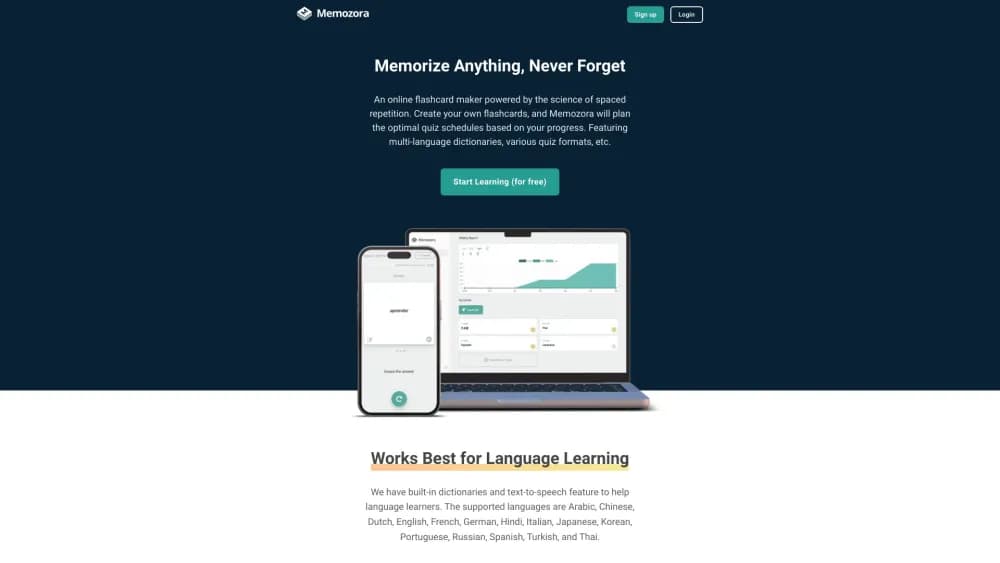
About Memozora: Online Flashcard Maker
What Is Memozora
Memozora is a browser-based flashcard app for people who want to memorize something and get on with their day. You type a question on the front of a card and an answer on the back, then the scheduler decides when each card comes back. Difficult cards show up often. Easy ones drop out of rotation for weeks.
The appeal is the lack of clutter. No leaderboard, no streak counter, no mascot nudging you to return. You open a deck, answer what the app puts in front of you, and close the tab. People who bounced off heavier study tools tend to like that.
What you give up for the simplicity is depth. There's no image occlusion, no cloze deletion builder, no shared deck marketplace, and no native Android or iOS app. If your material depends on diagrams, or you need to review on a plane, that's a real gap. The tool is at its best when a card can be answered in one sentence.
You can make flashcards online without installing anything, which is the practical reason it gets recommended on Chromebooks and locked-down work laptops where app installs are blocked.
Getting Started
- Sign up with an email address and password. The free plan needs no payment details.
- Create a deck and name it something you'll recognize in a month, such as "Spanish verbs" or "Biology chapter 4".
- Add cards one at a time, or keep a list in a spreadsheet and bring it in with CSV import.
- Pick a quiz type: standard flashcards, reverse flashcards, or a typing quiz.
- Open the deck daily and let the scheduler choose the cards. The graphs tell you how much you're retaining.
Product Information
A quick look at Memozora: Online Flashcard Maker's pricing, supported platforms, and performance.
Best for
The users, tasks, and scenarios where this tool fits best.
Users
- Language learners
- Students preparing for exams
- People who found Anki too fiddly
Tasks
- Vocabulary drilling
- Memorizing definitions and formulas
- Rehearsing a presentation
- Organizing a term list you already keep
Scenarios
- A 15 minute review session on a laptop or phone browser between other tasks.
- Exam week, when cards have to be built tonight rather than next month.
- Studying a language on a school Chromebook where you can't install software.
Key features
Spaced Repetition Scheduling
Every card carries its own review interval, and the app adjusts that interval after each answer. Get a card right and it stays away longer. Miss it and it returns the next day. The point is to spend your time on the cards you're about to forget rather than re-reading everything you already know.
Built-In Dictionary
The dictionary panel pulls translations and example sentences without leaving the study screen, and you can save a result as a card in one step. Fifteen languages are covered, including Spanish, Japanese, Korean, Arabic, and Thai. It saves the copy and paste trip to a separate tab, which is where most vocabulary workflows fall apart.
Text-to-Speech Pronunciation
The speech feature reads cards aloud with a natural sounding voice, so you hear a word while you see it. Listening matters in languages where spelling and pronunciation drift apart, and it also helps if you're reviewing on a commute with headphones in.
Three Quiz Types
Standard flashcards show the front and reveal the back. Reverse flashcards flip the direction so you produce the term from the definition. A typing quiz makes you spell the answer, which is stricter and better for exam recall. Switching between them is a per session choice, not a permanent setting.
CSV Import and Export
Decks move in and out as CSV files. That gives you a backup you can open in Excel, a way to build 200 cards in a spreadsheet instead of the web form, and an exit route if you decide to leave. It's a small feature that removes most of the lock-in worry.
Retention Graphs
Each card is bucketed into a low, medium, or high retention level, and the daily graph shows how many cards sit in each bucket. It's a coarse view compared with the statistics dashboards in dedicated spaced repetition software, but it answers the question most people actually ask: am I holding on to this material or not.
Pros and cons
Pros
- The free plan allows unlimited decks and cards, and the 30 quiz daily cap is more than a casual learner uses.
- Review timing is fully automatic, so there's no study plan to build by hand.
- Built-in dictionary and text-to-speech cut the busywork of making language cards.
- It runs in any modern browser on desktop and mobile, including Chromebooks.
- CSV import and export keep your decks portable.
Cons
- There's no native mobile app, so offline review isn't possible and you need a connection.
- The free plan stops at 30 quizzes a day, which hurts during exam week.
- No image occlusion or cloze deletion, so anatomy and diagram heavy subjects are a poor fit.
- There's no public API, which means no automation and no connection to other tools.
Frequently asked questions
Yes. Memozora is a free flashcard maker with an optional paid plan. The free tier includes unlimited decks and cards plus 30 quizzes per day. Memozora Plus costs $3 per month and removes the daily quiz limit.
Related content
Explore related tools, skills, and articles for Memozora: Online Flashcard Maker.
Memozora: Online Flashcard Maker Alternatives

Odyssey 3
Odyssey · OtherOdyssey-3 is Odyssey's foundation world model. It simulates physics in real time, turns a prompt into an interactive environment, and adapts to robots, cars and games.

JarvisCore
Prescott Data · Coding · Productivity · OtherJarvisCore is an open source Python runtime where AI agents work as equal peers on an agent mesh, claim tasks from a shared ledger, and reach external services through a zero-trust broker.
Clef
Cloudflare · Business · OtherClef is Cloudflare's open-source decision model for Workers AI. It returns calibrated probabilities for typed questions, not generated text, so agents can classify, route, and act fast.