

Menu Explain
Mentioned In, LLC · Other
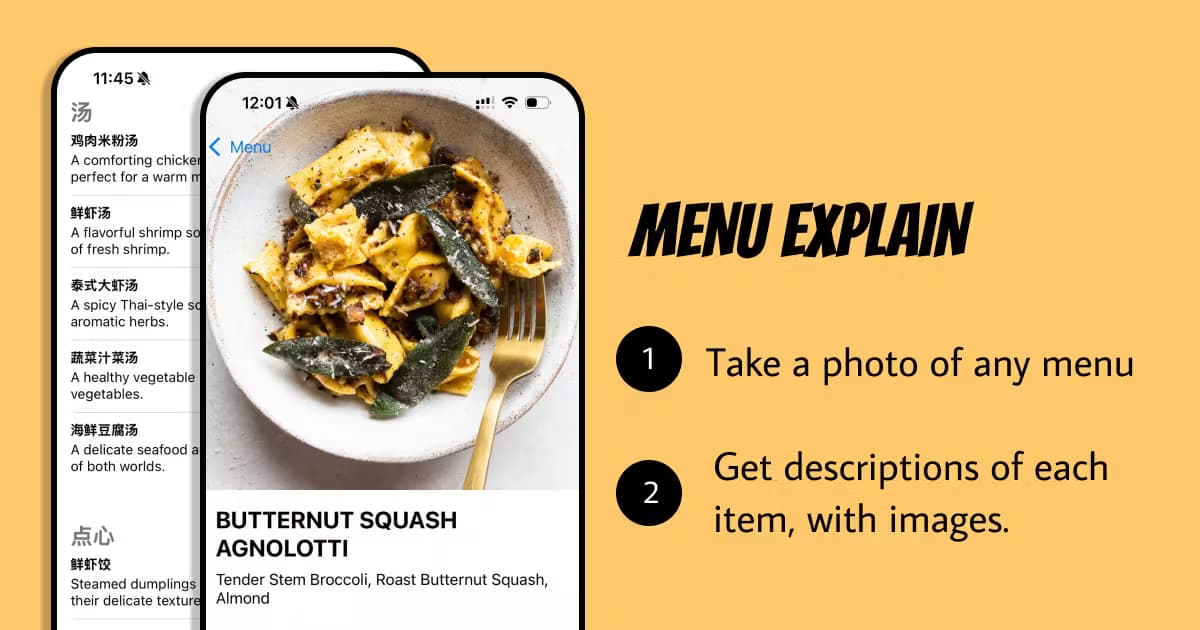
Menu Explain is an AI menu scanner app that photographs any restaurant menu and returns photos, ingredients, calories and allergen flags for each dish.
About Menu Explain
What Is Menu Explain
Menu Explain is a mobile app for travelers and anyone who eats out and wants to know what's actually on the plate. As a menu translator app, it goes further than the name suggests. Point your camera at a menu and it reads each dish, then returns a plain-language summary, a reference photo, an ingredient breakdown, a calorie estimate and allergen flags. It's built for people who'd rather not order blind.
The problem it solves is narrower than "translate a menu." A literal translation of "Spaghetti alla Nerano" still leaves you clueless. The app explains the dish itself: fried zucchini, basil and provolone in a sauce. The original name stays on screen, so you can still say it when the waiter arrives, even if you can't read a single word of the language the menu is written in. That distinction matters most in places where the menu is handwritten or chalked on a wall. This is a food translation app that explains the plate, not just the words.
There are real limits. Descriptions, photos, calories and allergen flags are informed estimates based on the dish name, and the app says so plainly, which is more honesty than most scanning apps offer. If you have a serious allergy, confirm with the restaurant staff before you order. It also won't help with a menu that's too blurry to read or a dish the model has never seen. No photo, no explanation.
Getting Started
- Download Menu Explain from the App Store. No account or setup is required.
- Set the ingredients and allergens you want flagged once, so every later scan keeps checking for them.
- Point your camera at a printed, handwritten or chalked menu and take the photo.
- Read the explanation for each dish: summary, photo, ingredients, calories and allergen warnings.
- Save the menu so you can find that dish you loved again on your next trip.
Product Information
A quick look at Menu Explain's pricing, supported platforms, and performance.
Best for
The users, tasks, and scenarios where this tool fits best.
Users
- Travelers abroad
- People with food allergies or dietary limits
- Anyone who eats out often
Tasks
- Reading a foreign-language menu
- Checking a dish before ordering
- Tracking a trip's meals
Scenarios
- First night in a new city
- A restaurant with no English menu
- Scanning a handwritten or wall menu
Key features
Scan any menu with one photo
The core interaction is a single photo. Want to scan a menu in any language? Point your camera and the app reads the whole list. It handles printed menus, handwritten ones and text chalked onto a wall, which is where plain translation apps tend to fall apart.
Photos for every dish
Each dish comes back with a reference picture, so you know roughly what's arriving before you order. This is the part that changes how you read a menu, because a name you'd normally skip past becomes something you can actually picture sitting in front of you. It sounds small. Then you try it once on a menu you can't read and stop wanting to guess.
Ingredient breakdown in plain language
Menu Explain describes what's in a dish in everyday words rather than a word-for-word gloss of its name. That's the difference between "spaghetti alla Nerano" staying a mystery and learning it's zucchini, basil and melted provolone. It's the feature that makes the app worth opening for dishes you've never heard of.
Allergen warnings you set once
You tell the app what you avoid a single time, and every scan after that flags the dishes that contain it. It's a real time-saver when you're scanning a long menu in a language you can't read. The warnings are estimates, so for a serious allergy, treat them as a prompt to ask staff, not a final answer.
Calorie estimates per dish
Every dish carries a calorie estimate, so a long lunch doesn't have to be a total mystery. The numbers are educated guesses based on the dish, not lab measurements, which is worth remembering if you're counting closely. Handy for a rough sense of a meal. Not a substitute for a scale.
Support for 30+ languages
The app reads menus in more than 30 languages and keeps the original dish name on screen. You can understand the dish and still order it in the local language, which avoids the awkward point-and-hope routine. Most travel menu scanners stop at the text. This one keeps both the explanation and the name you need to say out loud.
Saved menus
Every scan is stored, so the dish you loved in Lisbon is still there next month. This turns the app into a light travel log of the meals worth repeating, with no extra effort on your part, which is a nice bonus for anyone who travels often.
Pros and cons
Pros
- Explains dishes rather than just translating names, so you understand what you're ordering.
- Works on printed, handwritten and chalked menus.
- Free to use, with daily free scans and no account or setup.
- Allergen flags you configure once carry through every scan.
- Handles 30+ languages and keeps the original dish name for ordering.
Cons
- Photos, calories and allergen flags are estimates and can be wrong, so anyone with a serious allergy still has to confirm every flagged dish with restaurant staff before ordering.
- iOS only, so Android users are left out. iPhone or iPad running iOS 15.1 or later is required.
- No public API, so you can't wire it into another app or workflow.
- Accuracy depends on a clear, readable menu; a blurry photo won't get far.
Frequently asked questions
It scans a restaurant menu photo and returns a summary, picture, ingredients, calorie estimate and allergen flags for each dish. Think of it as explaining the dish, not just translating its name.
Related content
Explore related tools, skills, and articles for Menu Explain.
Menu Explain Alternatives

Odyssey 3
Odyssey · OtherOdyssey-3 is Odyssey's foundation world model. It simulates physics in real time, turns a prompt into an interactive environment, and adapts to robots, cars and games.

JarvisCore
Prescott Data · Coding · Productivity · OtherJarvisCore is an open source Python runtime where AI agents work as equal peers on an agent mesh, claim tasks from a shared ledger, and reach external services through a zero-trust broker.
Clef
Cloudflare · Business · OtherClef is Cloudflare's open-source decision model for Workers AI. It returns calibrated probabilities for typed questions, not generated text, so agents can classify, route, and act fast.