
MIDIGEN
MIDIGEN · Writing · Voice & Language
MIDIGEN is a free AI MIDI melody and chord generator that helps musicians and producers turn ideas into editable, royalty-free MIDI files in seconds.
About MIDIGEN
What Is MIDIGEN
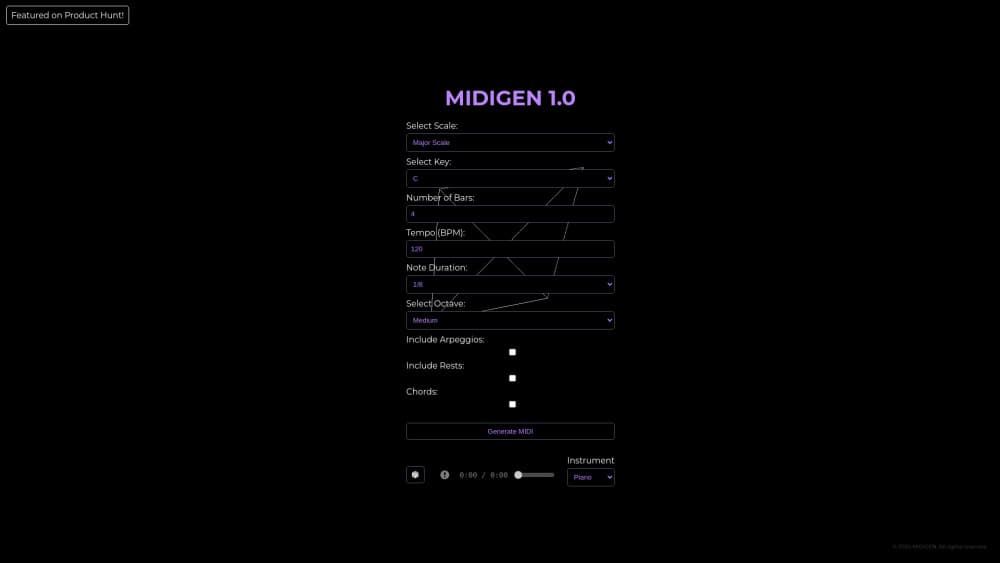
MIDIGEN is a browser-based music production tool that generates MIDI melodies and chord progressions from a set of parameters you control. It sits in the same space as other AI music generators, but it doesn't hand you audio you can only play back. Instead, it writes note data, so you can open the result in any DAW and keep working on it.
The idea is to get past the blank track problem. You pick a key, a tempo, and a complexity level, and the generator then sketches a short pattern that follows basic music theory instead of throwing random notes at you. Producers use those sketches as starting points for pop beats, and game composers use them when they need a quick melodic idea for a scene.
The main limitation is scope. MIDIGEN focuses on melody and chord progressions rather than full arrangements with drums, bass, and a finished mix, so it won't replace the rest of your production chain. If you need finished audio tracks, this won't do it. You also won't find deep MIDI parameter editing yet. The official site says more detailed rhythm control and MIDI editing are on the roadmap, but as of now those tools aren't there.
Getting Started
- Open the MIDIGEN site and click Launch. No account is required to start.
- Set the parameters for your idea: key, tempo, and complexity level.
- Generate a melody or chord progression and preview it in the browser.
- Export the result as a MIDI file, then drag it into your DAW.
- Edit the notes, swap instruments, and build the rest of the track around it.
Product Information
A quick look at MIDIGEN's pricing, supported platforms, and performance.
Best for
The users, tasks, and scenarios where this tool fits best.
Users
- Music producers
- Game composers
- Beginners learning theory
- Songwriters stuck on a hook
Tasks
- Sketching a chord progression
- Drafting a melody line
- Prototyping game music
- Teaching music theory
Scenarios
- A late-night session where nothing's coming together
- Scoring a short game level on a deadline
- A production class demo
- Sampling-free work with copyright worries
Key features
MIDI Melody Generation
The core of MIDIGEN is turning your parameters into a playable melody. You set the key, tempo, and complexity, and it writes a sequence of notes you can preview right away. Because the output is MIDI, every note stays adjustable, so a generated phrase is a draft, not a locked file.
Chord Progression Generator
Alongside melodies, MIDIGEN works as a chord progression generator. That's useful when you have a melody but no harmony, or the other way around. Pop writers tend to reach for it first, since a solid progression often carries a whole section.
Parameter Control
You're not stuck with whatever the generator decides. Key, tempo, and complexity are all adjustable before you generate. Bumping complexity up gives denser patterns; dropping it down keeps things simple and singable. It's a small set of knobs, so how much control do you actually get? Enough to steer the mood, not enough to hand-place every note.
DAW-Ready MIDI Export
Everything exports as standard MIDI, which means it opens in Logic, Ableton, FL Studio, GarageBand, and just about any sequencer. No proprietary format, no locked file. You get clean note data and full control over what happens next.
Royalty-Free Commercial Use
The site states that MIDIGEN output comes with full commercial usage rights. Since it generates original MIDI rather than sampling existing recordings, that's the whole point: you sidestep the clearance headaches that come with sample-based libraries.
No Sign-Up, No Usage Limits
You can start generating without creating an account, and the site says there are no usage limits. That keeps the barrier low for anyone who just wants to test an idea. Worth noting the free tier covers the full tool, so there's no paywall to hit mid-session.
Pros and cons
Pros
- Generates editable MIDI instead of locked audio, so you keep full control in your DAW
- No sign-up and no usage limits, which makes it easy to try quickly
- Free to use, with commercial rights included
- Works in the browser, so there's nothing to install on your machine
- Handles both melodies and chord progressions in one place
Cons
- No drum, bass, or full-arrangement generation, so it won't finish a track for you
- MIDI parameter editing is limited right now, which means fine-tuning happens in your DAW
- Browser-only access, so there's no offline or standalone app version
- Since it's AI-driven, results vary, and you'll likely regenerate a few times before something clicks
Frequently asked questions
MIDIGEN generates MIDI melodies and chord progressions for music production. Producers and composers use it to get a starting idea, then edit the notes in their own DAW.
Related content
Explore related tools, skills, and articles for MIDIGEN.
MIDIGEN Alternatives

Google EmbeddingGemma 2
Google DeepMind · Writing · Image · CodingGoogle EmbeddingGemma 2 is a 740M-parameter open model that turns text, code, images, audio, and video frames into vectors in one 768-dimension space, running on phones and laptops.

MePersona
MePersona, Inc. · Writing · Productivity · MarketingMePersona is an AI unified inbox for creators. It learns your voice, drafts replies to fan messages from 12 platforms, and sends only what you approve.

Fluence
Yay Software (Yannick Huchard) · Writing · Voice & Language · ProductivityFluence is an Android app that reads PDFs, EPUBs, Word files and web articles aloud, follows each sentence as it speaks, and answers questions about the text on the phone itself.