

Minutes: AI Meeting Note Taker
Minutes AI · Writing · Productivity
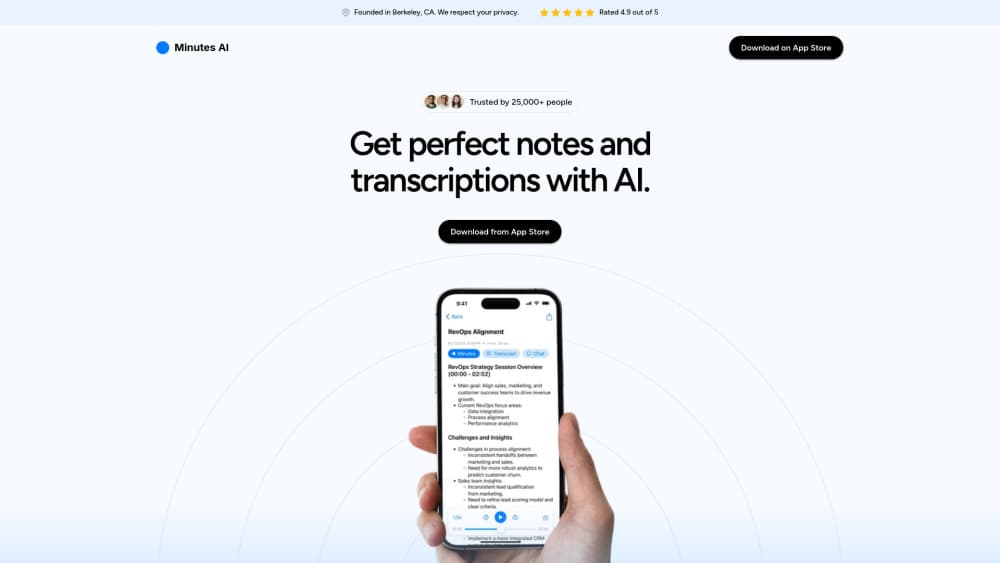
Minutes: AI Meeting Note Taker is an AI note taking app for iOS, macOS, and Android that records meetings, transcribes them, and turns the audio into formatted notes and summaries.
About Minutes: AI Meeting Note Taker
What Is Minutes: AI Meeting Note Taker
Minutes: AI Meeting Note Taker is an app that handles note taking for you. You record a meeting, a lecture, or an interview, and the app produces a word-for-word transcript along with organized notes and a summary. The team behind it works out of Berkeley, California, and says more than 750,000 people use the product. Taken together, users have pushed over 200 million minutes of audio through it.
The core promise is simple: stop splitting your attention between listening and typing. The app labels speakers in the transcript. It adds headings and bullet points on its own. And it lets you search the text for a term you remember hearing. You can also ask the recording questions in plain language, like what numbers someone referenced on a slide.
The biggest limitation is platform reach. Minutes runs on mobile and macOS, not as a full web app. A Windows-only team can't use it on a desktop. Pricing is also mostly handled through in-app purchases on the app stores, so exact tiers vary by platform. It's built for individuals and small teams more than for large enterprises that need admin controls out of the box.
Getting Started
- Download Minutes from the App Store or Google Play and create an account, or sign in on the Mac app.
- Start a recording with one click, or upload an audio file or paste a YouTube link instead of recording live.
- Optionally enter keywords (names, acronyms, uncommon terms) so the AI listens for them, and pick the transcription and summary languages.
- Let the app generate the live transcript, then review the formatted notes, key points, and speaker labels.
- Ask follow-up questions in chat, edit any errors, and export the minutes as a PDF, email, or text.
Product Information
A quick look at Minutes: AI Meeting Note Taker's pricing, supported platforms, and performance.
Best for
The users, tasks, and scenarios where this tool fits best.
Users
- Professionals in back-to-back meetings
- Students recording lectures
- People with ADHD or trouble focusing in calls
- Journalists and podcasters
Tasks
- Turning a recorded meeting into shareable minutes
- Searching audio for a specific term
- Extracting action items
- Importing an existing recording
Scenarios
- A weekly team standup you need notes for but can't type during
- A lecture or webinar you want to study later
- An interview where you need accurate quotes
- Cross-language calls
Key features
Automatic AI Notes and Summaries
Minutes doesn't just transcribe. It reads the audio and builds structured notes with headings and bullet points, pulling out what mattered. You get a document that reads closer to meeting minutes than to a raw transcript. That cuts down the editing most people do by hand.
Live Transcription With Speaker Labels
This AI transcription app records live and builds the transcript in real time. It separates speakers, so a back-and-forth conversation stays readable instead of turning into one wall of text. That matters for interviews, panels, and any call where who said what actually counts.
Chat With Your Audio
After a recording finishes, you can ask it questions. Want the stats someone cited, the list of decisions, or a quick recap? Type the question and the AI answers from the recording. It turns a long meeting into something you can query instead of rewatch.
Flexible Audio Input
Three ways in: the built-in recorder, an uploaded file, or a YouTube link. The upload path accepts mp3, mp4, mpeg, mpga, m4a, wav, and webm. Handy if you already have recordings from Voice Memos or another app and don't want to re-record. You can transcribe meetings you captured elsewhere, and you can pull the audio back into a searchable, speaker-labeled transcript without touching the original file, without starting over.
Export and Share
Turn notes into a formatted PDF, an email, or a text message and send them on. The output is designed to be shareable with little cleanup. That matters when you're sending minutes to people who weren't in the room.
Language Support and Translation
The app handles 50+ languages and lets you set transcription and summary languages separately. So you can transcribe a Spanish call and read the notes in English. Useful for multilingual teams. Accuracy varies by language and audio quality, so check the output on less common languages.
Privacy and Security
Minutes says it's SOC 2 compliant and that it won't sell your data or hand it to unrelated third parties. You can delete your data permanently at any time. For anyone recording sensitive calls, those are the commitments to check before trusting an app with the audio.
Pros and cons
Pros
- Automatic formatting saves real editing time compared to raw transcription tools.
- Speaker labels make multi-person conversations easy to follow.
- Chat feature turns long recordings into answers on demand.
- Works across iOS, macOS, and Android with a consistent workflow.
- Clear privacy stance: SOC 2 compliant with permanent data deletion.
Cons
- No dedicated web app, so Windows and Linux users on desktop are left out.
- No public API, which blocks teams that want to pipe transcripts into their own tools.
- Pricing is largely tied to app store in-app purchases, so tiers are less transparent than a plain pricing page.
- Accuracy drops with heavy accents, quiet audio, or poor microphones, so some manual cleanup is still likely.
Frequently asked questions
It records or imports audio, produces a speaker-labeled transcript, and generates formatted notes and summaries from it. You can then search the text or ask the AI questions about the recording. It brings meeting transcription and note taking into one app.
Related content
Explore related tools, skills, and articles for Minutes: AI Meeting Note Taker.
Minutes: AI Meeting Note Taker Alternatives

Google EmbeddingGemma 2
Google DeepMind · Writing · Image · CodingGoogle EmbeddingGemma 2 is a 740M-parameter open model that turns text, code, images, audio, and video frames into vectors in one 768-dimension space, running on phones and laptops.

MePersona
MePersona, Inc. · Writing · Productivity · MarketingMePersona is an AI unified inbox for creators. It learns your voice, drafts replies to fan messages from 12 platforms, and sends only what you approve.

Fluence
Yay Software (Yannick Huchard) · Writing · Voice & Language · ProductivityFluence is an Android app that reads PDFs, EPUBs, Word files and web articles aloud, follows each sentence as it speaks, and answers questions about the text on the phone itself.