
Mirai Translator
Mirai Translate, Inc. (NTT Docomo group) · Writing · Productivity
Mirai Translator is an AI translation service from Japan's Mirai Translate, part of the NTT Docomo group. It handles text, office files, and live speech, with a focus on Japanese business content.
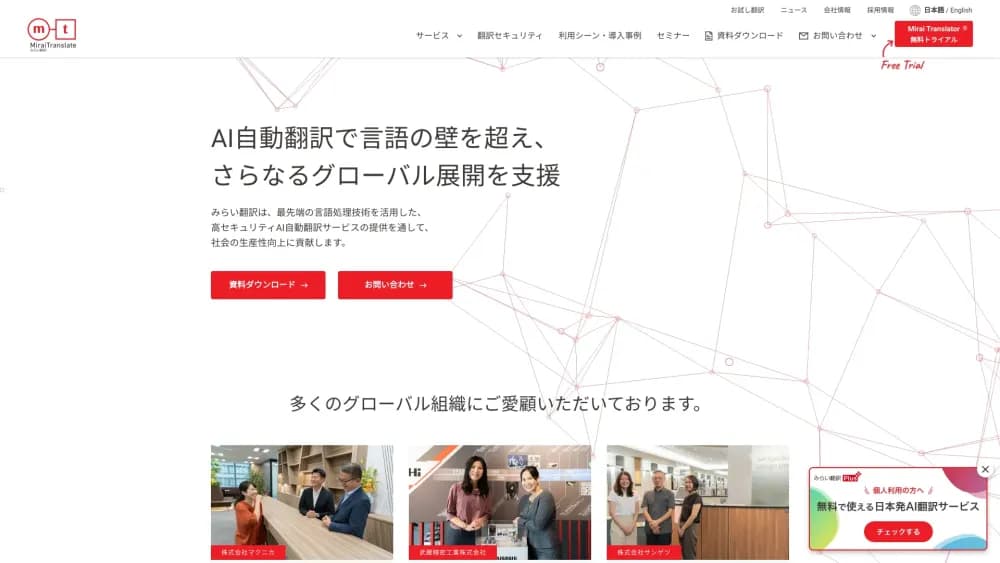
About Mirai Translator
What Is Mirai Translator
Mirai Translator is a machine translation service from Mirai Translate, Inc., a Tokyo company that sits inside the NTT Docomo group. It started as a research project with Japan's NICT institute and grew into a tool aimed at companies that need to move large amounts of Japanese content into other languages without handing the work to an outside translator.
The pitch is accuracy on business writing. Mirai Translate says its neural engine matches the reading level of a business professional with a TOEIC score of 960, and that its output improves information transfer and fluency by up to 32% over older statistical engines. It handles contracts, financial reports, and patent filings through models trained on those document types, which are the areas where a generic translator tends to slip.
The service comes in two shapes. Mirai Translate FLaT targets whole organizations with unlimited users and volume, while Mirai Translate Plus serves individuals and small teams on a per-seat plan. Security is the other selling point: translation logs are not reused, files stay on domestic servers, and the company holds ISO 27001, ISO 27017, and a SOC 2 Type 2 report.
The catch is reach. Mirai Translator's language list stops at 20 on FLaT and 14 on Plus, and its whole design favors Japanese pairings, so it is not a general substitute for a broad global translator. The patent and legal models, voice translation, and the API are paid options, and their pricing needs a sales conversation.
Getting Started
- Create an account on the Mirai Translate site and pick FLaT for a team or Plus for personal use, or try the free on-site translator before you sign up.
- Paste text into the browser box, or upload a Word, Excel, PowerPoint, PDF, or plain text file, and the translated text or file comes back.
- Register company names, product names, and specialist terms in the user dictionary, and save repeated sentences in translation memory so the wording stays consistent.
- For meetings, open the Listening Assistant to read live speech translation as people talk, or run a video file through the automatic subtitle tool.
- For software projects, request API access and connect the translation engine to your own system with dictionary and translation memory support.
Product Information
A quick look at Mirai Translator's pricing, supported platforms, and performance.
Best for
The users, tasks, and scenarios where this tool fits best.
Users
- Japanese corporate teams
- Manufacturing and export staff
- Individuals and freelancers
- Compliance and legal reviewers
Tasks
- Translating technical and legal files
- Keeping terminology consistent
- Translating live meetings
- Adding subtitles to video
- Embedding translation in a product
Scenarios
- A group-wide document push
- Cross-border engineering support
- International conferences and interviews
Key features
Neural Machine Translation Engine
The core engine is the reason people pick the service. Mirai Translate describes it as matching a business professional with a TOEIC score of 960, and says output improves information transfer and fluency by up to 32% over older statistical engines. The focus sits on business writing and economic news in Japanese pairings, which is where a general translator tends to produce stiff or wrong sentences.
File Translation With Layout Priority
You upload a Word, Excel, PowerPoint, PDF, or plain text file and get a translated file back, not a wall of text. A layout priority mode keeps the original design, figures, and charts in place, and text color and formatting carry over. The tradeoff is that text inside images is not translated in layout priority mode, so you pick the mode based on whether the design or the full text matters more.
Specialist Legal, Financial, and Patent Models
On top of the general engine, Mirai Translator offers models trained for specific document types. The legal and financial model covers contracts, regulations, earnings releases, and securities reports, while the patent model handles the long sentences and set phrasing of patent filings. These are the documents where a wrong term carries real cost, so the specialist models are the main draw for regulated industries.
User Dictionary and Translation Memory
A user dictionary lets you register company names, product names, and jargon so a fixed term is always translated the same way. Translation memory stores sentences you have translated before and reuses them, which fits boilerplate email and manual text. Together they keep a large organization from drifting into several versions of the same phrase.
Real-Time Voice and Video Translation
The Listening Assistant translates meeting speech as it happens, for both online and in-person sessions, and it can auto-generate a file for meeting minutes. Chunk-style display breaks the translation into readable blocks so you can follow the speaker and their slides at the same time. A separate tool adds translated subtitles to video files.
Translation API for Developers
The API connects the same engine to your own systems, with per-character pricing that gets cheaper at higher monthly volumes. It supports the dictionaries and translation memory, plus an option for file translation that returns translated office documents. Support staff guide the setup, which is aimed at security-conscious development teams rather than casual builders.
Security and Compliance
Mirai Translator runs on domestic servers, deletes input text after processing, and states that it does not reuse translation data. It holds ISO 27001 and ISO 27017, and in late 2025 added a SOC 2 Type 2 report. For banks, drug makers, and government bodies, that combination of certifications is often what clears the tool for internal use.
Pros and cons
Pros
- Japanese business translation quality is strong, which is the main reason companies choose it over a general global tool.
- File translation keeps the original layout, so you skip rebuilding tables and formatting after every document.
- User dictionaries and translation memory keep terminology consistent across a large team and a long project.
- Domestic servers, no reuse of translation data, and ISO and SOC 2 certifications suit regulated industries.
- The API and the voice and video tools let one vendor cover text, files, meetings, and embedded use.
Cons
- Language coverage stops at 20 on FLaT and 14 on Plus, so teams working in less common languages still need a second tool.
- Pricing for the enterprise plans and the specialist models is quote-based, which makes it hard to estimate cost before you talk to sales.
- The layout priority mode leaves text inside images untranslated, so design-heavy PDFs may need manual clean-up.
- Voice translation runs as its own paid option at a separate monthly rate, so it is not included with the basic plans.
Frequently asked questions
Mirai Translator translates text, office files, live speech, and video subtitles between languages, with a focus on Japanese business documents. Companies use it for contracts, specs, manuals, meetings, and product content that needs to reach another language.
Related content
Explore related tools, skills, and articles for Mirai Translator.
Mirai Translator Alternatives

Google EmbeddingGemma 2
Google DeepMind · Writing · Image · CodingGoogle EmbeddingGemma 2 is a 740M-parameter open model that turns text, code, images, audio, and video frames into vectors in one 768-dimension space, running on phones and laptops.

MePersona
MePersona, Inc. · Writing · Productivity · MarketingMePersona is an AI unified inbox for creators. It learns your voice, drafts replies to fan messages from 12 platforms, and sends only what you approve.

Fluence
Yay Software (Yannick Huchard) · Writing · Voice & Language · ProductivityFluence is an Android app that reads PDFs, EPUBs, Word files and web articles aloud, follows each sentence as it speaks, and answers questions about the text on the phone itself.