

Modeinspect
Modeinspect · Coding · Productivity
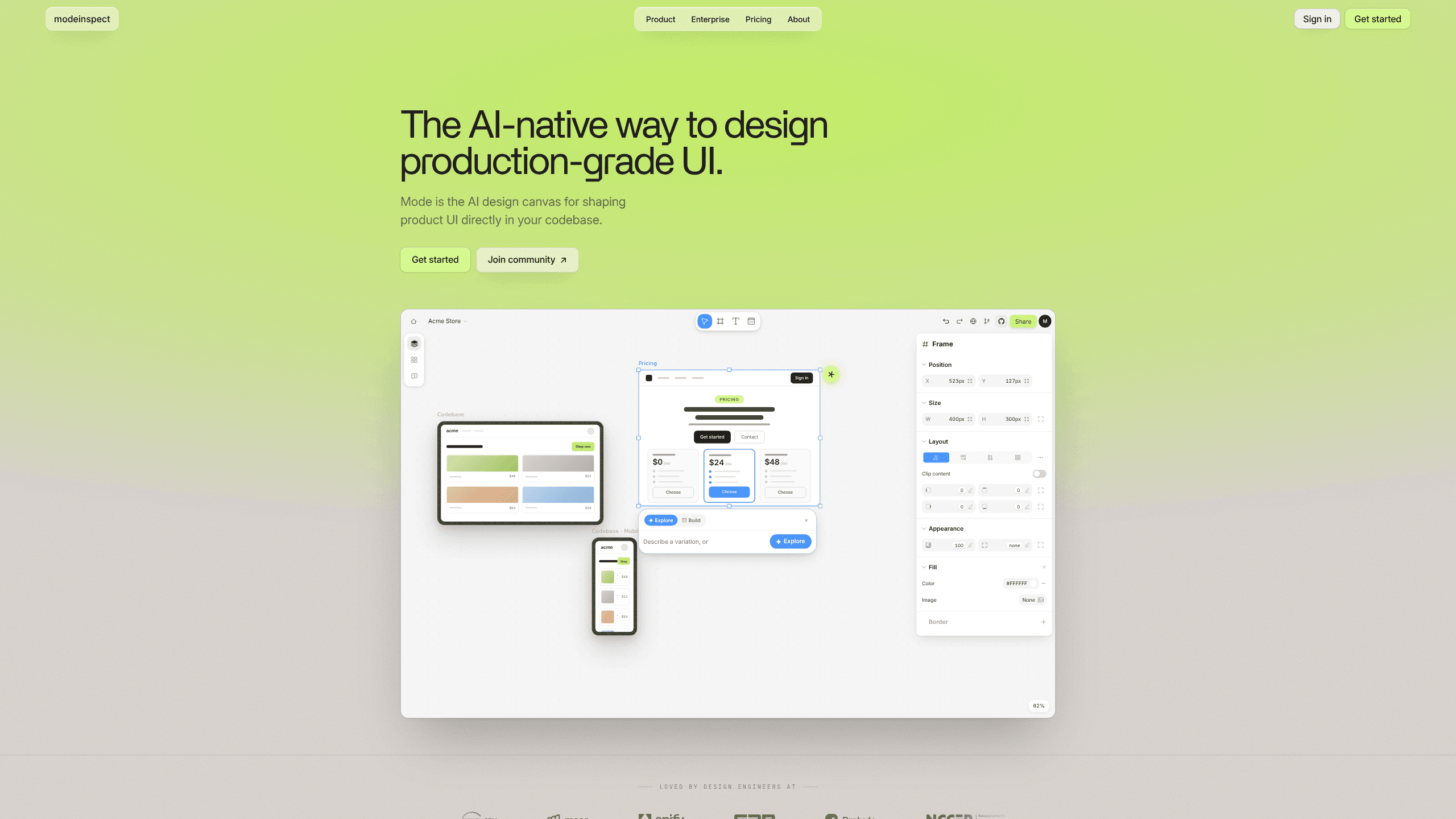
Modeinspect is an AI design canvas that lets teams shape production-grade product UI directly inside their codebase. Instead of drawing throwaway mockups, you drop in the real components your app ships, work against your actual design tokens, and see how every screen behaves with live data. It's built for design engineers, the people who sit between design and front-end work.
About Modeinspect
What Is Modeinspect
Modeinspect is a browser-based design platform aimed at product teams who want their design work to match what actually ships. The core idea is simple. Your design canvas should sit on top of the real product, not beside it. You bring your repo. The tool turns your components and styles into editable canvas frames.
That matters because most design tools force a handoff, where a designer draws a screen, a developer rebuilds it with real components, and the two drift apart the moment either side changes. Modeinspect skips that gap by making the real component the thing you design with. It's a simple swap with a big effect. No more rebuilding. No more drift.
The biggest limit is that it's a committed workflow. You need a codebase with reusable components and a token system to get value from it. A solo maker sketching a landing page won't need any of this. Teams already working with a design system will, and that's exactly who it's built for. There's no Google Play app here, by the way. It's a web product.
Getting Started
- Sign up and connect your repository so Modeinspect can read your components, styles, and design tokens.
- Open a new canvas and drag in real components at 1:1 from your library, keeping every variant and state intact.
- Adjust layout, spacing, and color with visual controls, and let the token system keep everything on-brand automatically.
- Wire your screens to live data and test different states before you commit anything.
- Share the canvas with your team or hand off the design as merge-ready code for review.
Product Information
A quick look at Modeinspect's pricing, supported platforms, and performance.
Best for
The users, tasks, and scenarios where this tool fits best.
Users
- Design engineers
- Product teams with a design system
- Front-end developers shipping UI
Tasks
- Prototyping new screens
- Design QA and state testing
- Exploring layout changes
Scenarios
- Tightening the design-to-dev loop when a redesign keeps drifting from the built product.
- Onboarding a new feature area where designers and engineers need to agree on the same components.
- Auditing UI consistency across screens when you suspect the shipped product has quietly wandered off-system.
Key features
Design on a Real Canvas
Modeinspect gives you the freedom of a familiar design tool but anchors it to your actual product. Frames show your components, your styles, and your screens, so nothing you place is a redrawn look-alike. For teams tired of mockups that slowly stop matching reality, that's the whole point. It's a small shift in where you design, but it changes what the design is worth once it's done.
Components at 1:1
You drop in the actual components your app ships, and every variant and state comes with them. A button with a loading state, a disabled dropdown, a filled form field: they behave exactly as they do in production, which means a design review shows you the real thing instead of a hopeful approximation. Redrawing stops being necessary, so drift stops being a slow, invisible problem. That's the draw. Nothing gets redrawn, so nothing wanders.
Enforced Design Tokens
Every color, spacing value, and text style comes straight from your token library, so anything you place on the canvas lands on-brand without a designer having to remember the rules or a reviewer having to catch every stray hex code. Off-system values simply aren't on the menu. So who actually benefits? Anyone who's chased a rogue padding value across ten screens.
AI Prototyping
Modeinspect pushes AI-assisted prototyping as a headline use case. You experiment with layout and structure on the canvas, then let the tool move those choices toward code. The page framing puts it as AI prototyping rather than a full automated build, so treat it as a faster first draft, not a replacement for a developer's judgment. Use it to get somewhere faster. Then let a human finish the job.
Design-to-Code Output
The pitch is merge-ready code rather than a spec a developer has to reinterpret. You work from Figma, a screenshot, or the canvas, then ship something closer to a pull request. That cuts the translation step where intent usually gets lost. It's not magic. Complex logic still needs a human. But the mechanical parts get handled.
Design QA
The design QA angle targets a real headache: catching UI problems before release instead of after, when a broken layout has already reached customers and someone has to write the apology. You load screens with live data and check how they hold up across states and edge cases. Finding a broken empty state on the canvas beats finding it in production. Ask anyone who's shipped a blank error screen on a Friday.
Developer Experience
A separate developer experience focus signals that Modeinspect isn't only for the design side. Engineers get a workflow that speaks their language, with real repo components and tokens rather than a vector file they have to reverse-engineer. The gap between "design approved" and "code merged" gets shorter, and that's the gap where most friction actually lives.
Enterprise Controls
The enterprise tier covers the boring-but-necessary stuff: SOC 2 compliance, SSO, and SCIM for account provisioning. Larger organizations worried about access management and audit trails get a path to adopt it without security pushback. Those controls matter more than any canvas feature once a company passes a certain size. No security team, no rollout. It's that simple.
Pros and cons
Pros
- Designs with your real components and states, so there's no gap between canvas and shipped product.
- Token enforcement keeps every screen on-brand without manual checking.
- The design-to-code path cuts the handoff step that usually loses intent.
- Design QA with live data catches state problems before release.
- Enterprise-grade controls (SOC 2, SSO, SCIM) make it viable for larger teams.
Cons
- The value depends on having a componentized codebase and a token system, so teams without either get little out of it.
- It's a web-only product, which won't help anyone hoping for a mobile companion app.
- Pricing beyond the free tier isn't listed publicly, so you have to talk to sales before you can budget.
- It targets design engineers, and designers who don't read code may find the codebase-first model foreign.
Frequently asked questions
It's an AI design canvas for shaping production-grade product UI inside your codebase. You design with real components, tokens, and live data, then hand off merge-ready code. It's aimed at design engineers and product teams rather than casual designers.
Related content
Explore related tools, skills, and articles for Modeinspect.
Modeinspect Alternatives
Forefront
Forefront · CodingForefront is a web platform for building with open-source AI. It lets you fine-tune leading open-source language models on your own data, evaluate how they perform, and run them through an API or export them to host yourself. Developers who want the convenience of a closed-source platform but insist on owning their models and data are the target audience here.

Startkit
StartKit.AI · CodingStartkit is a boilerplate for building AI SaaS and AI wrapper products. Think of it as an AI startup boilerplate with the boring parts already wired up: authentication, Stripe and Lemon Squeezy payments, usage limits, transactional email, and an AI API starter that talks to OpenAI, Anthropic, Groq, or Llama. You clone the repo, set your price, and start on the part of your product that people actually pay for. It's Next.js under React and Tailwind, so most of the boilerplate code already feels familiar.
Testim
Tricentis · CodingTestim is an AI-powered test automation platform for building and running end-to-end tests across web, mobile, and Salesforce applications. It leans on machine learning to keep tests stable when an interface changes, so teams spend less time fixing broken selectors. Not bad for an automated testing tool you can start using today. You create tests by recording actions in a browser, then optionally add JavaScript when you need more control. It's a solid pick for busy QA teams.