

Monogram AI
Monogram · Coding · Productivity
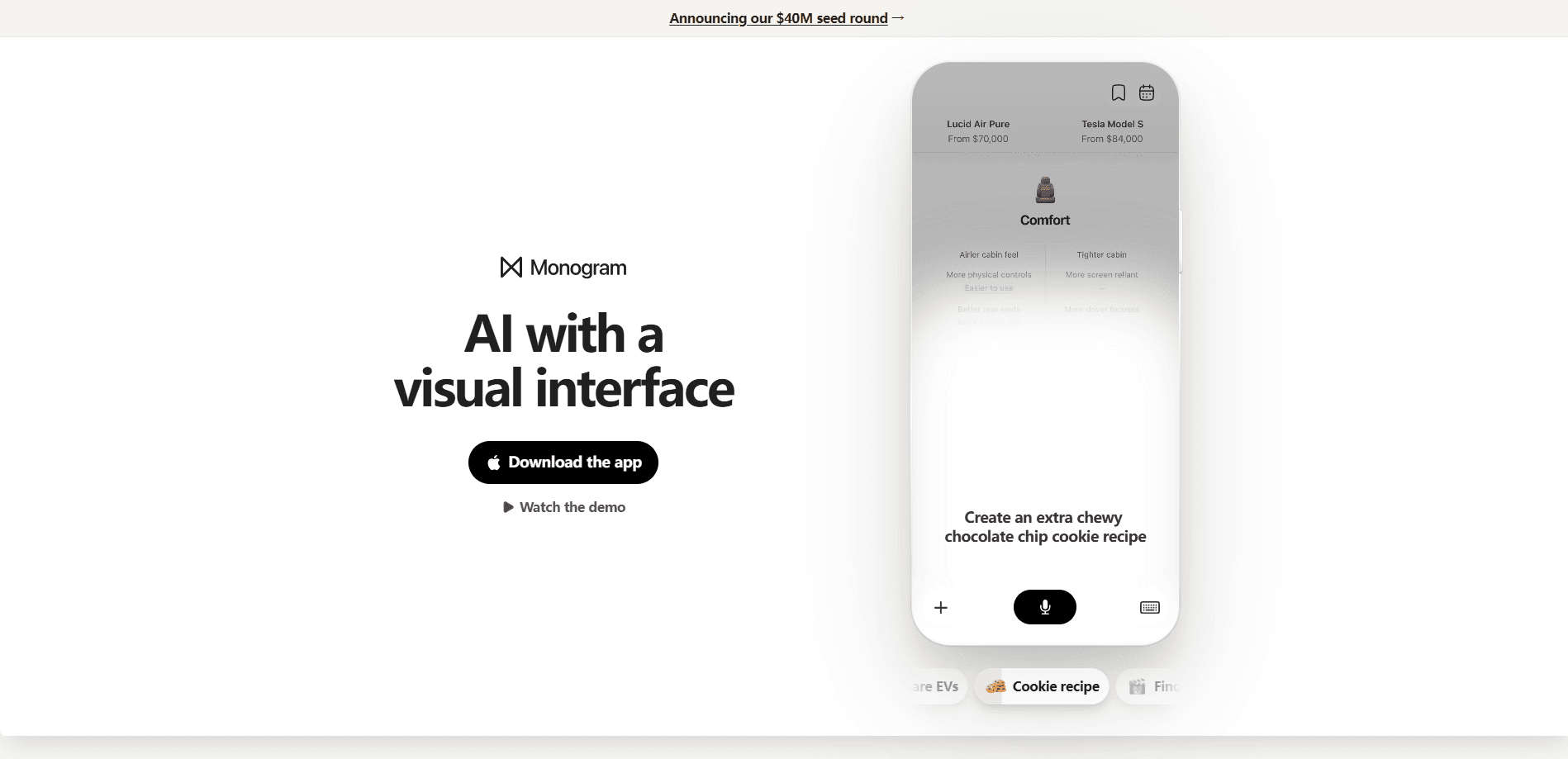
Monogram AI is a general-purpose AI app for iPhone that answers your questions by building a small, interactive interface on the spot instead of dumping a wall of text. It's AI with a visual interface, not another chat box. Ask about dinner, a trip, or something to watch, and the app generates visuals, lists, and tappable options you can actually use. It's built for everyday decisions, not coding or research.
About Monogram AI
What Is Monogram AI
Monogram AI is an AI assistant from Monogram, a company founded by Eren Bali, Edouard Tabet, and Murat Akbal, the team behind Carbon Health and Udemy. The app's whole pitch is that chat is a clumsy way to talk to AI. That's the core idea. Rather than reply with paragraphs, Monogram generates an entire user interface in a few seconds, tailored to whatever you asked. The company raised a $40M seed round led by DST Global Partners and Lux Capital to build exactly this.
The idea it's betting on is familiar if you remember the jump from typing commands to clicking through a screen. Monogram wants the same leap for AI, where you point, tap, and browse instead of rephrasing prompts until something clicks.
The biggest catch is availability. Monogram AI ships as an iOS app, so Android users are out of luck for now. No Android. There's also no published API, and the team hasn't spelled out a detailed usage cap, which matters if you plan to lean on it heavily. That's a real limit.
Getting Started
- Open the App Store on your iPhone and search for Monogram AI, then install the app.
- Launch it and create an account or sign in with the option it offers.
- Type a normal question, like what to cook tonight or where to go for a weekend trip.
- Read the visual response and tap the elements inside it to refine the result.
- Save or share whatever the interface produces, or ask a follow-up in the same thread.
Product Information
A quick look at Monogram AI's pricing, supported platforms, and performance.
Best for
The users, tasks, and scenarios where this tool fits best.
Users
- iPhone owners who find regular AI chat clunky and want something faster to scan
- Casual users planning meals, trips, or weekend plans on the couch
- People who think in pictures and lists rather than long paragraphs of text
Tasks
- Deciding what to watch or cook with a few taps instead of a dozen follow-up prompts
- Sketching a rough travel plan you can adjust as you go
- Getting a quick visual comparison of options when you haven't made up your mind
Scenarios
- Killing time on a flight with no clear question in mind yet
- Comparing a few product options before you commit to buying
- Working out a simple plan when you don't feel like opening a laptop
Key features
Visual, interactive responses
This is the reason Monogram AI exists. Instead of returning text, it generates a small interface built around your question, complete with cards, lists, and buttons you can tap. A question about dinner might come back as a handful of recipe options you can flip through, not a paragraph you have to parse. Big difference.
On-the-fly interface generation
The app builds each interface in seconds, and it builds a different one every time depending on what you ask. That means you're not stuck with a fixed set of screens or templates. The layout can shift from prompt to prompt. So it never feels quite the same twice.
Everyday question answering
Monogram AI is tuned for things you'd actually ask during a normal day: what to watch, what to make, where to go. It's general-purpose, so it handles plenty of other questions too, but the visual format pays off most on open-ended choices where you want options rather than one answer. That's where it earns its keep.
Tappable refinement
You don't have to rewrite your prompt to narrow things down. Tap what looks closest and the app adjusts from there, which cuts down on the back-and-forth that makes text chat tiring. For anyone who's spent ten minutes coaxing a decent answer out of a chatbot, this is a real change. Feels different.
Built for the phone
Monogram AI is designed for iPhone first, with screens meant to be tapped and scrolled rather than typed into. That fits how most people actually use their phones. I'll be honest about the flip side: there's no Android version, so your phone decides whether you can try it at all. Simple as that. No Android, no app.
Pros and cons
Pros
- Answers arrive as a visual interface you can tap, not a wall of text
- Interface is generated fresh for each question in seconds
- Well suited to everyday picks like food, trips, and things to watch
- Refining an answer takes taps rather than rewritten prompts
- Backed by an experienced founding team and a $40M seed round
Cons
- iOS only, so Android users can't install it
- No public API, which rules out builders adding it to their own apps
- No detailed free-tier or usage limits published, so heavy users can't plan around caps
Frequently asked questions
It's a general-purpose AI assistant that answers your questions by generating a visual, interactive interface instead of a block of text. You ask something, and it returns a small screen with cards, lists, and tappable options built for that specific question.
Related content
Explore related tools, skills, and articles for Monogram AI.
Monogram AI Alternatives
Forefront
Forefront · CodingForefront is a web platform for building with open-source AI. It lets you fine-tune leading open-source language models on your own data, evaluate how they perform, and run them through an API or export them to host yourself. Developers who want the convenience of a closed-source platform but insist on owning their models and data are the target audience here.

Startkit
StartKit.AI · CodingStartkit is a boilerplate for building AI SaaS and AI wrapper products. Think of it as an AI startup boilerplate with the boring parts already wired up: authentication, Stripe and Lemon Squeezy payments, usage limits, transactional email, and an AI API starter that talks to OpenAI, Anthropic, Groq, or Llama. You clone the repo, set your price, and start on the part of your product that people actually pay for. It's Next.js under React and Tailwind, so most of the boilerplate code already feels familiar.
Testim
Tricentis · CodingTestim is an AI-powered test automation platform for building and running end-to-end tests across web, mobile, and Salesforce applications. It leans on machine learning to keep tests stable when an interface changes, so teams spend less time fixing broken selectors. Not bad for an automated testing tool you can start using today. You create tests by recording actions in a browser, then optionally add JavaScript when you need more control. It's a solid pick for busy QA teams.