
Morph: Apply AI edits to files FAST
Morph (MorphLLM) · Coding
Morph is a model API for coding agents. Its Fast Apply model merges AI-generated code edits into existing files at 10,500 tokens per second with 98% accuracy over one OpenAI-compatible API.
About Morph: Apply AI edits to files FAST
What Is Morph
Morph is the model API layer for coding agents. It runs fast general models for the main agent loop, then adds specialized models for the sub-tasks general models do slower and pricier: applying edits, searching code, compacting context, and classifying agent behavior. The one this page covers is Fast Apply, the model that takes an AI edit and writes it into a real file.
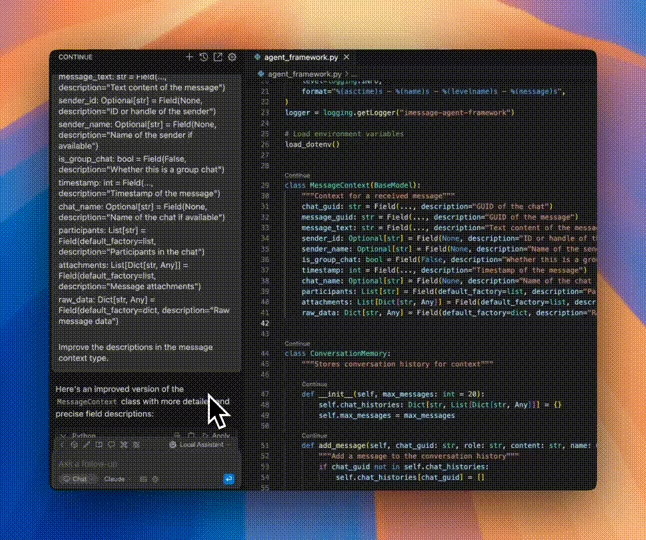
The problem it solves is narrow and constant. Coding agents produce edits as fragments, not full files, and merging those fragments back is where a lot of time and tokens go. Rewriting an entire file to change a few lines is wasteful. Unified diffs break on fuzzy context, and search-and-replace falls over on whitespace or quote differences. Fast Apply takes a minimal snippet and merges it into the original file, so the agent never has to reproduce the whole thing.
Two things are worth knowing before you commit. Fast Apply only helps if your agent outputs partial edits with the right markers. If your agent still rewrites whole files, there is nothing for the model to merge until you change its prompt. And this is a developer API, not an app you download. You wire it into a coding agent, an editor, or a CI pipeline.
Getting Started
- Sign up and grab an API key from the Morph dashboard
- Install the SDK, either
@morphllm/morphsdkfor TypeScript or the OpenAI-compatible client for Python - Point your OpenAI client at
https://api.morphllm.com/v1and pass the model string, likemorph-v3-fast - Send the original file inside
<code>tags and the edited lines inside<update>tags, then write the merged result back to disk
You can also skip the wiring and run npx -y @morphllm/morph-setup, which adds an edit tool and code search to Claude Code, Cursor, Codex and VS Code in one command.
Product Information
A quick look at Morph: Apply AI edits to files FAST's pricing, supported platforms, and performance.
Best for
The users, tasks, and scenarios where this tool fits best.
Users
- Developers building coding agents
- Teams running agent workflows in production
- Editor and IDE plugin authors
- Small teams and solo builders
Tasks
- Applying AI edits to existing files
- Streaming edits into a live file
- Multi-hunk edits in one call
- Replacing brittle edit pipelines
Scenarios
- An agent fixes a bug in a 500-line file
- A coding assistant edits code on every turn
- A CI or automation pipeline patches files
- A solo developer prototyping an agent
Key features
Apply Edits at 10,500 Tokens per Second
Fast Apply merges an AI edit into a file at 10,500 tokens per second, with 98% accuracy. The speed comes from a small model trained end to end for one job, served on a custom inference engine with hand-written GPU kernels, not a general-purpose endpoint. The result is sub-second latency on typical files, which matters when an agent edits code many times in a session. For higher-accuracy batch work, morph-v3-large trades speed for precision.
Lazy Edit Snippets With Merge Markers
The model works from a lazy edit, which is just the changed lines wrapped in // ... existing code ... markers. The agent sends only what it changes, and Fast Apply returns the complete merged file. For LLM code edits that land as fragments, that means the merge happens in one call instead of a client-side patch routine. This cuts token use by roughly 40% against a full-file rewrite, because nobody pays for the unchanged lines twice. The one catch is that missing markers read as deletions, so your agent prompt has to teach the format.
OpenAI-Compatible API and SDKs
Everything runs through one OpenAI-compatible endpoint at https://api.morphllm.com/v1. Existing OpenAI code only needs a new base URL and model string. Morph ships a TypeScript SDK, @morphllm/morphsdk, and Python users run the standard OpenAI client. The SDK also has ready-made edit tools for Anthropic, OpenAI and the Vercel AI SDK, so you can drop Fast Apply behind an edit_file tool call without writing the glue yourself.
One-Command MCP Setup
Morph ships an MCP server that adds an edit tool and codebase search to your editor. A single command, npx -y @morphllm/morph-setup, auto-detects Claude Code, Cursor, Codex and VS Code and configures them all. That path is for people who want the speed-up without building an agent from scratch. Per-client setup guides and prompt templates cover the rest.
Free Tier and Usage-Based Pricing
The free tier covers 200 requests a month, which is enough to test Fast Apply on real work before you pay. Past that, pricing is per token with no per-seat fees: morph-v3-fast runs $0.80 per million input tokens and $1.20 per million output tokens. Subscription plans start at $20 a month for 2M credits and scale to $400 a month for 80M credits on the team tier.
Self-Hosting and Enterprise Options
Morph offers self-hosted and air-gapped deployments for teams that cannot send code to a hosted API. Enterprise Apply adds custom model configurations, and the business side covers SOC 2 Type II, GDPR and data residency. For companies with a security review to pass before any code leaves the building, that path is the one that matters.
Works Across Languages and File Types
Fast Apply handles text code in any language, whether that is TypeScript, Python, SQL or a config file, because it works on the file's text rather than a language-specific parser. It is built for single files and multi-hunk edits within them. Binary files, minified JavaScript and non-text content are out of scope, and single-character edits are cheaper to do client-side.
Pros and cons
Pros
- 10,500 tok/s and 98% accuracy on the main model, so file edits stay fast inside an agent loop
- Cuts token use by about 40% versus a full-file rewrite, which lowers cost on token-heavy runs
- OpenAI-compatible API means existing code needs a new base URL and model string, nothing more
- One-command MCP setup wires Fast Apply into Claude Code, Cursor, Codex and VS Code
- A 200-request free tier and per-token pricing with no per-seat fee make it cheap to try
Cons
- It only works if your agent emits partial edits with `// ... existing code ...` markers, so a prompt change comes first
- It is a developer API, not a standalone app, so non-coders get little use out of it
- Binary files, minified JavaScript and non-text content are not supported, and single-character edits are a poor fit
- The hosted API sends your code to Morph's servers, so teams with strict rules need the self-hosted path
Frequently asked questions
Fast Apply merges AI-generated code edits into existing files. You send the original file and a minimal edit snippet, and the model returns the complete merged file. It is built for coding agents that produce partial edits and need them written into real files without a full rewrite.
Related content
Explore related tools, skills, and articles for Morph: Apply AI edits to files FAST.
Morph: Apply AI edits to files FAST Alternatives

Base Code
Base44 (Wix) · Coding · ProductivityBase Code is a shared cloud development environment from Base44. Teammates describe changes to an existing GitHub codebase in chat, preview them live and send them back as pull requests.

Google EmbeddingGemma 2
Google DeepMind · Writing · Image · CodingGoogle EmbeddingGemma 2 is a 740M-parameter open model that turns text, code, images, audio, and video frames into vectors in one 768-dimension space, running on phones and laptops.

GitGlow
GitGlow · Coding · ProductivityGitGlow is a local-first desktop Git client that lets independent developers review their own code and their AI agents' changes in one place before shipping.