

MovieWiser
MIGUEL SANTAOLALLA GARNA · Other
MovieWiser is an AI movie and series recommender for iPhone, iPad, and Mac. Tell it what you like and it suggests films and shows, keeps a favorites list, and points you to related titles.
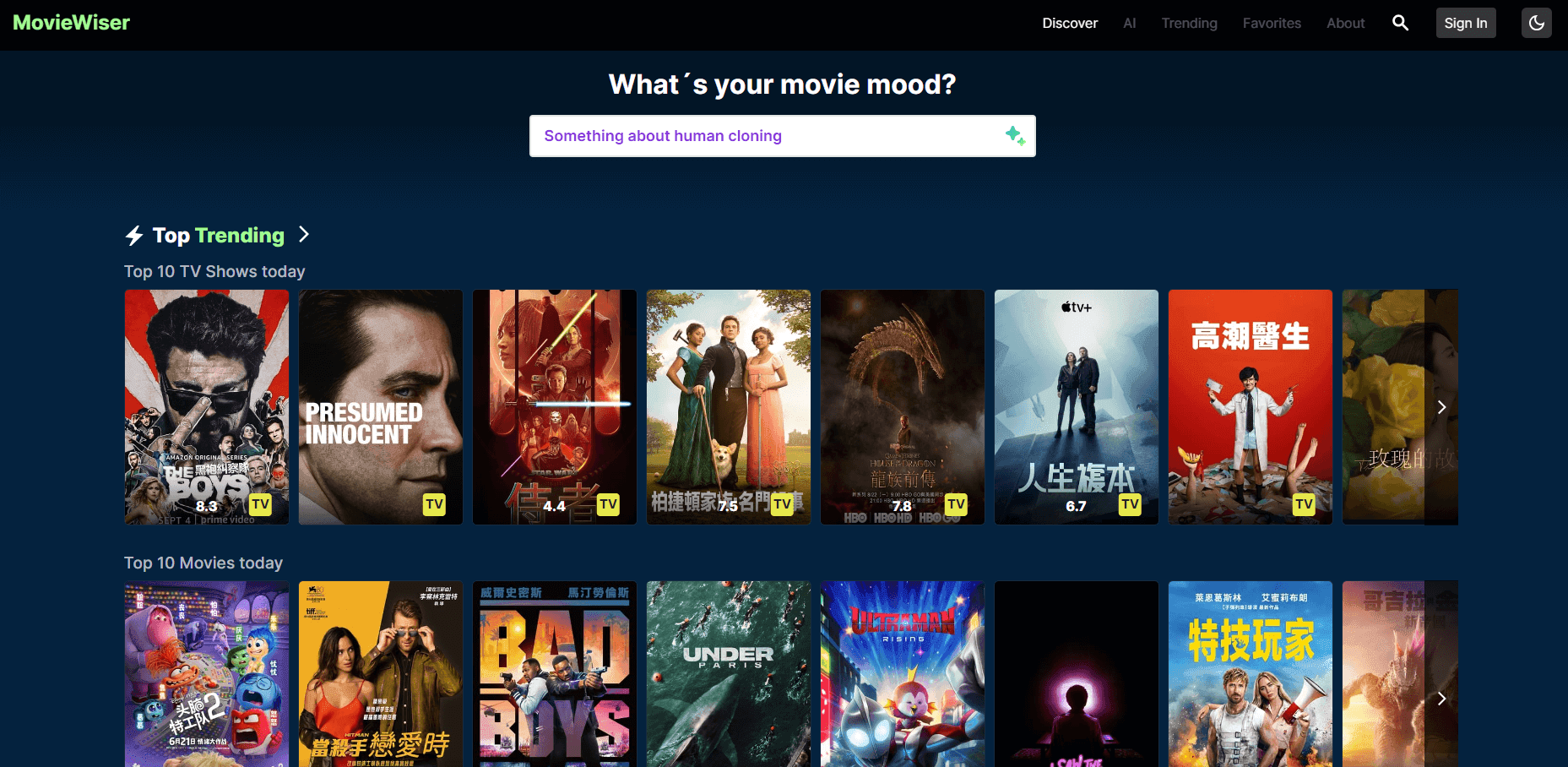
About MovieWiser
What Is MovieWiser
MovieWiser is a free app that uses AI to recommend movies and TV series. You set up an account, tell it what you enjoy, and it serves up suggestions instead of leaving you to scroll a streaming catalog with nothing loaded. It also acts as a light organizer: you save favorites and browse related titles the app pulls together for you.
The app targets the moment when you know you want to watch something but have no idea what. Rather than a fixed chart of "top 10 this week," it leans on your own taste to narrow the field. The recommendations come from an AI layer the developer describes as an aggregator and recommender, which means it blends titles from across sources rather than tracking a single streaming service.
The limits are worth knowing up front. It runs only on Apple devices, with no Android or web version. The store listing keeps to a short pitch, so features beyond recommendations, favorites, and related content aren't spelled out in depth. And the deeper you drift from mainstream English-language titles, the less you can assume it has your niche covered. For a free iPhone app that answers "what should I watch," it does the job without clutter.
Getting Started
- Download MovieWiser from the App Store. It's free, and the download is small, so it installs in seconds.
- Create an account or sign in with Google directly from the iOS app.
- Tell the app what you like, either as you go or through the recommendations you accept and skip.
- Browse the AI picks, save the ones that look right to your favorites, and open related titles when you want a nearby suggestion.
- Turn on push notifications if you want alerts when something on your watchlist changes.
Product Information
A quick look at MovieWiser's pricing, supported platforms, and performance.
Best for
The users, tasks, and scenarios where this tool fits best.
Users
- Casual viewers who stall on the "what do I watch tonight" question
- People building a watchlist
- Movie and series fans who like discovering adjacent titles
Tasks
- Deciding what to watch on a quiet evening
- Keeping track of films and shows you mean to get to
- Finding a film similar to one you just finished
- Testing a recommendation app before paying
Scenarios
- A movie night where nobody can agree
- A long flight or commute
- Building a habit of logging what you watch
Key features
AI Recommendations
The core of the app is an AI layer that turns your taste into personalized film picks. Instead of a static popularity chart, it leans on the signals you give it, so the AI TV show recommendations and movie suggestions reflect what you actually watch. The more you accept or skip titles and mark favorites, the sharper they get.
Movie and Series Aggregation
MovieWiser pulls titles together from more than one place, so it can point you toward a film or show regardless of which service happens to carry it. That matters when the thing you want isn't on the one streaming app you happen to have open.
Favorites and Watchlist
Saving a title to favorites keeps your shortlist in one spot. It doubles as a light tracker: the list is a running record of what you meant to watch, and it's the part of the app you come back to most between viewing sessions.
Related Content Suggestions
From a title you already like, MovieWiser suggests others in the same neighborhood. It's a faster way to dig than starting from a blank search box, and it suits the way most people actually browse for something new.
Push Notifications for Watchlist Updates
Turn on notifications and the app pings you when something on your watchlist changes. For a series you're following or a film you're waiting on, that saves you from checking manually.
Google Sign-In
You can sign in with a Google account straight from the iOS app, on top of the app's own account flow. It cuts the setup down to a couple of taps when you'd rather not create yet another password.
Pros and cons
Pros
- It's free, with no in-app purchase to unlock the recommendations, so there's no cost to try it properly.
- The download is under a few megabytes, so it installs quickly even on a phone that's tight on space.
- Favorites and related-content browsing make it more than a one-trick recommender.
- A single Apple ID covers iPhone, iPad, Mac, and Vision Pro, so the same account follows you across devices.
Cons
- There's no Android app or web version, so anyone not on an Apple device is locked out entirely.
- The store listing is thin on details. Features beyond recommendations, favorites, and related content aren't clearly documented, so you learn the app by using it.
- It's a discovery tool, not a streaming service. It tells you what to watch, not where to press play on the movie itself.
- With no pricing page and no stated API, it's hard to gauge whether a paid tier or integrations are coming.
Frequently asked questions
MovieWiser recommends movies and TV series based on your taste. You browse AI suggestions, save titles to favorites, and open related titles when you want something similar. It's built to answer the "what should I watch" question faster than scrolling.
Related content
Explore related tools, skills, and articles for MovieWiser.
MovieWiser Alternatives

Odyssey 3
Odyssey · OtherOdyssey-3 is Odyssey's foundation world model. It simulates physics in real time, turns a prompt into an interactive environment, and adapts to robots, cars and games.

JarvisCore
Prescott Data · Coding · Productivity · OtherJarvisCore is an open source Python runtime where AI agents work as equal peers on an agent mesh, claim tasks from a shared ledger, and reach external services through a zero-trust broker.
Clef
Cloudflare · Business · OtherClef is Cloudflare's open-source decision model for Workers AI. It returns calibrated probabilities for typed questions, not generated text, so agents can classify, route, and act fast.