
Microsoft Text-to-Speech Downloader
Independent developer (microsoft-tts-downloader.com) · Voice & Language
Microsoft Text-to-Speech Downloader is a free browser tool that turns text into speech with Microsoft's neural voices and saves the audio as a file in a click.
About Microsoft Text-to-Speech Downloader
What Is Microsoft Text-to-Speech Downloader
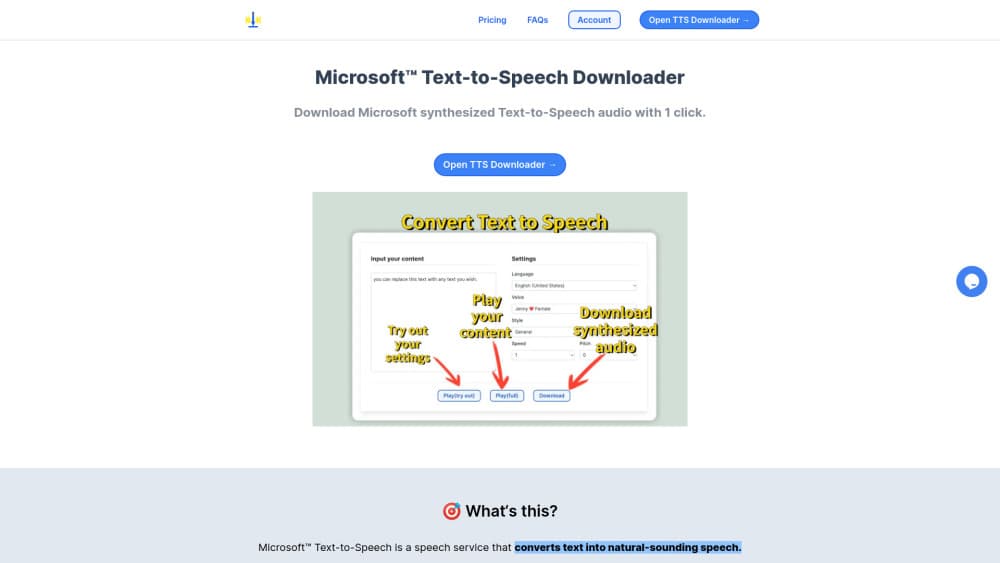
Microsoft Text-to-Speech Downloader is a web page that sends your text to Microsoft's speech service and hands back the spoken result as an audio file. You paste a script, choose a language and a voice, then hit play or download. Nothing gets installed, and there's no account to create.
The tool exists because Microsoft's own demo lives inside Azure. Using it the official way means a subscription, a speech resource, an API key and a region. Most people who want a voiceover file for a video don't need any of that overhead. This TTS tool strips it down to a free text to speech online form with three dropdowns.
Two limits are worth knowing before you rely on it. The project is unofficial, so a change on Microsoft's side can break it overnight with no support channel to call. It also handles one block of text at a time, which turns a long document into repetitive work.
Getting Started
- Open the site in a modern browser and paste your script into the input box.
- Pick the language first, since the voice list reloads around your choice.
- Select a voice, then adjust style, speed and pitch where that voice supports them.
- Press play and check how it handles names, numbers and abbreviations.
- Download the audio and rename the file before it disappears into your downloads folder.
Product Information
A quick look at Microsoft Text-to-Speech Downloader's pricing, supported platforms, and performance.
Best for
The users, tasks, and scenarios where this tool fits best.
Users
- Video creators
- Teachers and trainers
- Developers
- Podcasters on a budget
Tasks
- Narrating a social video
- Producing language learning audio
- Testing pronunciation
- Making an accessible version of an article
Scenarios
- A deadline edit
- A prototype demo
- A one-off explainer
Key features
One-Click Audio Download
The whole point of the tool is the download button. You type, you listen, you save, and the audio lands on your machine instead of streaming inside the page. That makes it a text to speech downloader in the literal sense, not a player with a paywall in front of the file. It works as an AI voice generator and a downloader in the same tab.
Microsoft Voice Library
The voice menu pulls from Microsoft's catalogue, which runs to hundreds of neural voices across more than 100 languages and locales. You get the same names you'd see in Azure, from the familiar US English set to smaller regional voices. The list is wide enough that most European and Asian languages have at least one usable option.
Speaking Styles
Some Microsoft voices ship with styles such as newscast, cheerful or sad, and the site exposes them as a dropdown. A style changes the delivery without changing the voice, which helps when a straight read sounds flat for a trailer or an ad. Voices without styles simply skip that control.
Speed and Pitch Controls
You can push the rate up or down and shift the pitch in small steps. A slower rate helps for tutorial audio and language practice, while a slight pitch change can make two characters sound like different speakers. The settings apply to the whole block of text, so you can't vary them mid-sentence.
No Account and No API Key
There's no signup wall, no email capture and no key to paste. That's the main reason people reach for this over the official route: the friction between wanting a voice sample and hearing it is close to zero. It also means nothing ties your usage to an identity on the site.
Browser-Only Workflow
Everything runs in the tab, on Windows, macOS, Linux, Android or iOS. You don't install an app, and Edge isn't required, since the voices come from Microsoft's cloud. The tradeoff is that a closed tab ends the session, so save the file before you move on.
Pros and cons
Pros
- It's free, with no account, no trial clock and no credit card.
- The voice list covers Microsoft's full neural range, so you can audition regional accents before paying for API access.
- Style, speed and pitch controls sit on the same screen as the text box, which keeps iterations fast.
- The download button hands you a file you own locally, which is what most video and podcast work needs.
- It runs in any browser, so a Chromebook or a phone works as well as a desktop.
Cons
- It's an unofficial wrapper, so Microsoft can change the service and leave the tool broken, with nobody to contact when that happens.
- Long scripts have to be split and stitched by hand, since there's no batch queue, SSML editor or project file.
- There's no API, so you can't automate a weekly podcast or plug the voices into your own app.
- Commercial use is on you to clear, because the site offers no license guidance and Microsoft's own terms still apply to the audio.
Frequently asked questions
It's a free website that converts typed text into speech using Microsoft's neural voices and lets you download the result as an audio file. You don't install anything, and you don't need an Azure subscription.
Related content
Explore related tools, skills, and articles for Microsoft Text-to-Speech Downloader.
Microsoft Text-to-Speech Downloader Alternatives

Foley
Hanamori Labs, LLC · Voice & Language · Productivity · AI AssistantFoley is a voice to-do list that turns a spoken sentence into a filed task, complete with project, date and time, then helps you plan the day around what is already there.

HireKey
HireKey · Voice & Language · Productivity · LeaningHireKey is an AI job search copilot built by a former tech recruiter. It checks role fit, tailors resumes, runs interview practice and tracks every application.

Fluence
Yay Software (Yannick Huchard) · Writing · Voice & Language · ProductivityFluence is an Android app that reads PDFs, EPUBs, Word files and web articles aloud, follows each sentence as it speaks, and answers questions about the text on the phone itself.