

MultipleChat
NLP GmbH (MultipleChat) · Business · Chatbot
MultipleChat is an AI workspace that puts ChatGPT, Claude, Gemini, Grok and Perplexity behind one login. Compare AI responses side by side, or let several models work as a team.
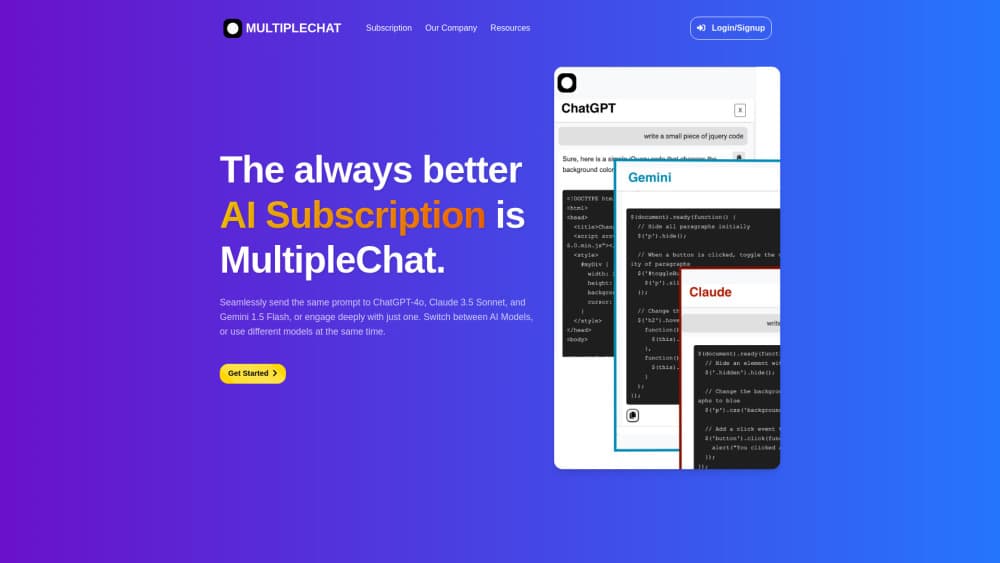
About MultipleChat
What Is MultipleChat
MultipleChat is a browser and desktop AI workspace from NLP GmbH, a Swiss company based in Küsnacht that has been building multi-model tooling since 2019. The pitch is narrow and easy to check: one subscription, multiple AI models, one window to read them in.
Most people end up with three AI subscriptions and a row of open tabs. MultipleChat folds that into a single chat screen. The model picker sits at the top, the answer lands underneath, and a rail on the left holds projects, files and the four studios.
The catch is that you rent access instead of owning it. Every reply travels through MultipleChat's API connections to OpenAI, Anthropic, Google, xAI and Perplexity, so caps depend on your plan. Model names move fast too. The pricing page currently lists GPT-6 Astra, Claude Opus 5.5, Gemini 3.8 Flash and Grok-4.6, and those labels will age.
Getting Started
- Sign up at multiple.chat or multiplechat.ai. The free tier needs no credit card.
- Choose a mode in the composer: One model, Side by Side, or AI Team.
- Type the prompt, or run the Prompt Optimizer first when the question is still fuzzy.
- Read the answers, open Model Disagreements when the models split, then export from a studio or keep the thread in a project.
Product Information
A quick look at MultipleChat's pricing, supported platforms, and performance.
Best for
The users, tasks, and scenarios where this tool fits best.
Users
- Anyone already paying for two or more AI subscriptions
- Analysts and consultants who have to defend an answer
- Small teams that want one invoice
- Students and casual users
Tasks
- Comparing AI responses to the same prompt
- Fact checking a draft before it ships
- Turning a conversation into a deliverable
- Choosing an image direction
Scenarios
- A recurring job where you never remember which model is best
- Research where citations matter
- A team that keeps losing context between chats
Key features
Side by Side answers
One prompt goes to ChatGPT, Claude, Gemini and Grok at the same time, and the replies stack in columns. You can scan them in a few seconds and see who hedged, who padded, and who actually answered. It's the fastest way to compare AI responses without retyping anything.
AI Collaboration modes
Instead of a single reply, a chain of models drafts, critiques and merges. Nine modes cover different jobs: Smart, Conversation, Ensemble, Co-operative, Debate, Simulation, Expert, Humanize and Research. Debate is the one worth trying first on a decision you're unsure about, because the models are told to attack each other's reasoning rather than agree.
Disagreement flags and Auto Verification
When two models contradict each other, MultipleChat surfaces the conflict in a Model Disagreements panel instead of hiding it in prose. A second model can also fact check the main answer against web sources. Treat the flags as a to-do list, not a verdict. The product itself says to verify important facts independently.
Four creation studios
Document Studio turns notes into DOCX and PDF files. Presentation Studio builds decks with speaker notes, Excel Studio cleans messy rows and adds formulas, and Image Studio generates and edits visuals. All four read from the same conversation, so you don't paste context into a separate tool.
Projects, files and sandboxes
Projects keep files, chat history and standing instructions together, which means a new thread starts with the right context instead of a blank box. Paid plans add file workflows, and you can route code and calculations to the ChatGPT or Claude sandbox rather than MultipleChat's own tools.
Prompt Optimizer and Team Reason
Prompt Optimizer rewrites a vague request with audience, structure and output format before it reaches the model. Team Reason works the other way around: after an answer arrives, a reviewer model re-examines it through a chosen lens such as root cause, stress test or conflict. Both are small features that change how much you trust the output.
Pros and cons
Pros
- One login covers five model families, and switching between them takes a click, not a new subscription.
- Side by side comparison is genuinely useful for judging answer quality, especially on writing and analysis tasks.
- The studios close the gap between chatting and shipping a file, which saves a step on reports and decks.
- Swiss operator with GDPR compliance and optional Swiss data residency, a real factor for European teams.
- Free tier with no card, so you can test the workflow before committing to $20 a month.
Cons
- Usage caps on Pro are not published in detail, so heavy users may hit limits before they expect to.
- You never touch the provider's own app, which means you lose features that exist only there, such as some native file handling.
- Model labels change often, and the workspace can lag behind a fresh release by a few weeks.
- No public API for MultipleChat itself, so you can't wire the comparison workflow into your own tools.
Frequently asked questions
Yes. The free plan gives you limited access to a selection of models with basic file workflows and no credit card. Premium models, AI Collaboration and higher limits sit behind the paid plans.
Related content
Explore related tools, skills, and articles for MultipleChat.
MultipleChat Alternatives

Knocket
Knocket (Tencent RTC team) · Productivity · Business · ChatbotKnocket is a free live chat and contact page tool that lets visitors message you from your website, app, or a shareable link, with every reply handled from Telegram or one inbox.

shippedit.me
Krawlup · Marketing · Businessshippedit.me now redirects to Krawlup, a web platform that audits SEO, AEO and page speed every week, then hands the fixes to AI coding agents over MCP.

Ayven
Alknoma · Productivity · BusinessAyven is an AI control centre by Alknoma that turns a plain-language goal into a dated plan, hands the work to your people and AI agents, and asks for your approval only when the call is yours.