

muno
muno · Voice & Language · Productivity
muno is an AI managerial platform that lets managers run team conversations without scheduling a single meeting. Instead of chasing updates over chat, you create an AI agent that speaks with each teammate by voice, collects their answers on their own time, and turns the responses into summaries, sentiment signals, and key themes. Think of it as team feedback automation you set up once and then reuse. It suits team leads, founders, and operations managers who need regular async voice check-ins without adding another recurring call to the calendar.
About muno
What Is muno
muno is a web-based platform for building AI agents that hold voice conversations with your team. Each agent is shaped around one purpose, like a quarterly goals check-in, a weekly standup, or a project retrospective. You describe the conversation in plain words, and the platform turns that description into a structured set of topics with time boxes.
The problem it targets is async communication that never quite works. Written updates get skipped. Long threads bury the important details, and short surveys produce shallow answers. Voice conversations feel more natural than forms, so people tend to say more. muno keeps the whole cycle asynchronous, so nobody blocks their day waiting for a call.
The clearest limit is scope. muno is a layer for collecting and organizing what people tell you, not a project tracker. It doesn't replace a task board or a document tool. It also leans on voice input, so teammates who dislike speaking aloud may prefer to skip it. Response rates depend on how well you frame the questions, not on the software alone.
Getting Started
- Sign in to the muno dashboard and open the agent workspace, where existing agents are listed by name and status.
- Create an agent by describing the conversation in voice or text, or fill in the form manually if you'd rather type the topics out.
- Review the AI-generated topics and their timing, then reorder or rewrite them until the flow matches what you want to ask.
- Invite the teammates who should take part and let the agent run; participants answer at their own pace during the open window.
- Read the results on the insights view and export summaries or presentations to Google Docs, Google Slides, or Notion.
Product Information
A quick look at muno's pricing, supported platforms, and performance.
Best for
The users, tasks, and scenarios where this tool fits best.
Users
- Team leads running a mid-size group
- Founders and operations managers
- People-managers with remote reports
Tasks
- Quarterly goals check-ins
- Weekly standups
- Project retrospectives
- Support and sentiment tracking
Scenarios
- Checking in on a fixed weekly rhythm
- Early-stage project research
- Distributed teams across time zones
Key features
Voice AI Agents
Each agent speaks in natural voice and responds in real time, so the async voice check-in feels closer to a short conversation than a form. Teammates can talk at their own pace, pause, and pick up where they left off. The agent opens the topic and follows up. That keeps the exchange moving without a human moderator.
Conversational Agent Creation
You describe the conversation in voice or type it out, and muno extracts the structure for you. The form-based path is there if you'd rather write the topics yourself. What you get back is a session outline you can refine before anyone is invited. It's that quick.
AI-Generated Topics
Topics come from your own context and timing preferences rather than a fixed template. A check-in agent, for example, might open on current progress, move into challenges and blockers, cover support needed, and close on next steps, with a time box for each. Want a different order? You can adjust it. Nothing is locked in.
Integrations and Export
Finished conversations turn into documents automatically. Summaries can go to Google Docs, presentation-ready decks to Google Slides, and workspace notes to Notion. The output lands where your team already works. No copy-paste required.
Insights Dashboard
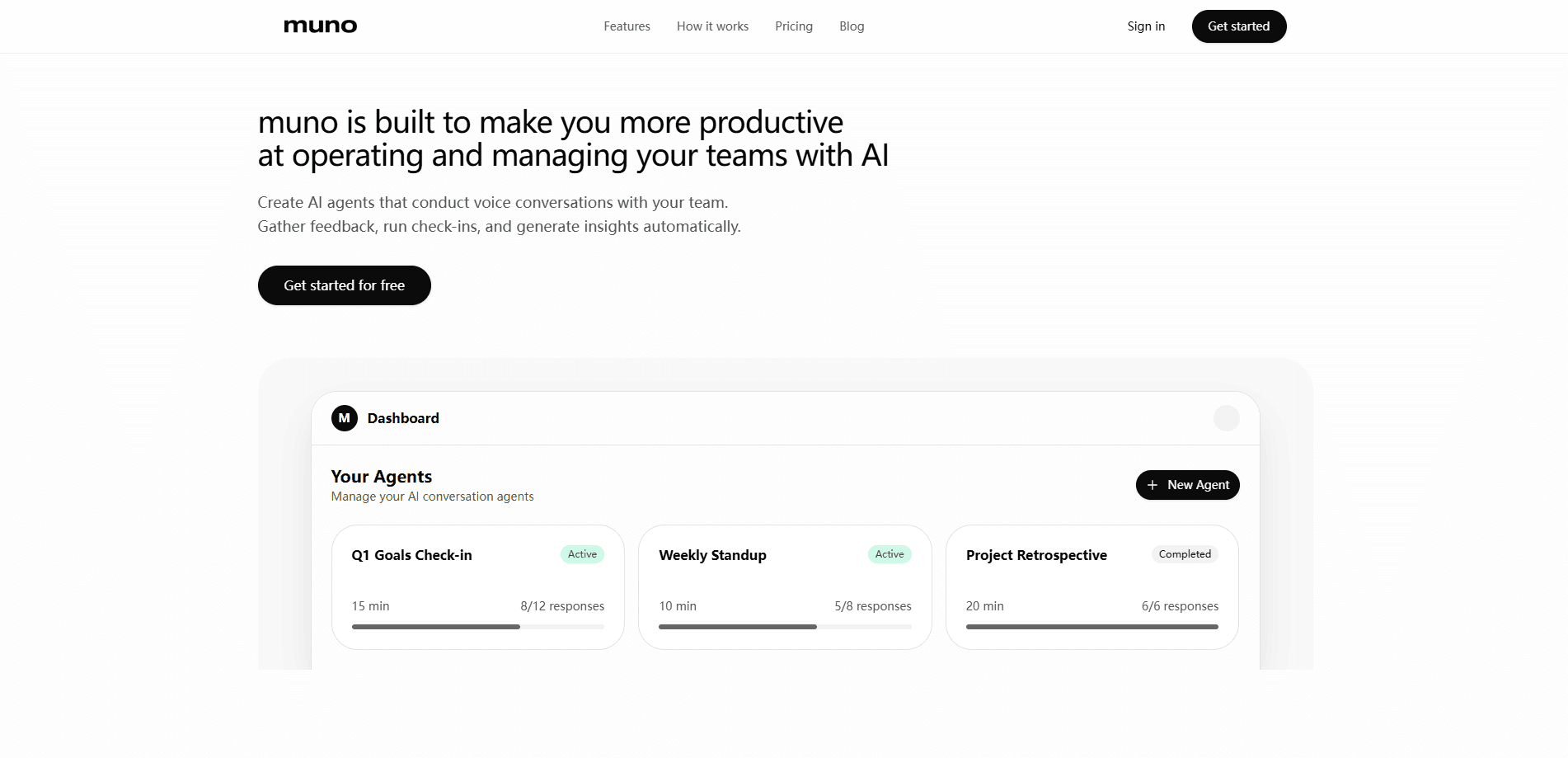
The insights view shows response rates, sentiment, and key themes across a set of conversations, working as a team insights dashboard rather than a raw transcript pile. You can see how many responses came in, how long the conversations took in total, and which points recur across the team. It's the part that replaces reading every transcript by hand.
Team Conversation Management
The dashboard keeps agents in one place with their status and progress visible. A quarterly check-in might show fifteen minutes of expected time and eight of twelve responses in. A retrospective shows as completed once everyone has answered. That single view makes it easy to see which conversations still need attention.
Pros and cons
Pros
- Voice conversations capture more detail than written status updates, so check-ins yield usable answers instead of one-line replies.
- The async format removes scheduling entirely; teammates respond on their own time and the agent handles the follow-up.
- Topics are generated from your own context, which saves the work of designing an interview script from scratch.
- Export to Google Docs, Google Slides, and Notion means results flow into the tools teams already use.
- Insights on response rate, sentiment, and themes make it practical to review many conversations quickly.
Cons
- The official product site wasn't reachable during research, so current pricing and plan limits couldn't be confirmed. Check them before you commit.
- Voice-first participation won't suit everyone; teammates who prefer writing may give shorter answers or opt out.
- It's a collection and insight layer rather than a task manager, so it won't replace a board, docs, or your existing project tracking.
- Value depends on how well you frame the topics, and a vague agent produces vague answers.
Frequently asked questions
muno builds AI agents that hold voice conversations with your team, then turns the answers into summaries and insights. You set up an agent for a specific purpose like a check-in or retrospective, invite participants, and review the results in the dashboard.
Related content
Explore related tools, skills, and articles for muno.
muno Alternatives

Foley
Hanamori Labs, LLC · Voice & Language · Productivity · AI AssistantFoley is a voice to-do list that turns a spoken sentence into a filed task, complete with project, date and time, then helps you plan the day around what is already there.

HireKey
HireKey · Voice & Language · Productivity · LeaningHireKey is an AI job search copilot built by a former tech recruiter. It checks role fit, tailors resumes, runs interview practice and tracks every application.

Fluence
Yay Software (Yannick Huchard) · Writing · Voice & Language · ProductivityFluence is an Android app that reads PDFs, EPUBs, Word files and web articles aloud, follows each sentence as it speaks, and answers questions about the text on the phone itself.