

Suno AI Music Prompt Generator
SunoPrompt · Voice & Language
Suno AI Music Prompt Generator, run by SunoPrompt, is a music prompt maker that turns a plain language idea into tagged prompts for Suno, Udio and other AI music platforms, with 12 optional controls.
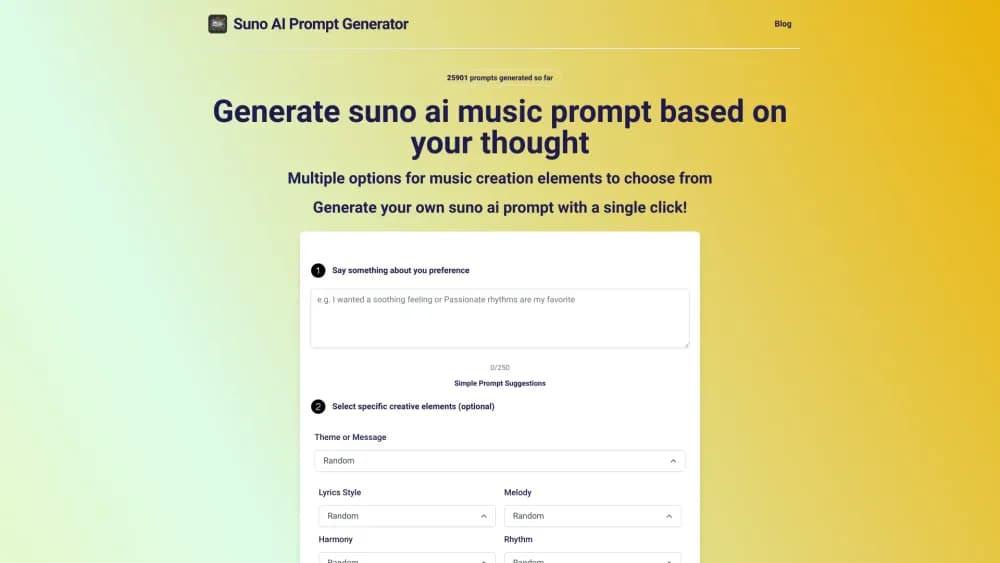
About Suno AI Music Prompt Generator
What Is Suno AI Music Prompt Generator
Suno AI Music Prompt Generator is a browser tool from SunoPrompt that writes the prompt, not the song. You describe what you want to hear, and the AI returns a structured prompt built from genre, mood, instrument and vocal tags that AI music generators accept.
The problem it solves is vocabulary. Most people can hum the idea in their head but cannot name the eight to fifteen tags that steer a model well. A free text box removes that gap: one sentence in, a usable prompt out.
The limits are worth knowing up front. The output is only a prompt, so you still need a Suno or Udio account to hear anything. Prompt credits are metered, the free allowance is a single welcome pack, and the site borrows its name from Suno without being part of that company.
Getting Started
- Open sunoprompt.com and describe the idea in the main concept box, up to 500 characters, in everyday words.
- Optionally open the 12 creative elements and set theme, melody, harmony, rhythm, structure, instrumentation, style, mood, dynamics, production, creativity and vocal style.
- Pick Aria Basic for fast free runs or Aria Pro for deeper musical reasoning.
- Hit Generate, then copy the prompt into Suno, Udio or any AI music platform.
- Check History to reuse or tweak an earlier prompt, since saved prompts need a signed in account.
Product Information
A quick look at Suno AI Music Prompt Generator's pricing, supported platforms, and performance.
Best for
The users, tasks, and scenarios where this tool fits best.
Users
- Songwriters stuck on a blank page
- YouTube and TikTok creators
- Producers testing genre blends
Tasks
- Turning a mood into structured tags
- Building a style prompt around your own lyrics
- Keeping a working library of prompts
Scenarios
- Drafting several directions before committing
- Scoring a video edit without a composer
- Learning how musicians describe sound
Key features
Twelve Creative Element Controls
The music prompt builder breaks a prompt into 12 parts: theme, melody, harmony, rhythm, structure, instrumentation, style, mood, dynamics, production, creativity and vocal style. Each one comes as a dropdown with concrete options, so picking a genre or a vocal style takes a click. Every control is optional and sits on Random by default, which means a beginner can type one line and still get a full prompt.
Three AI Models With Different Jobs
Aria Basic handles quick runs at no credit cost, while Aria Pro digs into musical structure and returns longer reasoning behind the tags. Both sit alongside a prompt engine that the site also bills as Gemini and GPT based, which matters when one model keeps producing tags that don't fit your reference. Paying users can switch between them per prompt.
Song Style and Lyrics Prompt Generation
The song style generator and the lyrics prompt generator sit on two tabs. Style generation starts from a mood or scene and builds outward. Lyrics generation takes text you already wrote and constructs an arrangement that fits its metre and line length. Songwriters who write words first get a prompt shaped around their own draft instead of a generic template.
Prompt History and Iteration
Every generated prompt is stored in History with its settings, so you can return to a version that worked and change a single element. Guests can generate without signing up, but their prompts aren't saved. Signing in unlocks the history, which is the part that makes repeated work faster.
Output Built for Other Platforms
Prompts come out as comma separated tag strings in the order that Suno and Udio respond to best, with structure hints for verse and chorus sections. You copy the text and paste it into the target platform as is, so there is no reformatting step. The tool doesn't ask for a paid plan to hand over the text.
A Connected Music Toolkit
The prompt generator sits at the front of a wider set of tools on the same site: an AI music generator, a vocal remover that splits tracks into up to eight stems with MIDI export, and a music agent that takes images, video or audio as input. A prompt written here can be pushed into the generator without leaving the account.
Pros and cons
Pros
- The prompt generator itself costs nothing, so testing prompt ideas never burns credits.
- The 12 optional controls give precise steering without requiring any music theory.
- Three models and a Random option cover both quick drafts and careful rewrites.
- Output is formatted for Suno and Udio, which removes the guesswork about tag order.
Cons
- It writes prompts, not songs, so a separate music subscription is unavoidable for anyone who wants audio.
- Free prompt credits come as a one time welcome pack instead of a monthly refresh, so heavy users run out and hit the paid tiers.
- The tool has no official link to Suno despite the name, which can confuse people looking for a Suno built in feature.
- Very specific production requests, such as a named session drummer's feel, often come back as generic tags.
Frequently asked questions
It converts a short description of a song into a structured prompt that AI music platforms can read. You get genre tags, instrument choices, tempo and vocal directions in one block of text, ready to paste into Suno or Udio.
Related content
Explore related tools, skills, and articles for Suno AI Music Prompt Generator.
Suno AI Music Prompt Generator Alternatives

Foley
Hanamori Labs, LLC · Voice & Language · Productivity · AI AssistantFoley is a voice to-do list that turns a spoken sentence into a filed task, complete with project, date and time, then helps you plan the day around what is already there.

HireKey
HireKey · Voice & Language · Productivity · LeaningHireKey is an AI job search copilot built by a former tech recruiter. It checks role fit, tailors resumes, runs interview practice and tracks every application.

Fluence
Yay Software (Yannick Huchard) · Writing · Voice & Language · ProductivityFluence is an Android app that reads PDFs, EPUBs, Word files and web articles aloud, follows each sentence as it speaks, and answers questions about the text on the phone itself.