

Music AI
Music AI · Writing · Voice & Language
Music AI is an AI music generator that turns text prompts into songs, vocals, instrumentals, and lyrics, with built-in video tools for creators.
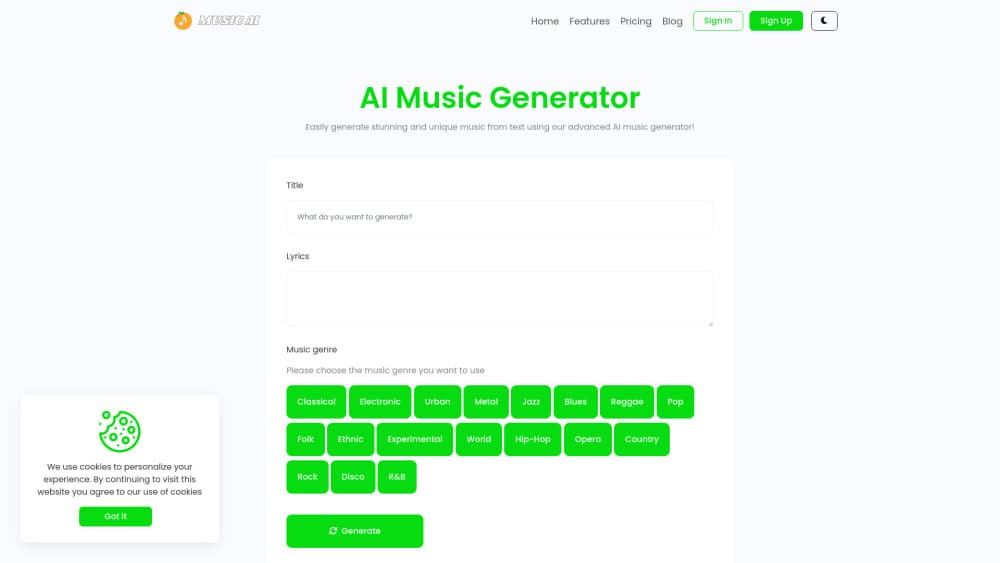
About Music AI
What Is Music AI
Music AI is a web-based AI music generator for anyone who needs original audio without hiring a musician. You describe a mood, genre, or scene in plain text, and the platform builds a complete track with structure, style, and optional vocals, handling the arrangement choices that usually take years of training and a decent ear to get right. Think of it as an AI song generator that also handles instrumentals. It works for hobbyists making background music and for marketers who need a quick jingle for a campaign.
The platform splits its work into two halves. The music side covers songs, vocals, instrumentals, and lyrics, while the video side adds text-to-video and image-to-video generation for music-backed clips. Both run on the same credit balance, so you decide where a month's budget goes. Pick one. Or split it.
The main catch is that everything runs on credits, and there's no permanent free tier. A generation costs about 20 credits, so the entry plan of 200 credits covers roughly ten songs. Ten songs. That's the whole month. If you only want one track, that math works against you. For steady output, it's a fair deal, especially when you'd otherwise pay a composer far more for a single custom track that you might end up scrapping after a round of notes.
Getting Started
- Create an account on the Music AI site and open the music generator.
- Pick a mode: Vocal for sung tracks or Instrumental for clean background scores.
- Write a prompt with your genre, tempo, mood, and any lyric or title direction you want.
- Generate the track, preview it in the browser, and tweak the prompt until it fits.
- Download the finished audio, or switch to the AI video generator to pair it with visuals.
Product Information
A quick look at Music AI's pricing, supported platforms, and performance.
Best for
The users, tasks, and scenarios where this tool fits best.
Users
- Content creators
- Small businesses
- Hobbyist musicians and lyricists
Tasks
- Generating a full song from a text prompt
- Producing instrumental background music
- Writing and shaping lyrics
- Creating music-backed video
Scenarios
- A YouTube creator who needs royalty-friendly background music on a tight deadline.
- A podcaster building a short intro theme without commissioning a composer.
- A social media marketer testing several audio styles for the same ad spot.
Key features
Prompt to Song
Type a mood, story, genre, or scene, and Music AI turns it into a finished song idea with structure and style. No notation. No chord charts. You don't need a music background at all, so the first finished draft can land in your inbox minutes after you finish describing the vibe you're after, which is a very different experience from booking studio time or coaxing a friend into recording a demo for free.
Vocal and Instrumental Modes
Vocal mode produces full sung tracks, while Instrumental mode gives you clean music for background scores, demos, and drafts. Switching takes a click. You can render the same idea two ways and hear which fits before you commit credits, which matters when a client wants a version with and without a voice and you would rather not rebuild the entire prompt from scratch just to strip the vocals out of a take you already liked.
Lyrics and Style Control
You steer the title, lyrics, genre, tempo, mood, and production direction. The more specific your brief, the closer the output lands to what you pictured, because the model has more constraints to latch onto and less room to guess wrong about the style you actually wanted. Vague prompts still work, but they leave more to chance.
Fast Creative Iteration
Generating variations is quick, and comparing styles takes minutes rather than sessions. You refine prompts until the track matches your project, which is how most people actually get a usable result. When does iteration stop? When the track fits. The cost is credits, so heavy iteration adds up.
Downloadable Audio
You can preview songs in the browser before committing, then download finished tracks for your workflow or campaign, so you can approve an idea quickly and still walk away with a clean file ready to drop straight into a video editor, a podcast mix, or an ad spot without an extra export step.
AI Video Tools
Text-to-video and image-to-video generation sit in the same account, so a finished track can get a visual companion without a second tool or a separate subscription, which keeps a one-person content operation from juggling three or four services just to ship a single short clip. It's aimed at social clips and short promos rather than full productions. Bonus, not a reason to sign up.
Pros and cons
Pros
- Handles songs, vocals, instrumentals, and lyrics in one place, so you don't juggle separate tools.
- Credit plans scale from a $9.9 entry tier to a $99 pro tier with 2,000 monthly credits.
- Built-in text-to-video and image-to-video tools cover audio and visuals on one balance.
- Prompt-based workflow needs no music production background.
- Downloadable outputs make it easy to move finished tracks into other projects.
Cons
- No free plan means you can't test the output quality before paying, which is a real risk when you have no idea whether the model's idea of your genre matches your own.
- At roughly 20 credits per generation, the entry plan covers only about ten songs.
- The site states safe-for-work content only, which rules out explicit material.
- There's no public help center or API page, so answers to edge cases rely on the FAQ or support email.
Frequently asked questions
Music AI is an AI music generator that turns text prompts into original songs, vocals, instrumentals, and lyrics. You describe what you want, the platform builds a track with structure and style, and you preview and download the result.
Related content
Explore related tools, skills, and articles for Music AI.
Music AI Alternatives

Google EmbeddingGemma 2
Google DeepMind · Writing · Image · CodingGoogle EmbeddingGemma 2 is a 740M-parameter open model that turns text, code, images, audio, and video frames into vectors in one 768-dimension space, running on phones and laptops.

MePersona
MePersona, Inc. · Writing · Productivity · MarketingMePersona is an AI unified inbox for creators. It learns your voice, drafts replies to fan messages from 12 platforms, and sends only what you approve.

Fluence
Yay Software (Yannick Huchard) · Writing · Voice & Language · ProductivityFluence is an Android app that reads PDFs, EPUBs, Word files and web articles aloud, follows each sentence as it speaks, and answers questions about the text on the phone itself.