

Musick AI
Musick AI · Voice & Language
Musick AI is an AI music generator that turns a short text description into a full song with vocals. You pick a style, add lyrics if you want, and download the track on a paid plan.
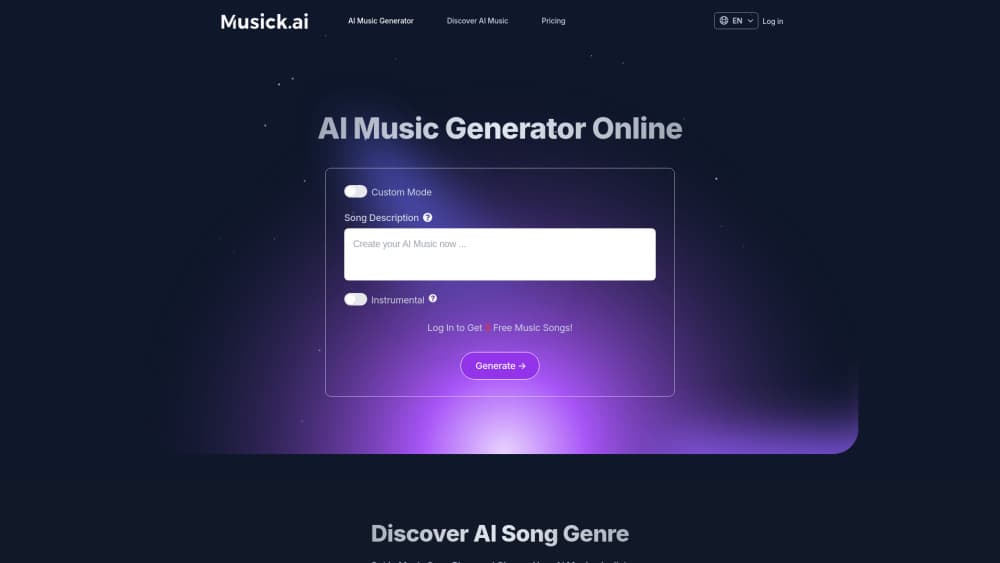
About Musick AI
What Is Musick AI
Musick AI is a browser-based AI song maker. You type what the track should sound like, choose a vocal gender, and hit generate. Because it's an AI music generator online, there's nothing to install and no plugin chain to wire up. The model writes the instrumental, the vocal line, and the arrangement, then hands back a finished song you can play in the page or download.
The pitch is speed on the first draft. A jingle, a podcast intro, or a background loop for a video usually costs a composer a day. Here it costs a text box and a couple of minutes. The site also runs a public music plaza, so you can hear what other people made before spending a single credit.
Two limits matter. The free tier won't let you download, and it publishes whatever you make to the public feed, which rules out anything confidential. Paid plans fix both, but they bill yearly, not month to month.
Getting Started
- Open musick.ai and create a free account. You get 30 generations spread over 30 days, one per day.
- Describe the song. Write the style and the subject in plain words, like "warm acoustic pop about a long drive home," then add lyrics or leave the instrumental toggle on if you don't want a singer.
- Set the voice. Pick male, female, or random, and choose model v1.0 or v2.0 depending on how polished you want the result.
- Generate and listen. The track renders in the browser and lands in My Music. Free accounts keep it public, paid accounts keep it private.
- Download or upgrade. Downloads unlock on Basic and Unlimited, along with a commercial license for the tracks you keep.
Product Information
A quick look at Musick AI's pricing, supported platforms, and performance.
Best for
The users, tasks, and scenarios where this tool fits best.
Users
- Content creators without a composer
- Hobbyist songwriters
- Beginner producers learning structure
Tasks
- Making background music for a video
- Writing a custom jingle for a small brand
- Sketching a rap or hip hop idea
- Producing a birthday or wedding song
Scenarios
- A deadline edit that needs music today
- Testing a dozen directions for one brief
- A side project with no music budget
Key features
Text to Music From a Single Description
The core input is a sentence. You write the genre, the mood, and the topic, and the model returns a song with structure, instruments, and vocals. Adding detail helps: naming an instrument or a tempo pulls the output closer to what you imagined. You don't need a prompt template or a list of tags to start.
Fifteen Genre Presets
The generator page splits styles into dedicated entries, covering EDM, R&B, jazz, pop, rap, metal, rock and roll, hip hop, blues, reggae, saxophone, K-pop, classical, disco, and country. Each entry preloads the tags that fit that style, which is faster than writing them by hand. Classical and jazz requests are the ones where the model most often needs a second pass.
Vocal Gender Control and Instrumental Mode
Every generation lets you ask for a male, female, or random voice, or skip vocals entirely with the instrumental switch. The AI vocal generator handles the singing from the lyrics you supply, so a rough line of text comes back as a performed take. The site is upfront that gender is a preference and results vary, so plan on regenerating if the timbre misses. Instrumental mode is the safer choice for background music under dialogue.
Two Model Versions
A version selector switches between v1.0 and v2.0. The newer model is the default for most people, since it handles longer arrangements and cleaner vocals. The older one is still useful when you want a rougher, more lo-fi texture or when a specific style came out better there.
Companion Lyric, Beat, and Rap Tools
Beyond the main generator, Musick AI ships smaller tools: an AI lyric writer that expands a genre and topic into verses, an AI beat producer for melody sketches, and an AI rap generator aimed at flow and punchline drafts. They're lighter than the song generator but handy when you're stuck on words rather than sound.
Downloads and Commercial License on Paid Plans
Basic and Unlimited both allow unlimited downloads and include a commercial license, so the tracks can go into client work, ads, or monetized videos. Free accounts can play tracks in the browser but can't export them, which is the practical line between trying the tool and using it.
Public Music Plaza for Reference
A Discover feed collects recent tracks from the community, sorted by genre. It's the fastest way to judge output quality before you pay, and a decent source of prompt ideas when your own descriptions keep landing in the same place.
Pros and cons
Pros
- A finished song with vocals from one sentence takes a couple of minutes, which is far quicker than assembling loops in a DAW.
- Fifteen genre presets and a text box cover most casual requests without any music theory.
- The Basic plan at $6.99 per month, billed yearly, includes 7,200 songs, unlimited downloads, and a commercial license.
- The public plaza lets you hear real output before you spend anything.
- Vocal gender and instrumental toggles cover both song demos and background music needs.
Cons
- The free tier blocks downloads and makes every track public, so it's a trial, not a working plan.
- Subscriptions renew annually, and there's no monthly option, which is a lot of commitment for an occasional user.
- Vocal timbre is a preference rather than a setting, and there's no stem export or fine editing, so fixing one bad bar means regenerating the whole track.
- No public API documentation is listed, which rules it out for automated pipelines.
Frequently asked questions
Yes, with limits. A free account gets 30 generations total, one per day, and you can listen to the results in the browser. Downloads are locked and every track you make is published to the public feed.
Related content
Explore related tools, skills, and articles for Musick AI.
Musick AI Alternatives

Foley
Hanamori Labs, LLC · Voice & Language · Productivity · AI AssistantFoley is a voice to-do list that turns a spoken sentence into a filed task, complete with project, date and time, then helps you plan the day around what is already there.

HireKey
HireKey · Voice & Language · Productivity · LeaningHireKey is an AI job search copilot built by a former tech recruiter. It checks role fit, tailors resumes, runs interview practice and tracks every application.

Fluence
Yay Software (Yannick Huchard) · Writing · Voice & Language · ProductivityFluence is an Android app that reads PDFs, EPUBs, Word files and web articles aloud, follows each sentence as it speaks, and answers questions about the text on the phone itself.