

Musiko AI
Musiko · Voice & Language
Musiko AI is an AI music generator that turns lyrics, prompts, or a single idea into complete songs in seconds. You type a line and pick a style. The tool handles the rest. It runs in your browser, hands you MP3 downloads, and sells one-time access passes instead of a monthly subscription, so you can generate AI music online and try it without committing long term.
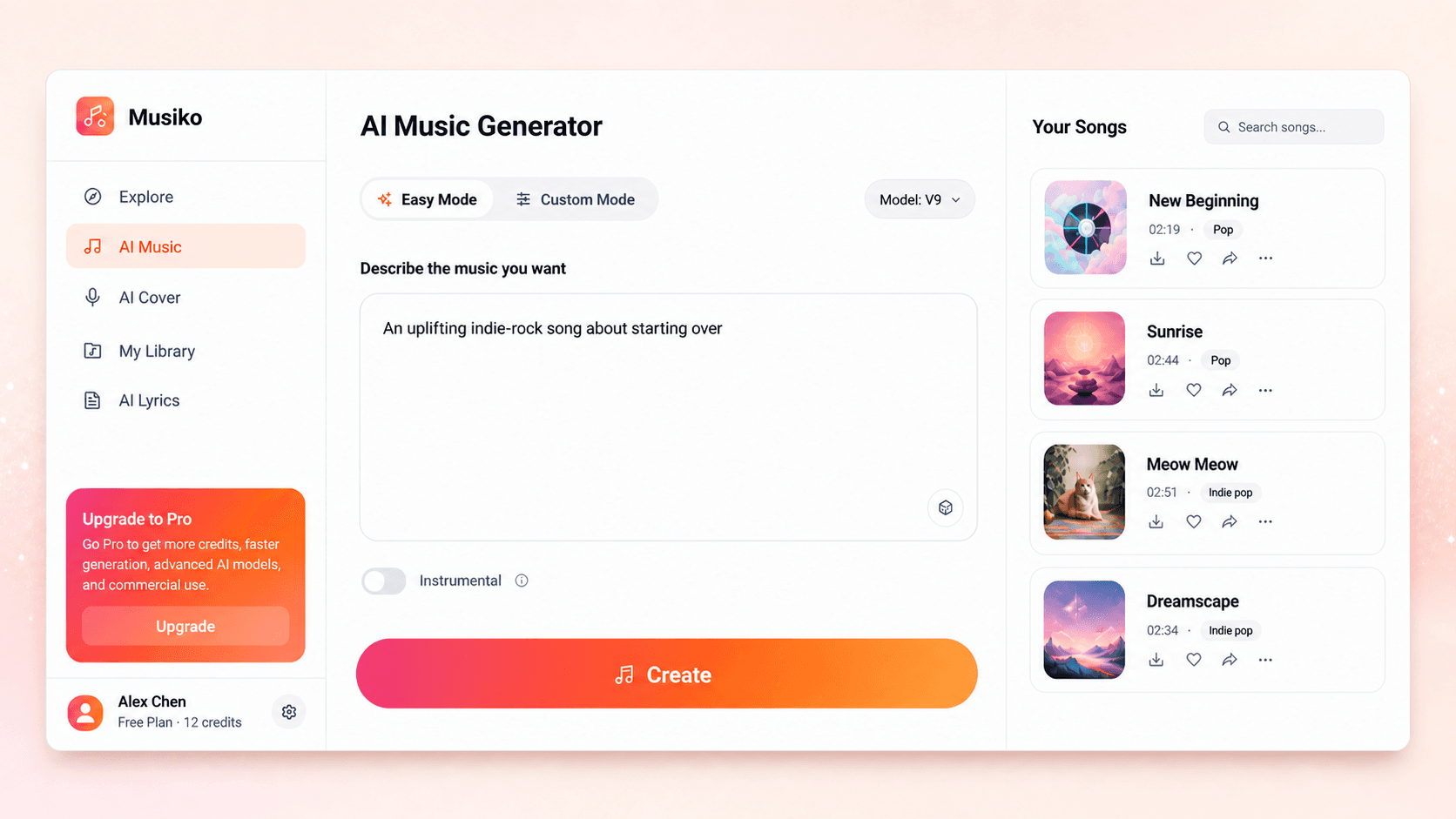
About Musiko AI
What Is Musiko AI
Musiko AI is a browser-based AI music generator aimed at people who want finished songs without touching a studio or a DAW. You give it a prompt, your own lyrics, or just a mood, and it returns full tracks with vocals, beats, and instrumentals. There's no software to install and no production experience needed, which is the whole pitch.
The tool covers more ground than a plain song generator. Alongside standard AI songs, it handles rap verses, lyrics, covers, remixes, instrumental-only tracks, and background music for videos or podcasts. Every job works the same way. Describe what you want, choose a genre or mode, and generate.
The main limits are practical ones. Output comes as MP3, not high-resolution stems you can mix yourself, so it suits creators rather than producers chasing studio-grade control. Access is sold as one-time passes with expiring credits, not an unlimited monthly plan, so heavy users will need to watch how fast credits burn.
Getting Started
- Open musiko.ai in your browser and create a free account to collect your starting credits.
- Pick a tool from the menu, such as the AI Song Generator, AI Rap Generator, or AI Instrumental Generator.
- Enter a prompt, a mood, or your own lyrics, then choose a genre that fits the sound you're after.
- Hit generate and wait a few seconds while the tool builds your track; one generation uses 12 credits and returns 2 versions.
- Preview both versions, download the one you like as an MP3, and use it in your video, podcast, or project.
Product Information
A quick look at Musiko AI's pricing, supported platforms, and performance.
Best for
The users, tasks, and scenarios where this tool fits best.
Users
- First-time creators
- YouTube and social media creators
- Songwriters and musicians
- Podcasters
Tasks
- Turning lyrics into a song
- Generating rap tracks
- Creating instrumental music
- Making background music
Scenarios
- A YouTube upload is due and you need royalty-free background music fast
- You wrote a verse but can't produce it
- You're building an indie game and want menu or ambient music
- You need branded audio for a short campaign
Key features
AI Song Generator
This is the core tool: type a prompt or your own lyrics, choose a genre, and Musiko AI returns a complete song with vocals and instrumentation in seconds. Each generation costs 12 credits and produces 2 tracks, so you get a choice instead of a single take. It's the fastest path from a blank page to something you can actually use.
Lyrics to Song and AI Lyrics Generator
If you already have lyrics, the tool turns them into a full song with vocals and production. If you don't, the AI Lyrics Generator writes verses, choruses, and hooks from a plain description of your idea. That means you can start from either end: words first or music first, depending on how you think.
AI Rap Generator
Rap gets its own mode. Give it a topic or your own lines and it builds custom lyrics with rhyme schemes, beats, and flows. Most song generators treat rap as an afterthought. Having a dedicated path here matters if that's the style you work in.
AI Instrumental and Background Music Generator
Not every project needs vocals. The instrumental mode creates vocal-free tracks for videos, podcasts, films, and games, and the background music tool targets royalty-free audio for YouTube, ads, and brand content. This is where YouTube and game creators get most of their value. Want menu music for a game or a quiet bed under a podcast? That's exactly what it's for.
Browser-Based, No Install
It runs in your browser. No install, no plugin. There's nothing to download and no separate mobile app to manage, so you can start on a laptop and keep working from any machine with a login. That low setup cost is a big reason beginners stick with it.
MP3 Downloads and Commercial Use
Finished songs download as MP3 files you can keep in your library. Eligible plans include a commercial use license, which covers things like client work, monetized videos, and brand projects. Check the current terms before using a track in ads or paid work. The license is the difference between a fun demo and music you can actually publish.
Pros and cons
Pros
- Works entirely in the browser, so there's no software to install and you can start in minutes.
- One-time access passes ($4.99 to $59.99) avoid the recurring monthly fees common in AI music tools.
- Dedicated modes for rap, instrumentals, and background music cover more than a basic song generator.
- MP3 downloads and a commercial use license on eligible plans make tracks usable in real projects.
- Free credits let you test output quality before spending anything.
Cons
- Output is MP3 only, so if you need separate audio stems to mix or master, you're out of luck.
- Credits expire at the end of your access window, which punishes people who buy a pass and then go quiet for weeks.
- It's web-only with no mobile app, and the API status is unclear, so you can't count on it for automated workflows.
Frequently asked questions
It turns text into music: you give it a prompt, a mood, or your own lyrics, and it generates complete songs with vocals, beats, and instrumentals. It also handles rap tracks, instrumental-only music, and background audio for videos and podcasts.
Related content
Explore related tools, skills, and articles for Musiko AI.
Musiko AI Alternatives

Foley
Hanamori Labs, LLC · Voice & Language · Productivity · AI AssistantFoley is a voice to-do list that turns a spoken sentence into a filed task, complete with project, date and time, then helps you plan the day around what is already there.

HireKey
HireKey · Voice & Language · Productivity · LeaningHireKey is an AI job search copilot built by a former tech recruiter. It checks role fit, tailors resumes, runs interview practice and tracks every application.

Fluence
Yay Software (Yannick Huchard) · Writing · Voice & Language · ProductivityFluence is an Android app that reads PDFs, EPUBs, Word files and web articles aloud, follows each sentence as it speaks, and answers questions about the text on the phone itself.