

Mutter AI Dictation
Mutter · Voice & Language · Productivity
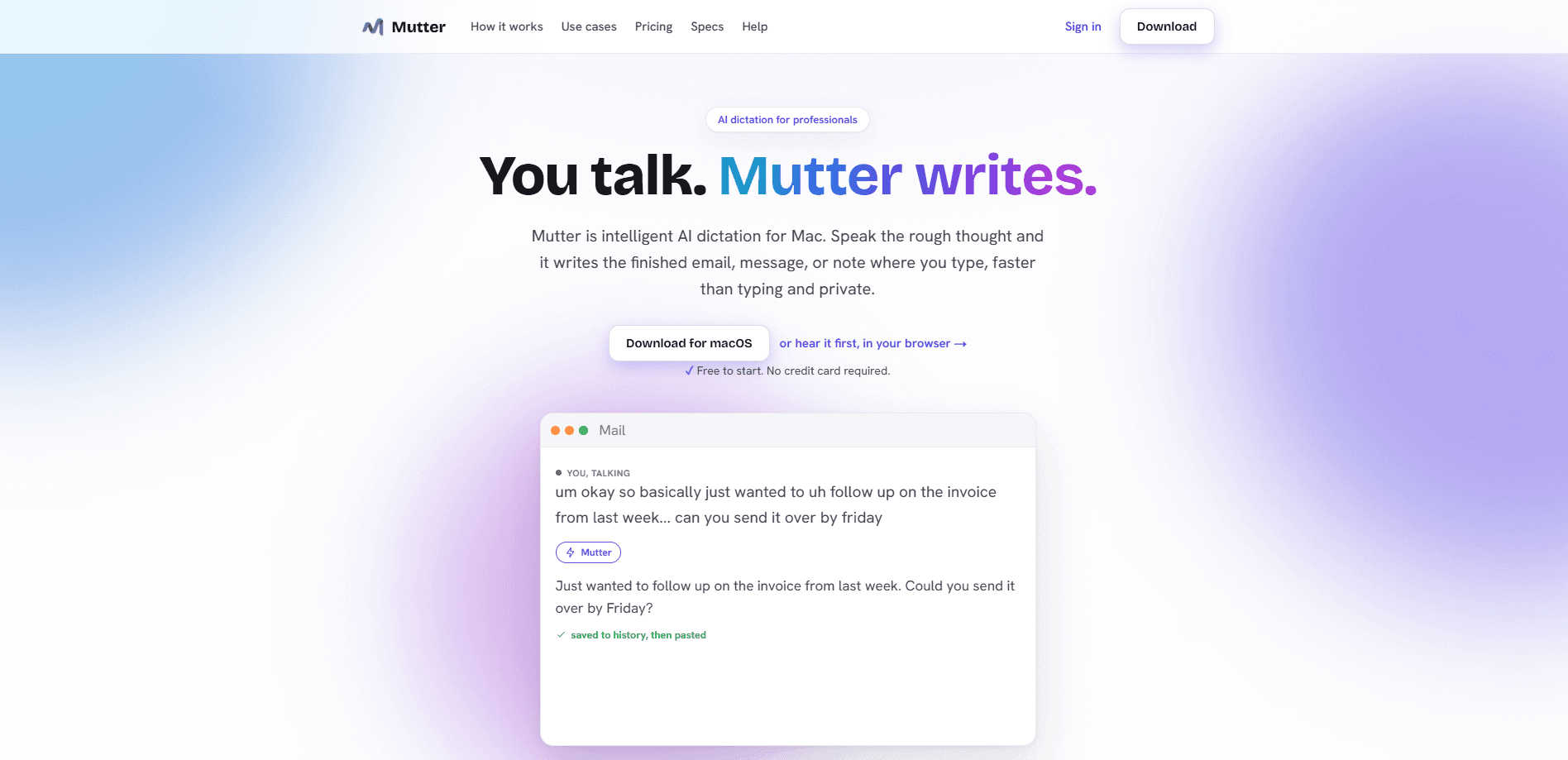
Mutter AI Dictation is a voice to text for Mac tool that turns messy speech into clean, finished writing, whether that's an email, a message, or a task list, right where your cursor sits. Hold a hotkey, talk the way you'd explain something to a coworker, and it clears the ums and false starts for you. It's a speech to text Mac app that runs either through a cloud model or a fully on-device mode for private, offline transcription.
About Mutter AI Dictation
What Is Mutter AI Dictation
Mutter AI Dictation is a voice dictation app built for macOS. The idea is simple. Most people speak around 150 words a minute and type closer to 40, so talking gets the thought out of your head several times faster. Mutter handles the cleanup, including the false starts, the repeated words, and the "um okay so," and writes the finished version where you'd normally type.
It's aimed at people who think out loud. Founders drafting replies. Clinicians writing notes. Lawyers working with sensitive material. Students getting essays started. The app sits across the tools you already use, so you don't need to switch windows to dictate something.
The biggest limit is platform. Mutter is Mac-only at launch, and it needs macOS 14 Sonoma or newer. Windows and Linux aren't supported yet. Private mode also requires an Apple Silicon Mac (M1 or later); on Intel Macs you're limited to the cloud model.
Getting Started
- Download Mutter from the official site and install it on a Mac running macOS 14 Sonoma or later.
- Create an account and pick a plan. The free tier gives 200 on-device words a month, no card needed.
- Grant microphone access. Accessibility permission is optional but lets Mutter paste straight into the app you're focused on.
- Hold the hotkey in any app, speak your thought, and release to let Mutter write the finished text.
- For private work, turn on Private mode and it transcribes on your Mac, so audio never leaves the machine.
Product Information
A quick look at Mutter AI Dictation's pricing, supported platforms, and performance.
Best for
The users, tasks, and scenarios where this tool fits best.
Users
- Writers and note-takers
- Privacy-sensitive professionals
- Multilingual users
Tasks
- Drafting emails and messages
- Turning scattered thoughts into task lists
- Writing in another language
Scenarios
- Clearing a backlog of replies
- Working offline on sensitive material
Key features
Messy Speech, Clean Output
You don't have to speak in full sentences. Mutter strips filler words, false starts, and repetition, then formats the result as the thing you were actually making. Say "um okay so just following up on the invoice from last week, can you send it by friday" and it writes "Following up on last week's invoice, could you send it over by Friday?" That cleanup is the core of what makes it useful, because raw dictation is rarely sendable.
Intent Mode
Instead of picking a format before you speak, you just say what you want. Say "reply to Josh confirming Thursday at 2" and Mutter gives you the email, ready to review and insert. Intent Mode is included with every plan, including the free tier.
On-Device Private Mode
Turn on Private mode and transcription runs on your Mac through an on-device model. No audio goes to a server, and Mutter says nothing is stored or used for training. Dictate with Wi-Fi switched off and it still works. This is the feature meant for work you wouldn't want leaving your machine.
Translation and 100+ Languages
Dictate in the language you think in, then use the globe in Intent Mode to rewrite the message in another. Mutter supports 100+ languages, and 20+ of them run on-device for offline, private use. It's the kind of on-device transcription that keeps multilingual work private too.
Built for Speed
The pitch rests on a simple gap. People speak near 150 words a minute. They type around 40. So Mac voice typing gets the thought down several times faster than a keyboard, and the hours you'd spend pecking at keys shrink to minutes. Why does that matter so much? Because the bottleneck in writing usually isn't the idea. It's the typing.
Pros and cons
Pros
- Cuts cleanup work automatically, so short emails and messages come out usable instead of needing a rewrite pass.
- Private mode keeps audio on the Mac and works offline, which matters for sensitive professional notes.
- Free tier is real: 200 on-device words a month with no card and no trial clock.
- Intent Mode removes the format-picking step and is included on every plan.
Cons
- Mac-only, and it needs macOS 14 Sonoma or newer, so Windows and Linux users are out for now.
- Private mode requires an Apple Silicon Mac; Intel users are pushed to the cloud model whether they want it or not.
- The free tier's 200 words a month runs out fast if you dictate regularly.
- Cloud plans bill annually, so the listed monthly price is the annual equivalent, not a month-to-month rate.
Frequently asked questions
It's a Mac dictation app that converts speech into finished writing. You hold a hotkey, talk, and it writes the cleaned-up email, message, or note into whatever app is focused.
Related content
Explore related tools, skills, and articles for Mutter AI Dictation.
Mutter AI Dictation Alternatives

Foley
Hanamori Labs, LLC · Voice & Language · Productivity · AI AssistantFoley is a voice to-do list that turns a spoken sentence into a filed task, complete with project, date and time, then helps you plan the day around what is already there.

HireKey
HireKey · Voice & Language · Productivity · LeaningHireKey is an AI job search copilot built by a former tech recruiter. It checks role fit, tailors resumes, runs interview practice and tracks every application.

Fluence
Yay Software (Yannick Huchard) · Writing · Voice & Language · ProductivityFluence is an Android app that reads PDFs, EPUBs, Word files and web articles aloud, follows each sentence as it speaks, and answers questions about the text on the phone itself.