

NewArc.ai
Variable Ltd (NewArc.ai) · Coding · Productivity
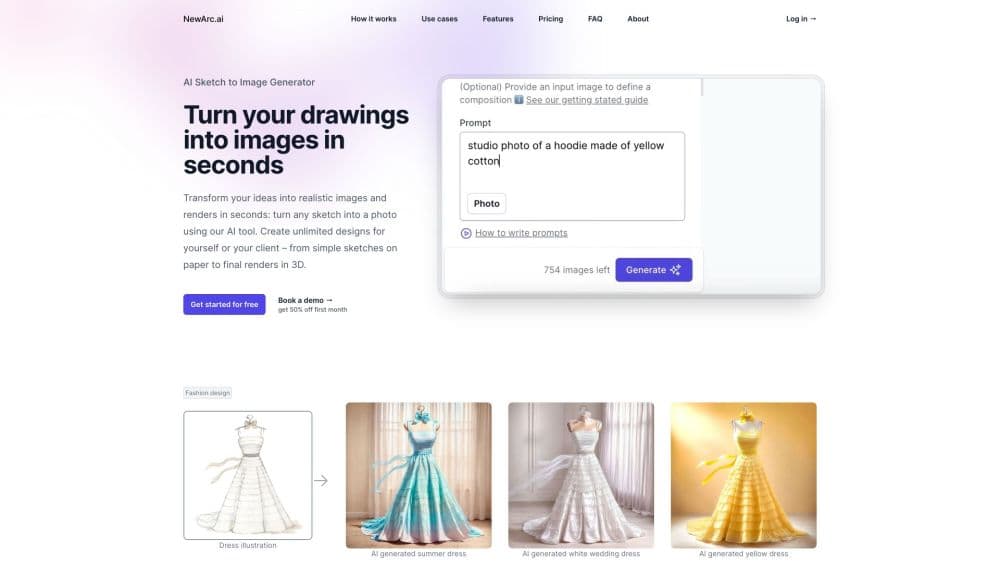
NewArc.ai turns hand sketches and flat drawings into photorealistic fashion images in seconds, adding virtual try-on, fabric options and image to video. The free tier gives 210 credits monthly.
About NewArc.ai
What Is NewArc.ai
NewArc.ai is a browser based design tool for fashion, footwear and product teams, and the company sells it as an AI sketch to image generator. You upload a sketch, a technical flat or a photo of an existing product, describe the look you want, and the tool returns a rendered image that reads like a studio shot. Footwear designers use it for concept review. Apparel teams use it to show a buyer what a sample will look like before the sample exists.
The company behind it is Variable Ltd, registered in London. The tool is built for people who already draw. It reads the lines you give it rather than inventing a design from nothing, so a rough scribble produces a rough result and a clean technical drawing produces something close to production ready.
Credits drive everything. Each generation costs a set number, and the heavier tools such as virtual try-on or video burn through them faster than a basic render. Paid plans take card payments only. Basic and Pro are limited to companies under $1M in yearly gross revenue, and one license covers one person.
Getting Started
- Sign up at newarc.ai with an email address. No card is required for the free tier, which starts at 210 credits a month.
- Upload your sketch as an image file, or start from a product photo if you want to restyle an existing item.
- Choose a generation mode, then write a short prompt covering material, color and setting. Adding a reference photo of the fabric you have in mind sharpens the result.
- Refine the output with the editing tools: recolor a panel, drop in a pattern, or place the design on a model with virtual try-on.
- Download the render, or export a short video clip for a deck or a social post.
Product Information
A quick look at NewArc.ai's pricing, supported platforms, and performance.
Best for
The users, tasks, and scenarios where this tool fits best.
Users
- Footwear designers
- Apparel and accessory designers
- Freelance illustrators and small studios
- Design students and teachers
Tasks
- Turning a pencil sketch into a client facing visual
- Building colorways
- Producing web and social visuals
- Documenting a design
Scenarios
- Design review before sampling
- Line sheet and lookbook prep
- Early concept exploration
Key features
Sketch to Image
This is the core of the product. You upload a hand drawing, an Illustrator technical flat, a fashion illustration or a collage, and the model returns a photo style render. It keeps your proportions and construction lines, which matters for footwear where a millimetre changes the silhouette. Most renders land in seconds, and the queue is shorter on the Enterprise plan.
Virtual Try-On
Virtual try-on puts the design on a person in a setting you describe in text. The model can be AI generated or a real person you work with, which helps when a brand wants its own fit model represented accurately. It replaces a fitting shoot for early feedback, not for final ecommerce imagery.
Image to Video
Image to video animates a still render, with a spin as the most common preset. Clips run a few seconds and suit product pages, paid social and pitch decks. It's a shortcut for motion content, and the output looks best on simple studio backgrounds.
Material References and Patterns
You can upload a photo of a real fabric and apply it to your design, so a wool coat renders with the texture and drape of the actual wool you plan to produce. The pattern tool overlays repeating prints at pixel level, with controls for scale, brightness and rotation, plus a masking tool so a stripe stays on the sleeve and off the collar.
Image to Sketch
Image to sketch runs in the other direction: a product photo goes in, a clean technical drawing comes out. Designers use it to rebuild a line drawing for a tech pack or to document a sample that was made without a proper spec sheet. It saves redrawing by hand, and the output stays editable.
Colorways and Smart Edit
Colorize changes the color of the full product or selected parts, using a color picker, an eyedropper or a HEX code. That makes colorway presentation cheap: one sketch, five palettes, no re-rendering from scratch. Smart Edit handles smaller fixes on a generated image, so you don't have to reroll the whole thing when one detail is off.
Pros and cons
Pros
- Rendering speed fits the way designers actually iterate, with most images arriving in seconds rather than minutes.
- The sketch to image output holds construction detail, so trims, stitching and panel breaks survive the render.
- Material references and pattern masking target real production questions, not just pretty pictures.
- The free tier and the education program make it easy to test on a live project before paying.
Cons
- Credits run out fast on video and try-on work, and unpaid balances are not rolled over, so heavy users pay monthly without carrying anything forward.
- Card payment only, which blocks studios that run on wire transfers or purchase orders until they reach Enterprise.
- No public API or documented developer access, so the tool stays a manual step in a pipeline rather than something you can automate.
Frequently asked questions
It converts sketches, technical flats and product photos into photorealistic fashion images, then lets you recolor, restyle and animate them. It's an AI fashion design tool for people who draw, not a text to image toy.
Related content
Explore related tools, skills, and articles for NewArc.ai.
NewArc.ai Alternatives

Base Code
Base44 (Wix) · Coding · ProductivityBase Code is a shared cloud development environment from Base44. Teammates describe changes to an existing GitHub codebase in chat, preview them live and send them back as pull requests.

Google EmbeddingGemma 2
Google DeepMind · Writing · Image · CodingGoogle EmbeddingGemma 2 is a 740M-parameter open model that turns text, code, images, audio, and video frames into vectors in one 768-dimension space, running on phones and laptops.

GitGlow
GitGlow · Coding · ProductivityGitGlow is a local-first desktop Git client that lets independent developers review their own code and their AI agents' changes in one place before shipping.