

NoteGPT
NoteGPT · Writing · Productivity
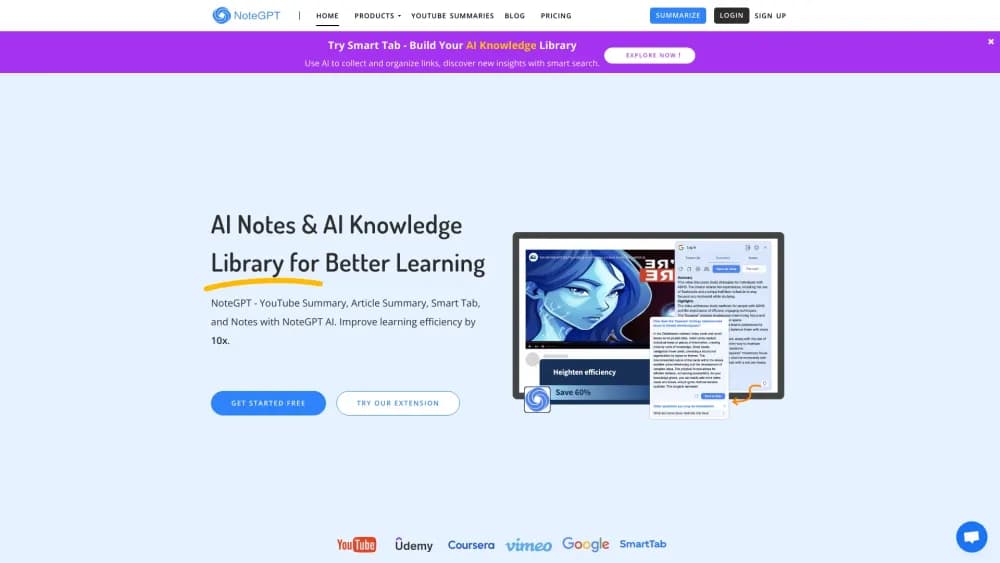
NoteGPT is an AI agent for summarizing YouTube videos, PDFs, and meetings, generating transcripts, turning them into mind maps, and letting you chat with any content.
About NoteGPT
What Is NoteGPT
NoteGPT is an AI note-taking tool built around one idea: you shouldn't have to sit through an hour of video or skim a long document to get what matters. Paste a YouTube link, upload a file, or drop in a meeting recording, and it hands back a summary with timestamps, key points, and a transcript you can jump around in.
The product started as a YouTube summarizer and grew into a broader AI note taker that also works as a study and work assistant. Today the same workspace handles audio, PDFs, slides, and web pages, so students, researchers, and creators keep everything in one place instead of juggling five tabs.
Two things define where it fits. It works best when you feed it content you'd otherwise have to read or watch yourself, and its free tier runs on quota limits rather than unlimited use. If you only need a quick summary now and then, the free plan covers you. If you process hours of material every week, you'll hit the ceiling and want a paid tier.
Getting Started
- Sign in at notegpt.io with an email or a social account. No credit card is needed to start.
- Pick your input. Paste a YouTube or podcast link, upload an audio or video file, or drop in a PDF, Word document, or slide deck.
- Let NoteGPT process it. You get a timestamped transcript, a structured summary, key insights, and a mind map.
- Chat with the content or export it. Ask follow-up questions, translate the transcript, or download the notes as PDF, markdown, SRT, or a mind map image.
- Save results to your workspace so you can revisit old summaries without reprocessing.
Product Information
A quick look at NoteGPT's pricing, supported platforms, and performance.
Best for
The users, tasks, and scenarios where this tool fits best.
Users
- Students
- Researchers and analysts
- Content creators and marketers
- Professionals who live in meetings
Tasks
- Summarizing a YouTube video
- Turning a PDF or article into notes
- Transcribing audio and meetings
- Building a mind map from any content
- Translating content
Scenarios
- Catching up on a course before an exam
- Researching a topic from long-form video
- Keeping meeting records without a note taker
Key features
YouTube Video Summarization
The core feature takes a YouTube link and returns a structured summary alongside a full transcript. NoteGPT generates its own transcript when a video has no captions, which most competing summarizers can't do. The output includes timestamped sections, so you can click through to the exact moment a point was made rather than scrubbing through the whole video.
Transcript and Subtitle Export
Every processed video or audio file produces a timestamped transcript you can edit, copy, or translate. Export formats include TXT and SRT, so you can drop subtitles straight into a video editor or keep a plain text version for your own notes. This is the part that turns a passive watch into something you can search later.
AI Mind Map Generation
From any summary, NoteGPT builds a mind map that lays out the structure of the content as a visual outline. You can download the map as an image and use it for revision, teaching, or planning. It's a quick way to see how a long video or document is organized before you commit to reading or watching it.
Chat With Your Content
Each summary comes with a chat panel that answers questions about the source material. You can ask about a specific claim, request an explanation of a term, or have it break down a section in simpler language. Because it's grounded in the content you uploaded, the answers stay tied to the actual video or document.
Document and Audio Support
Beyond video, the workspace handles PDFs, Word files, slides, images, audio, and web pages. Upload a file and get the same treatment: a summary, key points, a mind map, and the option to chat. That range means one tool covers both your video learning and your reading, rather than splitting them across two apps.
Browser Extension and Workspace
A browser extension adds a sidebar on YouTube and other supported pages, so you can summarize without leaving the tab. Everything you process lands in a workspace where summaries, transcripts, and mind maps are stored together. The library is what makes it usable over time, since you can reopen an old summary instead of regenerating it.
Pros and cons
Pros
- Summarizes videos that have no captions, which is the main reason people pick it over simpler tools.
- Timestamped transcripts and summaries make it easy to jump back to a specific moment.
- It covers video, audio, PDFs, and web pages in one workspace, so you avoid paying for several subscriptions.
- The free tier lets you test the core summarization before deciding on a plan.
- Mind maps and multiple export formats mean the output is reusable, not locked inside the app.
Cons
- Free and lower paid tiers run on monthly quotas. Once they're used up, you wait for the reset or upgrade, which can interrupt a heavy study week.
- Accuracy depends on the source audio. Poor recordings or thick accents can produce transcripts that need manual cleanup.
- Summaries are a starting point, not a substitute for the original. Anything important still needs a check against the source.
- Commercial use and higher processing limits sit behind the pricier plans, so casual users rarely need the top tier.
Frequently asked questions
NoteGPT summarizes and transcribes content so you don't have to watch or read all of it. It handles YouTube videos, audio, PDFs, and web pages, and returns a summary, a timestamped transcript, a mind map, and a chat panel for asking questions about the material.
Related content
Explore related tools, skills, and articles for NoteGPT.
NoteGPT Alternatives

Google EmbeddingGemma 2
Google DeepMind · Writing · Image · CodingGoogle EmbeddingGemma 2 is a 740M-parameter open model that turns text, code, images, audio, and video frames into vectors in one 768-dimension space, running on phones and laptops.

MePersona
MePersona, Inc. · Writing · Productivity · MarketingMePersona is an AI unified inbox for creators. It learns your voice, drafts replies to fan messages from 12 platforms, and sends only what you approve.

Fluence
Yay Software (Yannick Huchard) · Writing · Voice & Language · ProductivityFluence is an Android app that reads PDFs, EPUBs, Word files and web articles aloud, follows each sentence as it speaks, and answers questions about the text on the phone itself.