

Notewize: Guitar Lessons
Notewize · Other
Notewize is an interactive guitar learning app that pairs scrolling TAB, tempo control, and AI feedback with 200+ lessons and a lesson marketplace for students and teachers.
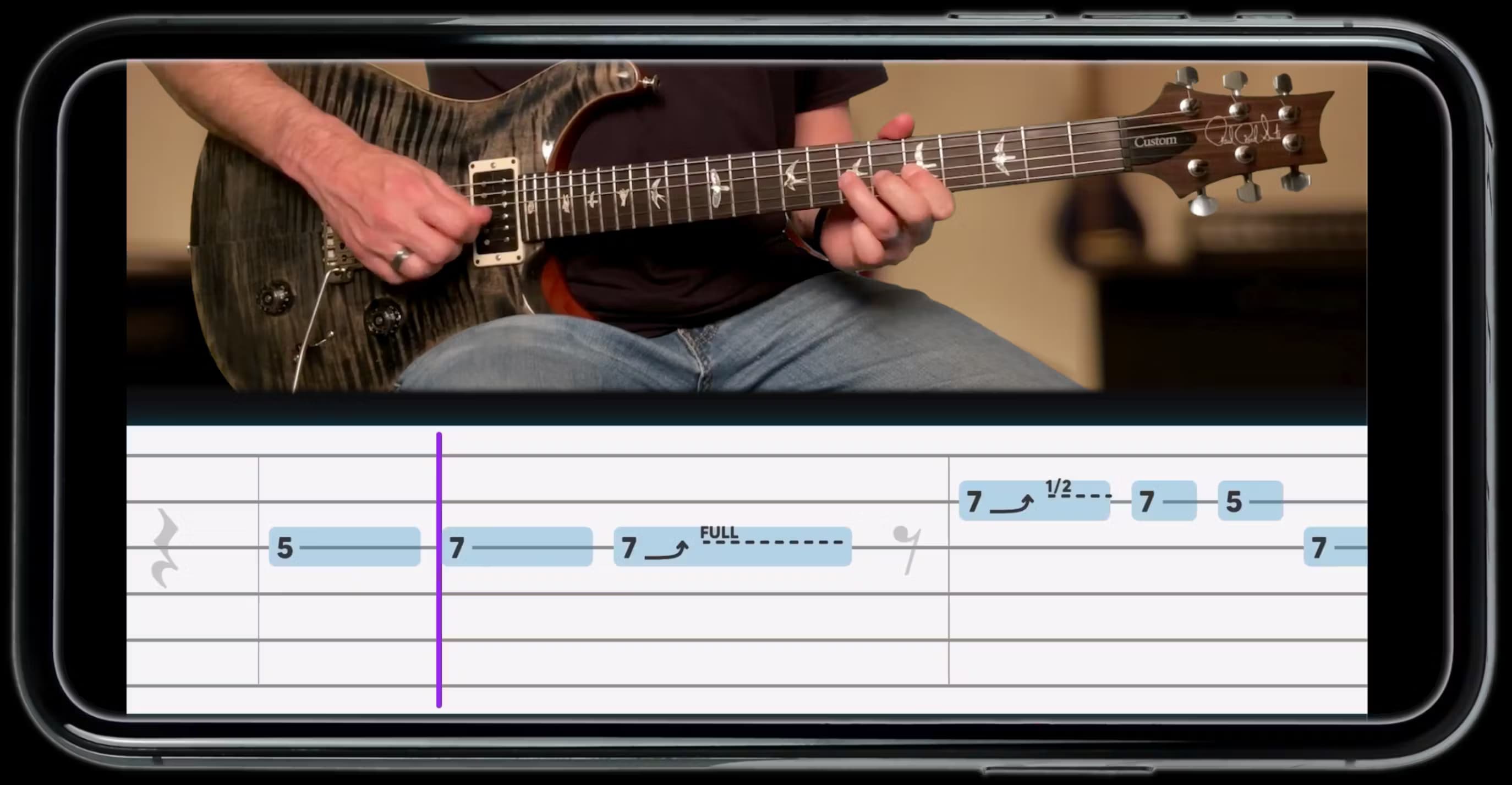
About Notewize: Guitar Lessons
What Is Notewize
Notewize is a guitar learning app built for two audiences at once: students who want structured practice and teachers who want to share or sell their own material. It runs on iOS and Android phones and tablets, so the lesson, the backing track, and the tab all live in the same place.
The core idea is feedback. Instead of guessing whether a chord rang clean or a riff landed on time, you play along and the app scores what you did. Teachers can load their own tab, backing tracks, and videos, then hand that content to students or publish it in the Notewize Store.
Notewize isn't a replacement for a teacher, and the AI scoring is a practice aid rather than a full assessment. It also won't teach you to read standard notation in depth, and the deepest features sit behind the Pro subscription.
Getting Started
- Download the Notewize app on iOS or Android, then create an account as a student or a teacher.
- Pick a lesson from the built-in library of 200+ songs, or open content your teacher shared with you.
- Set the tempo, then follow the scrolling TAB while the backing track plays.
- Switch on Feedback Mode to score your notes and timing, or use Free-Time Practice to move at your own speed.
- Review your scores and badges, then move to the next lesson.
Product Information
A quick look at Notewize: Guitar Lessons's pricing, supported platforms, and performance.
Best for
The users, tasks, and scenarios where this tool fits best.
Users
- Beginner guitarists
- Self-taught players who stalled
- Guitar teachers
Tasks
- Slowing down a hard riff
- Checking your accuracy
- Building a custom curriculum
- Selling lesson packs
Scenarios
- A weekly lesson where the teacher assigns in-app homework
- Learning remotely
- Daily solo practice
Key features
Scrolling Tab With Synced Backing Tracks
Lessons show animated tablature that scrolls in time with a professional backing track, so you follow the notes instead of pausing a video. Animated finger positions make it easier to see where each note sits on the neck.
AI Feedback Mode
Feedback Mode listens as you play and scores your note accuracy and timing in real time. After a run you get a score and a badge, which turns repetition into something closer to a game than a chore. It covers chord and note accuracy rather than tone or technique quality.
Tempo Control and Looping
You can slow any song to 60% or push it up to 120%, and both the tab and the backing track follow your chosen speed. Loop a single section to drill a hard transition before rejoining the full song.
Free-Time Practice Mode
Free-Time Practice drops the pressure of keeping up with a scrolling line. The tab advances only when you play the right notes, so complex passages move at your speed. It works on every song once you're on Pro.
Precision Guitar Tuner
A built-in tuner covers standard and custom tunings with clear guidance on which way to turn each string. It removes the need for a separate tuning app before you start practicing.
Custom Lesson Creation for Teachers
Teachers upload their own tab, backing tracks, and videos, then assemble them into lesson packs organized by difficulty and topic. The same toolset supports in-person, group, and remote teaching from a phone or tablet.
Notewize Store
The store is a marketplace where teachers publish custom lesson packs, set their own pricing, and reach students beyond their own studio. Learners can also buy add-on packs to extend the built-in library.
Pros and cons
Pros
- Single app covers lesson video, scrolling TAB, backing track, tuner, and scoring, so practice doesn't bounce between tools.
- Free tier is genuinely usable, with sample lessons, teacher-shared content, and tempo adjustment at no cost.
- Teacher tools are free during the pilot, and the store gives instructors a way to earn from content they already make.
- Strong mobile ratings point to a polished experience, with 4.9 stars on the App Store and 4.5 on Google Play.
Cons
- The AI feedback tools that define the app sit behind the $9.99/mo Pro plan, so the free version is a limited taste.
- No web or desktop app means you practice on a phone or tablet, which is cramped if you like a larger screen for tab.
- Student analytics and detailed practice reports were listed as coming soon, so teachers can't fully track progress yet.
- It's guitar-focused, so bass, ukulele, and piano players won't find much here.
Frequently asked questions
Yes, there's a free Basic plan with sample lessons, access to teacher-shared content, tempo control, and limited Feedback and Practice modes. Full access to the 200+ lesson library and AI tools requires the Pro plan at $9.99 per month or $99.99 per year.
Related content
Explore related tools, skills, and articles for Notewize: Guitar Lessons.
Notewize: Guitar Lessons Alternatives

Odyssey 3
Odyssey · OtherOdyssey-3 is Odyssey's foundation world model. It simulates physics in real time, turns a prompt into an interactive environment, and adapts to robots, cars and games.

JarvisCore
Prescott Data · Coding · Productivity · OtherJarvisCore is an open source Python runtime where AI agents work as equal peers on an agent mesh, claim tasks from a shared ledger, and reach external services through a zero-trust broker.
Clef
Cloudflare · Business · OtherClef is Cloudflare's open-source decision model for Workers AI. It returns calibrated probabilities for typed questions, not generated text, so agents can classify, route, and act fast.