

Notion MCP
Notion Labs, Inc. · Coding
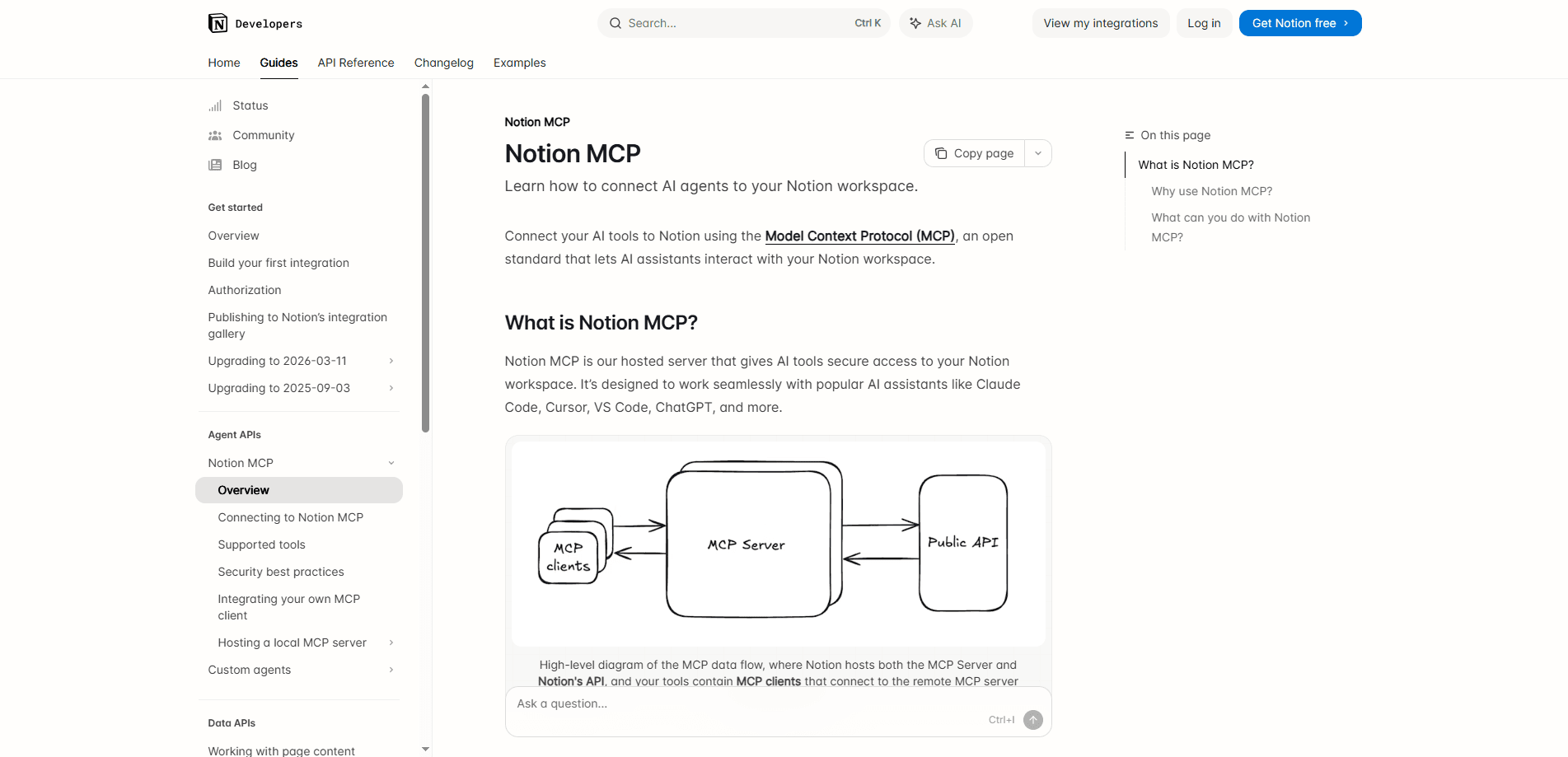
Notion MCP is a remote Model Context Protocol server hosted by Notion that connects AI apps like Claude Code, ChatGPT Codex, and Cursor to your workspace. Once you authorize the connection with OAuth, those clients can search your content, read pages, create new ones, and update databases using the same permissions you already have. Think of it as an AI workspace assistant that lives where your notes already are. There's nothing to self-host and no separate subscription, since access rides on top of your existing Notion plan.
About Notion MCP
What Is Notion MCP
Notion MCP is an integration layer that lets AI assistants work inside your Notion workspace, not just read a copy of it. It follows the Model Context Protocol, an open standard that gives AI agents a common way to call tools and pull context from the apps you use.
The problem it solves is friction. Copying text back and forth gets old fast. Before MCP, getting an AI assistant to touch your notes usually meant copying text back and forth or wiring up a custom API script. Notion MCP removes that step by exposing your workspace as a set of tools the assistant can call directly, in real time.
The most important limitation is scope. MCP tools act with your full Notion permissions, so an AI app can reach anything you can reach. That's broad by design. Content only loads when a source is actually connected and available to you, but for teams that's worth thinking about before you turn it on. Admins on Enterprise plans get governed controls to approve or block specific clients.
Getting Started
- Confirm the AI client you want to use supports remote MCP servers, such as Claude Code, Codex, Cursor, or another compatible app.
- Add the Notion server to that client. In Claude Code, run
claude mcp add --transport http notion https://mcp.notion.com/mcp; in Cursor or Codex, point the server URL tohttps://mcp.notion.com/mcp. - Complete the OAuth flow when prompted, and pick the Notion workspace you want to connect.
- Run a quick test prompt, like asking the assistant to search for a recent meeting note, to confirm it can reach your pages.
- Manage or revoke the connection later from your client's settings or from Notion's Settings menu under Connections.
Product Information
A quick look at Notion MCP's pricing, supported platforms, and performance.
Best for
The users, tasks, and scenarios where this tool fits best.
Users
- Developers and engineers
- Product and research teams
- Writers and content creators
Tasks
- Searching your workspace
- Creating pages and databases
- Updating existing content
Scenarios
- Turning a meeting recording into an action list
- Drafting documentation from code
- Consolidating research
Key features
Remote Server, No Hosting Required
Notion MCP is a remote server that Notion runs for you. You point your AI client at a single URL, authorize it, and you're connected. That's the whole setup. That means no local install, no tunnel, and no maintenance on your side, which is the main thing that sets it apart from self-built MCP setups.
OAuth-Based Authorization
The connection uses OAuth, so you sign in and approve access the same way you would for any Notion integration. You choose which workspace to expose, and you can revoke the connection later from Connections settings. It's the same trust model you're already used to, just extended to AI apps. Simple as that.
Workspace and Connected-Source Search
The AI client can search Notion along with sources you've connected, such as Slack, Mail, Calendar, Google Drive, or Jira. Advanced filters like editor, last-edited date, or content status need Business or Enterprise, but basic search works on every plan. Results are permission-aware, so you only see what you can already access.
Read, Create, and Update Content
The tools aren't read-only. An assistant can create pages and databases, fill in properties, and update content you point it at. That's what makes it useful for real workflows instead of just summaries. You stay in control of what gets written.
Multiple Client Support
Notion MCP works with a growing list of clients, including Claude Code, Codex (ChatGPT), Cursor, and other MCP-compatible tools. Setup differs by client, but the server URL stays the same, so switching tools doesn't mean rebuilding the whole connection. Nice.
Admin Controls on Enterprise
On Business and Enterprise plans, workspace owners can see and manage MCP connections in Settings. Enterprise admins with MCP Governance can approve which clients are allowed, block unapproved ones, and let an identity provider manage connections. For regulated teams, that turns MCP from a nice-to-have into something you can actually roll out.
Pros and cons
Pros
- No setup beyond pasting a server URL and completing OAuth, so getting started takes minutes.
- Works with the AI clients you already use, including Claude Code, Codex, and Cursor.
- Respects your existing Notion permissions, so access stays scoped to what you can already see.
- Enterprise governance lets admins approve or block specific clients and tools.
- Free to use on top of your current Notion plan, with no separate MCP fee.
Cons
- Tools act with your full Notion permissions, so a connected AI app can reach everything you can reach. Not ideal if you want narrower sharing.
- Advanced search filters such as editor, last-edited date, and content status require a Business or Enterprise plan, which leaves lower tiers with basic search only.
- Setup is client-specific and still developer-oriented, so non-technical users may need help wiring it up.
Frequently asked questions
It lets a connected assistant search your workspace, read pages, create new pages and databases, and update content you have access to. The assistant calls Notion MCP tools to do this in real time rather than working from a copied snapshot.
Related content
Explore related tools, skills, and articles for Notion MCP.
Notion MCP Alternatives

AI Mock Interview
SQLPad · Coding · LeaningAI Mock Interview is a practice tool built into SQLPad that simulates real job interviews and gives you instant feedback on both what you say and how you say it. You pick a role template or upload a job description, answer questions out loud in real time, and then review a transcript with notes on structure, clarity, and grammar. It's aimed at data professionals prepping for SQL, Python, data engineering, machine learning, and system design roles, and it works entirely in the browser. No install needed.
Codeflying
Kuafu Technology (Codeflying) · Coding · Marketing · ChatbotCodeflying is an AI app builder that turns a plain-language description into a working website, mobile app, or mini app. It works as a no-code app builder, so you type what you want and a set of AI agents handle requirements, architecture, front-end screens, back-end logic, and deployment. The goal is simple: build an app from a prompt, even with zero coding background. Marketing tools and a customer-facing chat agent come bundled too, so the result is more than a prototype stuck on a hard drive.

Runware
Runware, Inc. · Image · Video · CodingRunware is a generative AI inference platform that gives developers one API for image, video, audio, 3D, and language models. Instead of signing up with a dozen providers, you call a single endpoint, switch models with a one-line string change, and pay only for the requests you send. No servers to run. It's aimed at teams that want to ship AI features fast without building or babysitting their own GPU infrastructure.