
OneClickHuman
OneClickHuman · Writing
OneClickHuman is a browser-based AI humanizer that rewrites AI-generated drafts into natural-sounding text, keeps headings and links intact, and covers 10+ languages.
About OneClickHuman
What Is OneClickHuman
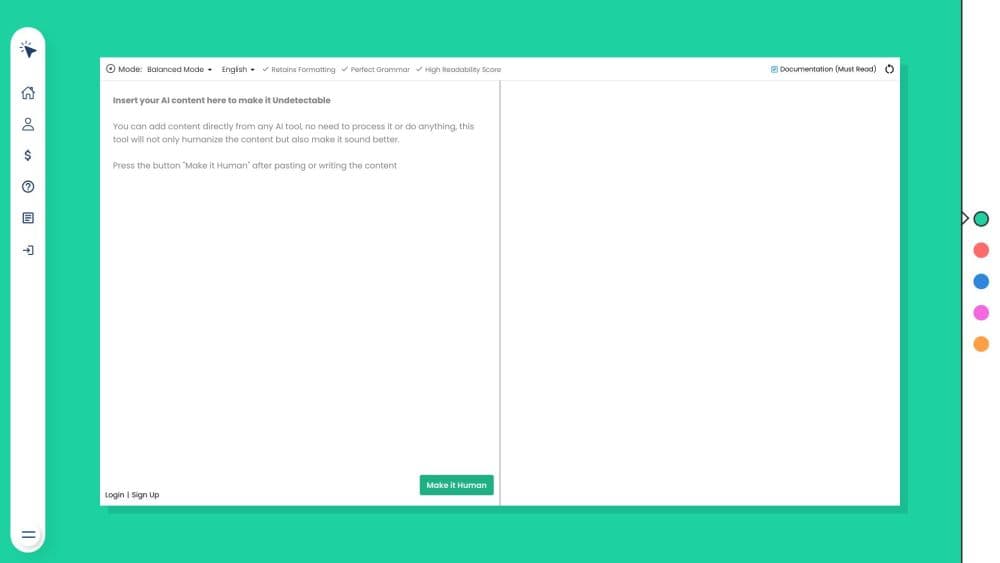
OneClickHuman is an AI to human text converter for turning machine-written drafts into prose that reads like a person typed it. You paste text into the editor, pick a conversion mode, and the tool sends back a rewritten version with different sentence lengths, plainer word choices, and fewer repeated sentence openers. The same account also opens an undetectable content generator for writing drafts from a prompt.
The problem it targets is familiar to anyone who publishes AI-assisted work. ChatGPT and Gemini drafts tend to arrive with the same rhythm: even sentence lengths, stock transitions, a conclusion that restates the intro. Editors then spend twenty minutes doing the rewrite by hand. OneClickHuman automates that pass and, unlike most AI text rewriters, keeps the structure of the document. Headings, bullet lists, bold runs, and links come back where you left them, which saves a rebuild if you're pasting into WordPress, Notion, or a CMS.
The limits deserve equal time. Detector results move in both directions, and no tool can promise a pass on every checker. An independent review by Originality.ai ran Premium Mode output through three detectors: ZeroGPT and Writer scored it as human, while Originality's own detector still called it AI with 100% confidence. A single run also tops out at 1,500 words, so book chapters and long guides need to be split. Bulk conversion sits on the roadmap as "coming soon," which means no queue for a folder of articles today.
Getting Started
- Create an account with an email address. The free tier needs no credit card, so you can test the output before paying anything.
- Paste your draft into the editor or load a formatted article. Headings, bullets, and links are read along with the body text.
- Pick Premium Mode if the text is going in front of readers, or Lightning Mode if you need volume fast and can accept plain-text output.
- Set the language when you're working in anything other than English. The tool lists more than ten.
- Compare the result with your original, correct any name, number, or quote the rewrite touched, then copy it into your editor or CMS.
Product Information
A quick look at OneClickHuman's pricing, supported platforms, and performance.
Best for
The users, tasks, and scenarios where this tool fits best.
Users
- Bloggers and SEO writers
- Non-native English writers
- Marketing teams running multilingual sites
- Freelancers and small agencies
Tasks
- Humanizing a ChatGPT draft before publishing
- Rewriting product descriptions at scale
- Cleaning up machine-translated pages
- Checking a draft against detectors before a client sees it
- Producing volume on a deadline
Scenarios
- A content lead covering a colleague's holiday week
- A SaaS team localizing a landing page into five languages
- A support team rewriting a help center
Key features
Premium Mode and Lightning Mode
The two modes split quality from speed, and both are built to humanize AI text rather than paraphrase it. Premium Mode is the default recommendation for anything readers will see: it holds formatting, keeps more of the original meaning, and the vendor puts its success rate against detectors at about 95%. Lightning Mode returns plain text in seconds and the vendor claims around 85%, with a warning that some tools will still catch it. Pick Lightning for meta descriptions and short posts, Premium for articles and client work.
Formatting That Survives the Rewrite
Most AI humanizers flatten a document into paragraphs. This one reads headings, bullet lists, bold text, and hyperlinks, then puts them back in place. For anyone publishing through a CMS, that's the difference between a five-minute paste and a thirty-minute rebuild. Tables and complex page layouts are a different story, so check those by hand after a run.
Detector Bypass Claims
OneClickHuman is marketed as a way to bypass AI detectors, and the vendor names ZeroGPT, GPTZero, and Originality as targets. Independent testing tells a more mixed story: in the Originality.ai review, ZeroGPT and Writer scored the humanized text as fully human, while Originality's own detector still flagged it. Treat detector scores as one signal among several rather than a guarantee.
Support for 10+ Languages
The humanizer accepts input in more than ten languages, and the output stays in the same language. That makes it useful for teams running localized blogs or product pages, where the English version is polished but the translated versions still sound like translation. You set the language per run, so a single account handles a multilingual content calendar.
Undetectable Content Generator
The account includes a second tool that writes articles from a prompt, positioned as a source of undetectable AI content. It's aimed at people who want the draft and the humanizing pass in one place instead of moving text between ChatGPT and a separate rewriter. The same detector caveats apply to whatever it produces.
API Access and Plan Scaling
API access comes with the Enterprise plan, so developers can wire humanizing into a publishing pipeline instead of pasting text by hand. Plans scale by monthly word count, from 50,000 words at $20 a month to 500,000 at $150, and a lifetime option buys a fixed word pool once. The free tier exists for evaluation, and paid plans raise the per-article ceiling to 1,500 words.
Pros and cons
Pros
- Keeps headings, bullets, and links, which removes the manual rebuild most AI text rewriters leave you with.
- Free tier with no card, so you can judge output quality on your own drafts before spending.
- Two modes let you trade quality for speed depending on whether the text is customer-facing.
- Lifetime pricing gives heavy users an escape from another monthly subscription.
- Handles 10+ languages, which covers most of the markets a small content team works in.
Cons
- Detector performance is uneven. Originality's own checker still flagged the humanized text, so a clean score elsewhere doesn't mean a clean score everywhere.
- The 1,500 word cap per run forces long guides and book chapters into several passes, and continuity between chunks is on you.
- Bulk conversion is still listed as coming soon, so a folder of fifty articles means fifty manual runs.
- Free tier output is limited enough that serious use pushes you to a paid plan quickly, and the cheapest plan still costs $20 a month.
Frequently asked questions
It rewrites AI-generated text so the sentences read like human writing. You paste a draft, choose Premium or Lightning Mode, and get a version with different rhythm and word choice, with headings and links preserved.
Related content
Explore related tools, skills, and articles for OneClickHuman.
OneClickHuman Alternatives

Emailwritr
Emailwritr · Writing · MarketingEmailwritr is an AI email copywriting tool built for affiliates, course creators, and online businesses that want more revenue from the list they already own. Instead of blank pages or generic chatbot prompts, this AI email writer generates welcome sequences, launch campaigns, cart recovery emails, and promo series from frameworks modeled on well-known direct-response copywriters. You connect your autoresponder, answer a few questions about your offer, and it writes the copy for you.

Swms
Swms AI · Writing · Productivity · BusinessSwms is an AI safety compliance tool that turns a plain description of a job into ready-to-use safety documents. Describe your project, trade, and known hazards, and it writes a safe work method statement, job hazard analysis, safe work procedure, RAMS, or safety data sheet in seconds. It also ships with Oscar, a chat assistant that answers workplace safety questions in any language. Teams in construction, mining, transport, and warehousing use it to cut the paperwork that usually eats into a workday.

Prosp
Prosp · Writing · Voice & Language · MarketingProsp is an AI LinkedIn outreach tool built for agencies and sales teams, and it writes the message and the voice note in your own voice for each prospect so they actually reply. You connect your accounts, find leads, and let the AI draft and send personalized messages at scale, all from one inbox. It's built for people running outbound at volume. That's the whole pitch. Every touchpoint still has to feel human.