

Open Source AI Chrome Extension
hh54188 · Other
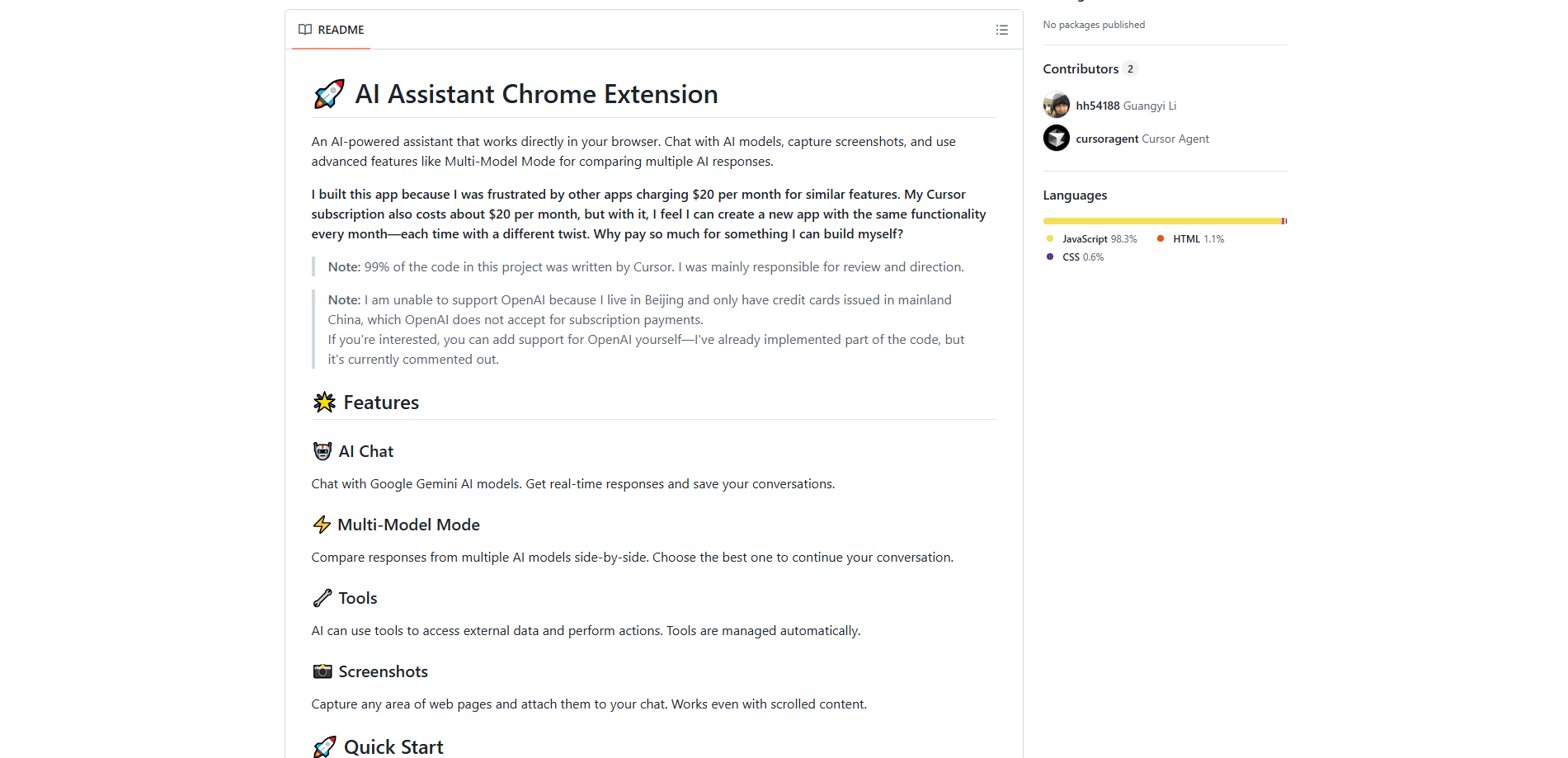
Open Source AI Chrome Extension is a self-hosted browser assistant that puts Gemini, GPT, and Claude into a side panel so you can chat, analyze screenshots, and compare answers without leaving the page. It's free and MIT-licensed, but you run the backend yourself and bring your own API keys.
About Open Source AI Chrome Extension
What Is Open Source AI Chrome Extension
Open Source AI Chrome Extension is a Chrome browser AI assistant that runs a local backend and talks to the AI models you already pay for. Instead of charging a monthly fee, it hands you the source code and lets you wire in your own Gemini, OpenAI, or Notion credentials.
The project started because its developer got tired of paying around $20 a month for browser chat tools he figured he could rebuild himself with the same features. Much of the code was written with Cursor, with the author handling review and direction. It's MIT-licensed, so you can read it, fork it, and change it.
The catch is setup. This isn't a one-click install from the Chrome Web Store. You need Node.js, a terminal, and at least one API key before the extension does anything useful. That's a dealbreaker for most casual users.
Getting Started
- Install Node.js v16 or higher and open the project folder in a terminal.
- Run
npm installinside both thebackendandchrome-extensionfolders. - Copy
env.exampleto.envin each folder and paste in your API keys. A Google Gemini key is required; OpenAI, Notion, and Firecrawl keys are optional. - Start the backend with
npm run dev, then build the extension withnpm run build. - Open
chrome://extensions/, turn on Developer Mode, click "Load unpacked," and select thechrome-extension/distfolder.
Product Information
A quick look at Open Source AI Chrome Extension's pricing, supported platforms, and performance.
Best for
The users, tasks, and scenarios where this tool fits best.
Users
- Developers who want to inspect and modify their browser AI tool instead of trusting a closed extension
- Privacy-minded users who'd rather route requests through their own backend and API keys
- Tinkerers comparing how Gemini, GPT, and Claude answer the same prompt
Tasks
- Chat assistance
- Screenshot analysis
- Multi-model comparison
- Tool use
Scenarios
- Reading long documentation and asking follow-up questions on the same tab
- Capturing a chart or error message and asking the AI what it means
- Testing which model handles a coding or writing prompt better before committing to one
Key features
Multi-Model Mode
You can send one prompt to several models at once and see their answers next to each other. Pick the response you like and keep chatting with that model. Which AI handles your question best? You find out in seconds. It's the fastest way to learn which model fits your work.
Screenshot Capture and Analysis
Grab any region of a web page and attach it to your chat. The capture handles scrolled content, so long pages don't break it. Handy when you want the AI to read a chart, a receipt, or a stack trace you can't easily copy.
Gemini Chat With Saved History
The core experience is a chat panel powered by Google Gemini, with conversations you can save and revisit. Gemini is the required model, so this works even if you never touch the optional integrations.
Tool Use for External Data
The assistant can call tools to fetch outside data and act on it, and the project manages those tools automatically. That means the AI isn't limited to what it already knows when a task needs current information.
Bring-Your-Own-Key Architecture
There's no shared account or subscription. You supply your own Gemini, OpenAI, Notion, or Firecrawl keys, and the local backend holds them. Your usage bills go straight to whichever provider you chose.
Optional Notion and Firecrawl Integrations
If you use Notion or Firecrawl, you can connect them for note-taking or web scraping workflows. Both are optional, and the extension runs fine without them.
Pros and cons
Pros
- Free and MIT-licensed, with full source you can read, fork, and self-host
- Works with multiple model providers instead of locking you to one
- Multi-model side-by-side comparison is built in, not bolted on
- Screenshot capture handles scrolled pages, which trips up many screenshot tools
Cons
- No Chrome Web Store listing, so installing means building from source
- You need Node.js and comfort with a terminal before anything works
- OpenAI support is partly stubbed out and commented off, so GPT access needs manual work
- You pay each AI provider separately and manage your own API keys
Frequently asked questions
Yes. The extension is free and MIT-licensed, and there's no subscription. You still pay your AI providers for API usage, so your real cost depends on how much you chat.
Related content
Explore related tools, skills, and articles for Open Source AI Chrome Extension.
Open Source AI Chrome Extension Alternatives
BinkBink
BinkBink · OtherBinkBink is a free online game platform and AI game maker that lets anyone turn a short text description into a playable browser game. You can jump into hundreds of community-made games. Or describe your own idea and play it in seconds, then share it with friends. Want to create your own game? You don't need to code. No engine setup, no download, no hassle.

Audiogen
Audiogen Inc. · OtherAudiogen is an AI music generator built by Audiogen Inc., a small research team that spent about 2.5 years training its own generative music model and designing a web interface around it. Instead of a plain text box, this AI music tool turns the timeline into a beginner-friendly Generative Audio Workstation, or GAW, where inpainting, extending, remixing and stem editing work more like painting on a canvas. The product is still in beta, so access runs through a waitlist or an invite. Paid plans aren't published yet.

Aiml API
AIMLAPI OÜ · OtherAiml API is a unified AI model API that puts more than 1000 models from OpenAI, Google, Anthropic, and others behind one endpoint and one bill. You write code against a single OpenAI-compatible schema, then switch between chat, image, video, and audio models by changing a model string. It suits developers and small teams who want multi-model access without juggling a dozen separate provider accounts, and it removes the usual billing headache that comes with testing several vendors. One key covers it all.