

Open Source Alternative Finder
John Ogoina · Other
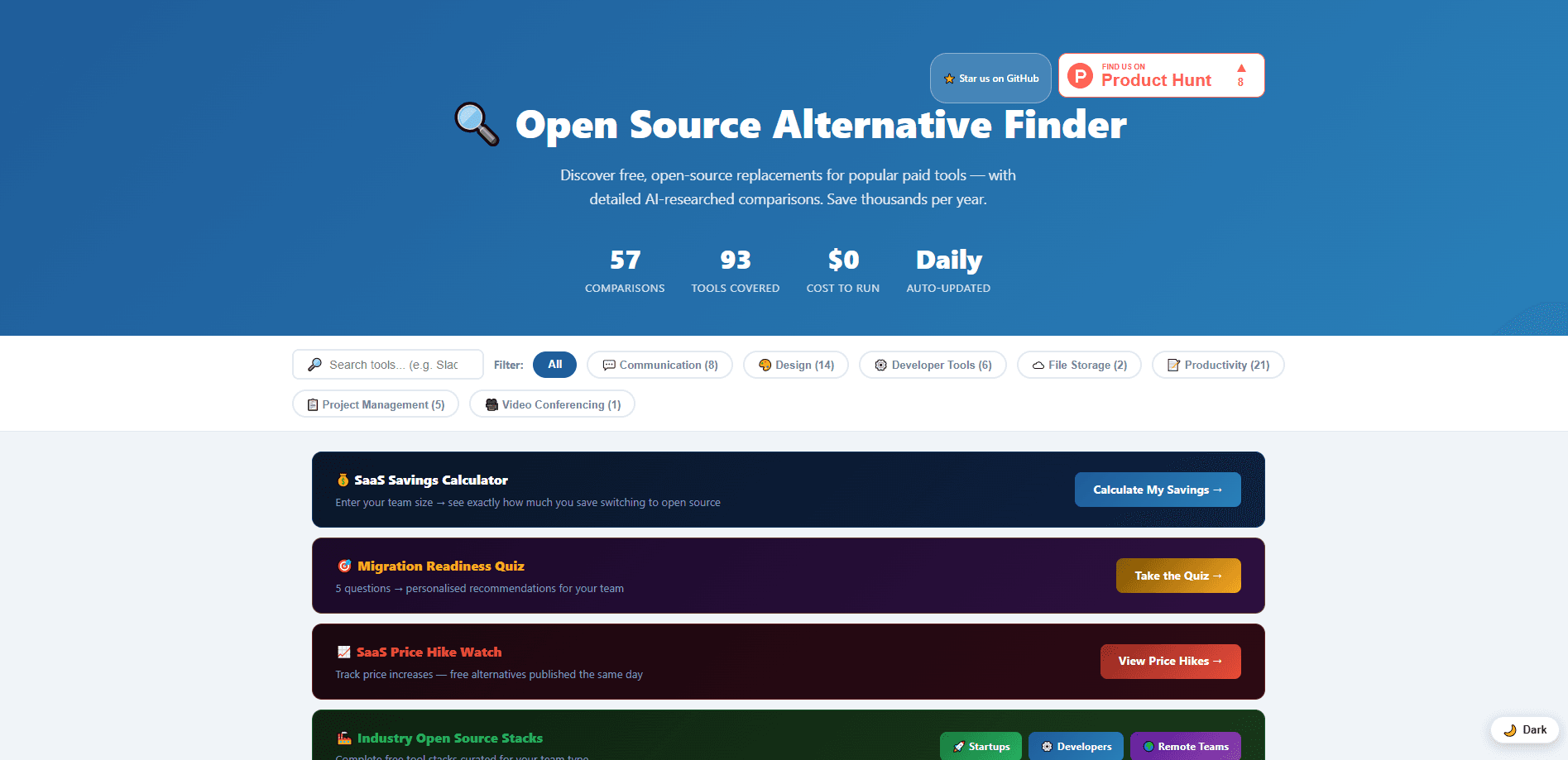
Open Source Alternative Finder (OSALFinder) is a free open source tool directory that pairs popular paid SaaS tools with open source alternatives you can adopt instead. Every comparison lists pricing, self-hosting difficulty, migration steps, and an estimated cost saving, so you can judge whether a switch is worth the effort. It covers 60+ tool pairs across communication, productivity, developer tools, design, and project management, and it rebuilds its data daily.
About Open Source Alternative Finder
What Is Open Source Alternative Finder
Open Source Alternative Finder is a comparison site for teams that want to cut recurring software bills. You search a paid tool you already pay for, such as Slack, Notion, or Figma, and the site shows open source replacements like Element, AppFlowy, or Penpot side by side.
It's built and maintained by a single developer, John Ogoina, and the whole thing runs on free infrastructure. A GitHub Actions pipeline scrapes live data every day at 6 AM UTC, then AI turns that data into readable comparison pages. That setup matters to you. Pricing and star counts refresh daily instead of going stale.
The honest limitation: no human reviews each page before it goes live. Quality control sits in the prompt design and the structured data, not in editorial oversight, and mistakes get corrected after someone reports them.
Getting Started
- Open osalfinder.com and browse the comparison list or use it to look up the paid tool you currently pay for.
- Check the "Switch and save" figure on each card to see the monthly cost difference between the paid tool and its open source match.
- Open a comparison page to compare pricing, features, self-hosting difficulty, and the migration steps.
- Read the disclosed affiliate status and the migration path before committing, so you know what an import actually involves.
- Pick your alternative, then follow the setup method listed for it, whether that's a cloud sign-up, Docker, or a self-hosted install.
Product Information
A quick look at Open Source Alternative Finder's pricing, supported platforms, and performance.
Best for
The users, tasks, and scenarios where this tool fits best.
Users
- Small teams watching cloud spend
- Solo developers and founders
- IT and ops staff evaluating migrations
Tasks
- Finding free alternatives to paid software
- Estimating SaaS cost savings
- Planning a self-hosted migration
Scenarios
- Reviewing a stack before renewal
- Early project research
- Cutting costs on a side project
Key features
Daily-Refreshed Comparison Data
The site rebuilds every 24 hours through a GitHub Actions pipeline that runs at 6 AM UTC. It scrapes live GitHub star counts, recent commit activity, and community signals for each tool, so the comparison you read reflects current project health rather than training data that could be a year old. Pricing tables pull from official sources and update on the same daily cycle.
Stated Cost Savings per Tool
Every comparison card shows a "Switch and save" figure, like Slack's $7.25-$15 per user per month dropping to free when self-hosted. That number is the fastest way to see whether a switch is worth your time. It's the headline feature. It's what separates this from a plain list of open source projects.
Self-Hosting Difficulty Ratings
Each tool carries a hand-coded difficulty score on a 1-5 scale, along with a setup method and a time estimate. If you've never deployed a Node app or stood up a Docker container, that rating tells you roughly what you're signing up for. It's the detail most alternative lists skip. Not minor. It's the part that decides whether you finish the migration.
Migration Steps and Import Formats
Comparison pages include migration paths that name real tools and real import formats, not vague guidance to "export your data." If a move from Notion to AppFlowy has a clean import route, the page should say so. Where the path is rough, that's worth knowing before you start.
Open, Machine-Readable Data
Beyond the web pages, every comparison is published as structured, machine-readable data. Developers can pull that dataset into their own tooling, build their own reports, or run analysis without scraping the site. The source code behind the whole project is open too.
Breadth Across Common Tool Categories
The directory spans communication, productivity, developer tools, design, file storage, video conferencing, and project management. Coverage runs from Slack, Discord, and Microsoft Teams in chat to Figma in design and Jira, Trello, and Asana in project management. That range is wide. Most teams will find at least a few of their paid tools on the list, which makes the directory useful even if you're only checking one or two. It's a quick way to see where your stack could shrink. So which pairs show up most? Slack, Notion, GitHub, Figma, and Jira all have several matches, and each page rates how hard the switch is.
Pros and cons
Pros
- Free to use, with the whole project running on open infrastructure and its source code published.
- Data refreshes daily, so pricing and GitHub activity stay current instead of going stale.
- Cost savings and self-hosting difficulty are shown up front, which speeds up decisions.
- Covers 60+ tool pairs across the categories most teams actually pay for.
- Migration steps reference real tools and import formats.
Cons
- No human reviews each page before publishing, so errors can appear until someone reports them and they get corrected.
- Pages are generated by AI, which means smaller details can drift even when the underlying data is accurate.
- Coverage is still growing, so a niche or industry-specific paid tool may not have a match yet.
- Affiliate links appear on some pages, so it's worth reading the disclosed status before you take a recommendation at face value.
Frequently asked questions
Yes. The site is free, requires no account, and runs at $0/month on free infrastructure. The source code is open. The comparison data comes in machine-readable form too.
Related content
Explore related tools, skills, and articles for Open Source Alternative Finder.
Open Source Alternative Finder Alternatives
BinkBink
BinkBink · OtherBinkBink is a free online game platform and AI game maker that lets anyone turn a short text description into a playable browser game. You can jump into hundreds of community-made games. Or describe your own idea and play it in seconds, then share it with friends. Want to create your own game? You don't need to code. No engine setup, no download, no hassle.

Audiogen
Audiogen Inc. · OtherAudiogen is an AI music generator built by Audiogen Inc., a small research team that spent about 2.5 years training its own generative music model and designing a web interface around it. Instead of a plain text box, this AI music tool turns the timeline into a beginner-friendly Generative Audio Workstation, or GAW, where inpainting, extending, remixing and stem editing work more like painting on a canvas. The product is still in beta, so access runs through a waitlist or an invite. Paid plans aren't published yet.

Aiml API
AIMLAPI OÜ · OtherAiml API is a unified AI model API that puts more than 1000 models from OpenAI, Google, Anthropic, and others behind one endpoint and one bill. You write code against a single OpenAI-compatible schema, then switch between chat, image, video, and audio models by changing a model string. It suits developers and small teams who want multi-model access without juggling a dozen separate provider accounts, and it removes the usual billing headache that comes with testing several vendors. One key covers it all.