

OpenAI Text To Speech WebUI
Focus Gulf · Other
OpenAI Text To Speech WebUI is a free browser frontend for the OpenAI TTS API. Paste text, pick one of six voices, and export natural speech in 57 languages using your own API key.
About OpenAI Text To Speech WebUI
What Is OpenAI Text To Speech WebUI
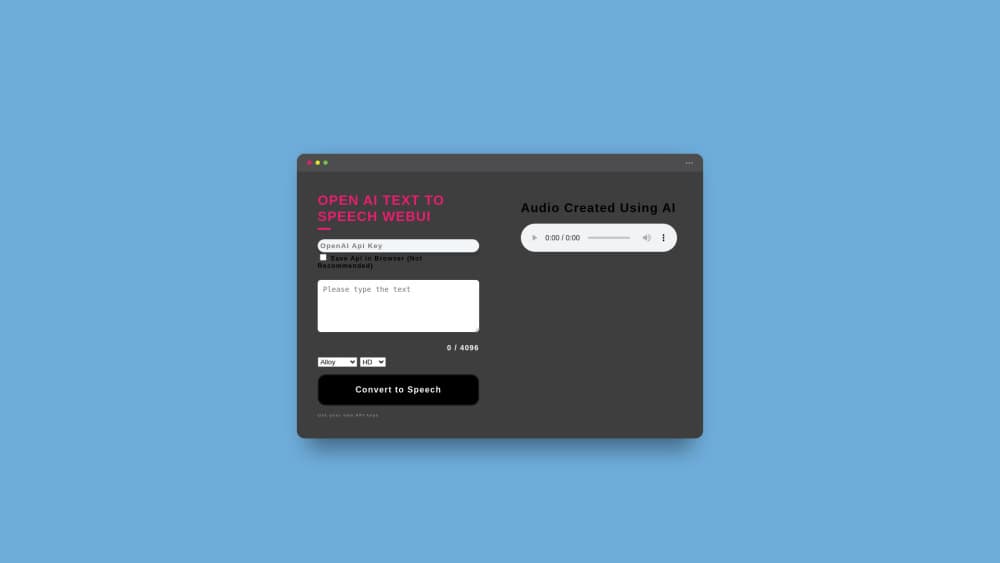
It's one page with a text box. You bring an OpenAI API key, paste your script, choose a voice and a quality setting, then press Convert to Speech. The browser calls OpenAI directly and hands back an audio file you can download.
The tool exists because of a small, specific problem. Its author needed voiceover for a product video, found most TTS services either flat sounding or pricey, and picked OpenAI's API as the cheap option that still sounded human. Instead of paying for another subscription, they built a form around the API and put it online for anyone to use.
The limits are worth knowing before you start. You need a funded OpenAI account, so "free" means the interface is free, not the audio. Each request stops at 4,096 characters, the interface has no timeline, no music bed, and no pitch control. It reads text aloud. That's the entire job, and it does that job without clutter.
Getting Started
- Create an API key at platform.openai.com/api-keys and make sure the account has credit. OpenAI bills per character, so a few dollars covers a lot of script.
- Open focusgulf.com/aispeechwebui in any modern browser. There's nothing to install and no account to create on the site.
- Paste the key into the API field. Leave the Save Api in Browser box unchecked unless you're on a device nobody else touches.
- Type or paste your text. The counter under the box shows how much of the 4,096 character budget you've used, then pick Alloy, Echo, Fable, Onyx, Nova, or Shimmer and set quality to High or HD.
- Press Convert to Speech. The audio plays in the page and you can save the file from the player or your browser's download prompt.
Product Information
A quick look at OpenAI Text To Speech WebUI's pricing, supported platforms, and performance.
Best for
The users, tasks, and scenarios where this tool fits best.
Users
- Solo content creators
- Podcasters and video editors working from scripts
- Language learners and teachers
Tasks
- Narrating short videos
- Turning blog posts into audio
- Building rough cuts before hiring a voice actor
- Practicing pronunciation in another language
Scenarios
- A one-off voiceover when a subscription isn't worth it
- Testing a script out loud before recording
- Checking OpenAI voice quality before wiring the API into a product
Key features
Six voices with different personalities
Alloy, Echo, Fable, Onyx, Nova, and Shimmer are the six options in the dropdown. Six is enough to make it a practical AI voice generator for a one person channel, and picking between them takes a minute of listening. Onyx and Echo read lower and steadier, which suits documentary narration, while Nova and Shimmer lean brighter for ads and explainers.
High and HD quality settings
The model switch maps to tts-1 and tts-1-hd. High returns audio fast and costs half as much, which is fine for previews and social clips. HD voices sound cleaner on long passages and handle pacing better, and you pay roughly double for the upgrade.
A 4,096 character ceiling that keeps things predictable
The counter under the text box tracks your remaining budget as you type. It's a hard stop, not a suggestion, so long articles need splitting. For most short form work the limit never comes up, and for audiobook style projects it sets a natural chapter size.
Your own OpenAI API key, nothing in the middle
Requests go from your browser to OpenAI, so the site never handles your billing or stores your audio. That also means there's no credit markup and no monthly fee. The Save Api in Browser option exists for convenience, and it keeps the key in local storage, which is a real risk on a shared machine.
57 languages from one text box
The interface doesn't ask you to pick a language. It infers one from the text you paste, which works well for French, Japanese, Hindi, Turkish, Swahili, and dozens more. Mixed language paragraphs can confuse it, so keep each request in a single language.
Runs in the browser with nothing to install
There's no app, no extension, and no signup. That makes text to speech online workable on a locked down laptop, a Chromebook, or a borrowed machine. It also means the page depends on your connection and on OpenAI's service being up, since every conversion is a live API call.
Pros and cons
Pros
- Costs nothing beyond what OpenAI charges, with no subscription, no credits, and no upsell.
- Six voices across two quality levels cover narration, ads, and scratch tracks in one page.
- 57 languages with no setup, which is useful when you need the same line in several markets.
- The interface is a single form, so the first conversion takes under a minute.
- Nothing installs and no account is created on the site, which keeps it usable on managed devices.
Cons
- You must have a funded OpenAI API key, and that signup plus billing setup is the real barrier for casual users.
- The 4,096 character cap forces you to split long scripts and stitch the files back together yourself.
- There's no editing beyond text: no speed control, no emphasis tags, and no way to fix a single mispronounced word without regenerating the whole clip.
- Audio quality and language coverage are whatever the OpenAI TTS API offers that day, so a model retirement changes your output without warning.
Frequently asked questions
The web interface is free. The audio isn't, because every conversion uses your own OpenAI API key and OpenAI charges per character. Budget roughly $15 per million characters on the standard model and $30 per million on HD.
Related content
Explore related tools, skills, and articles for OpenAI Text To Speech WebUI.
OpenAI Text To Speech WebUI Alternatives

JarvisCore
Prescott Data · Coding · Productivity · OtherJarvisCore is an open source Python runtime where AI agents work as equal peers on an agent mesh, claim tasks from a shared ledger, and reach external services through a zero-trust broker.
Clef
Cloudflare · Business · OtherClef is Cloudflare's open-source decision model for Workers AI. It returns calibrated probabilities for typed questions, not generated text, so agents can classify, route, and act fast.

iFixAi
iFixAi · Business · OtheriFixAi is an open-source auditor for AI agents. It runs your agent through a simulation of your business, grades every reply, and returns an A to F scorecard backed by evidence.