

OpenCharm
OpenCharm Labs · Voice & Language · Coding · Productivity
OpenCharm is an open-source AI agent companion that gives the agent you already run a glyph face, a voice and one key, on a Mac, a Windows PC or a $32 ESP32 board.
About OpenCharm
What Is OpenCharm
OpenCharm is a body for an agent that already exists. It ships no model and answers nothing on its own. What it adds is a face you can read from across a desk, a speaker that says one clear sentence, and a key you can find without looking. The agent keeps its own memory, skills and model. OpenCharm is the part that was missing.
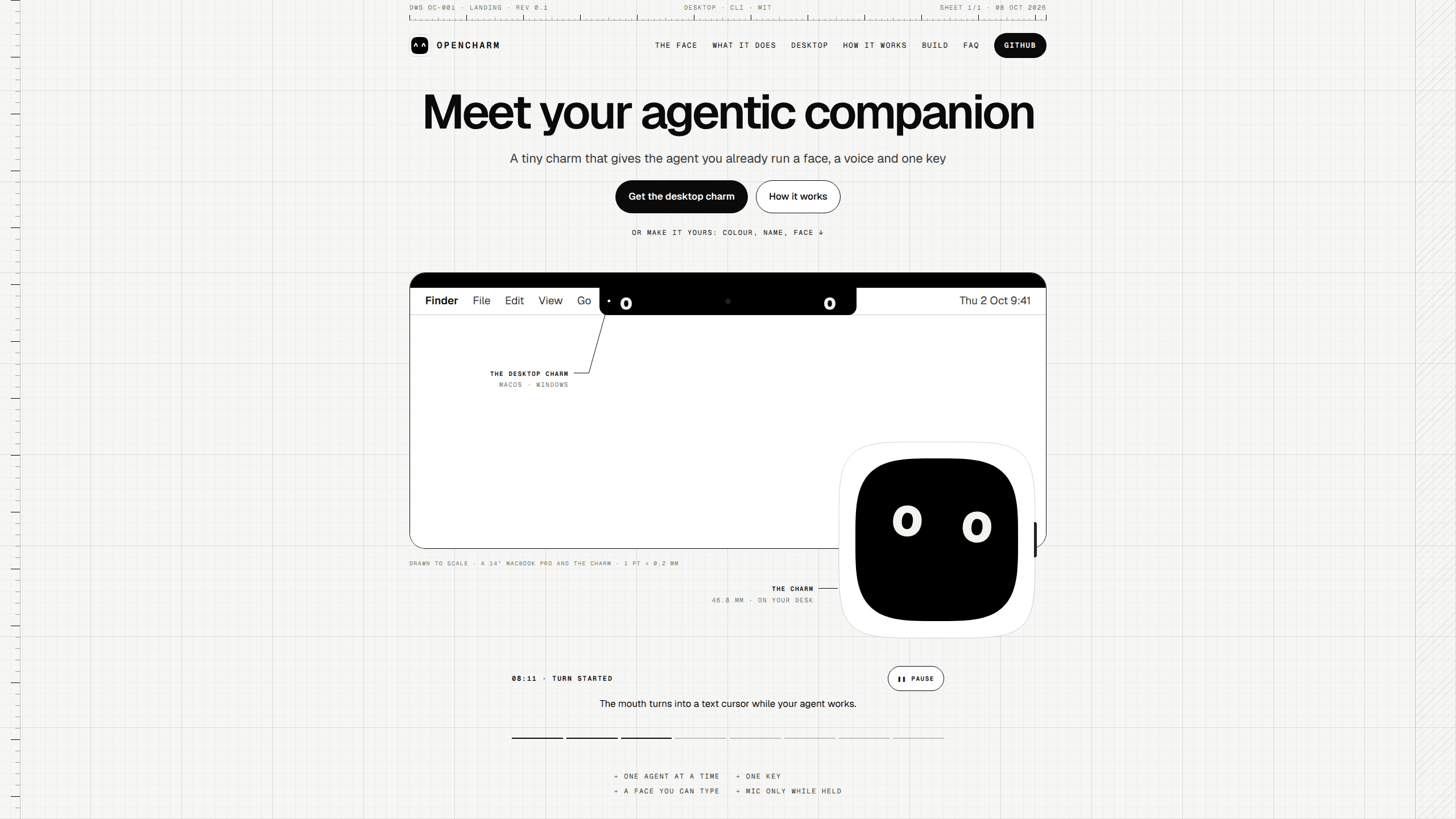
The software is MIT licensed and comes in two shapes. The desktop charm runs at the top of a Mac or Windows screen, next to the notch on a Mac and as a small black pill on Windows. The same code runs as firmware on a Waveshare ESP32-S3-Touch-AMOLED-2.16 board, which you buy and flash yourself for about $32.
A small daemon called charmd sits next to your agent. It handles pairing, the PIN, speech and the charm's own tools, then hands your request to the agent and brings back answers and questions. The connection goes through ACP, the Agent Client Protocol, so Claude Code, Codex, Gemini CLI, goose, Hermes Agent, OpenClaw and any other ACP client can drive it. An OpenAI-compatible server works too.
The limits are worth knowing before you start. OpenCharm does nothing useful without an agent installed and running, so the setup is real work. The board arrives as parts, not a finished gadget, and the project offers no warranty. The desktop build is signed with the project's own certificate rather than an Apple Developer ID, which means macOS asks you to confirm each new download. The code is also young: the first public release landed in October 2026 and version numbers are still in the 0.x range.
Getting Started
- Install the desktop charm from GitHub Releases, or buy the Waveshare board with a battery and flash OpenCharm OS over USB. Save the factory firmware first so you can restore it.
- Open Settings and pick the folder your agent works in, then pick the agent itself: an ACP preset, a custom ACP command, or an OpenAI-compatible server. The desktop app starts its own charmd and pairs by itself.
- On the board, choose Add a charm, enter your Wi-Fi from your phone, read the code on its screen, and set a PIN. Five wrong tries block the device until you unlock it from your computer.
- Hold the talk key and say hello. On a Mac the default is Option plus Space, on Windows it is Ctrl plus Alt plus Space, and both can be changed.
- Pick a voice: the local Mac voice, OpenAI or ElevenLabs with your own key, or none at all. After that, edit the text files in the workspace or add MCP servers when you want more from it.
Product Information
A quick look at OpenCharm's pricing, supported platforms, and performance.
Best for
The users, tasks, and scenarios where this tool fits best.
Users
- Developers who leave Claude Code or Codex running for hours
- People who would rather speak a request than type it
- Makers with a 3D printer and a spare evening
Tasks
- Starting a long task and walking away
- Approving what an agent wants to do
- Asking a quick question mid-task
- Keeping an eye on spend
Scenarios
- A desk with the phone face down
- An agent on a home server that never sleeps
- A shared workspace or a kitchen counter
Key features
A Face Made of Typed Glyphs
Two characters for eyes and one for a mouth, drawn on a black screen. That is enough for 22 moods across 13 agent states: listening while you hold the key, thinking when a turn starts, working during a tool call, needs you on an approval, done when a turn completes, stuck after three tool errors in a row, failed, learned when a skill is created, noted on a memory write, cost when a budget limit passes, asleep, and idle. Because each face is text, anyone can write a new one and share it.
One Key, Three Moves
Hold the key to talk and the microphone opens, then closes the moment you let go. Press it for everything else: wake the charm, stop it talking, dismiss a message, or answer no. Tap the face and it reacts. When the ring turns orange, holding means yes. On the desktop charm the key is Option plus Space on a Mac and Ctrl plus Alt plus Space on Windows, and you can remap it. There is no wake word and no gesture to learn.
charmd Keeps Your Agent in Charge
charmd is a small daemon that runs next to your agent, on a laptop, a Mac mini or a server. It handles pairing and the PIN, speech on your machine or through your own OpenAI or ElevenLabs key, and the tools the charm offers to your agent. The charm itself holds no API keys and stores no PIN, only hashes. Pairing works one agent at a time, so the face always belongs to a single session.
Same Build on Mac, Windows and a Desk Board
The desktop charm puts the eyes on either side of the notch, with a panel that opens underneath for captions and questions. On Windows the same thing sits in a black pill at the top center of the screen. The app is about 4 MB and uses roughly 2% of one core at rest, which matters for something that never closes. The board runs the same OpenCharm OS, written in C++.
Three Levels of Making It Yours
The first level needs no code. Who the charm is, what it knows and the skills it can run are text files in the workspace, and you can ask your coding agent to rewrite them. The second level adds MCP servers and exposes five built-in tools: show_face, ask, notify, say and set_look, so an agent can pick its own expression. The third level is the firmware, a C++ core built with ESP-IDF and tested in an emulator before it reaches the board.
Hardware You Build in an Evening
Most AI agent hardware arrives sealed. This is a ready-made Waveshare ESP32-S3-Touch-AMOLED-2.16 with a 2.16 inch 480 by 480 AMOLED screen, two microphones, a speaker amp, a battery and a case, listed at $31.99. Back up the factory firmware, flash OpenCharm OS over USB, then pair it in about five minutes. A printed shell adds about $1 and a phone strap about $2, so the whole thing lands between $32 and $35.
Pros and cons
Pros
- The price is hard to argue with. About $32 of parts buys a desktop companion, against $699 plus a monthly fee for the Humane AI Pin and $199 for the Rabbit R1.
- Everything that matters runs on your machine. The agent, charmd, the memory and the model stay local, and the code is yours under the MIT license.
- If the project stops, nothing bricks. There is no vendor cloud in the loop, so a dead company leaves you with working software and a board you can reflash.
- Privacy is designed into the key. The microphone opens only while you hold it, there is no camera, and the charm cannot open the mic on its own because the rule lives in the firmware.
- It works with the agent you already trust instead of replacing it. Claude Code keeps its skills, its memory files and its model, and the charm becomes its eyes and voice.
Cons
- It cannot do anything alone. Without Claude Code, Codex or another supported agent running, the charm is a face that blinks and nothing else.
- macOS treats each download as unsigned. The app uses the project's own certificate, not an Apple Developer ID, so every update needs the Open Anyway step.
- Voice replies leave your machine by default. Microsoft's free voices mean the text of each spoken answer goes to Microsoft, and keeping it local means using the Mac voice or paying OpenAI or ElevenLabs.
- Building the hardware is on you. You source the board, back up the firmware, flash over USB and print the shell, and the software comes with no warranty.
Frequently asked questions
OpenCharm is an open-source body for an AI agent you already run. It adds a face made of typed glyphs, a voice and one physical key, either as a desktop app on macOS and Windows or as firmware on a small ESP32-S3 board. It is not a new assistant and holds no model of its own.
Related content
Explore related tools, skills, and articles for OpenCharm.
OpenCharm Alternatives

Foley
Hanamori Labs, LLC · Voice & Language · Productivity · AI AssistantFoley is a voice to-do list that turns a spoken sentence into a filed task, complete with project, date and time, then helps you plan the day around what is already there.

HireKey
HireKey · Voice & Language · Productivity · LeaningHireKey is an AI job search copilot built by a former tech recruiter. It checks role fit, tailors resumes, runs interview practice and tracks every application.

Fluence
Yay Software (Yannick Huchard) · Writing · Voice & Language · ProductivityFluence is an Android app that reads PDFs, EPUBs, Word files and web articles aloud, follows each sentence as it speaks, and answers questions about the text on the phone itself.