
OpenCode Superapp
OpenCode Superapp · Coding
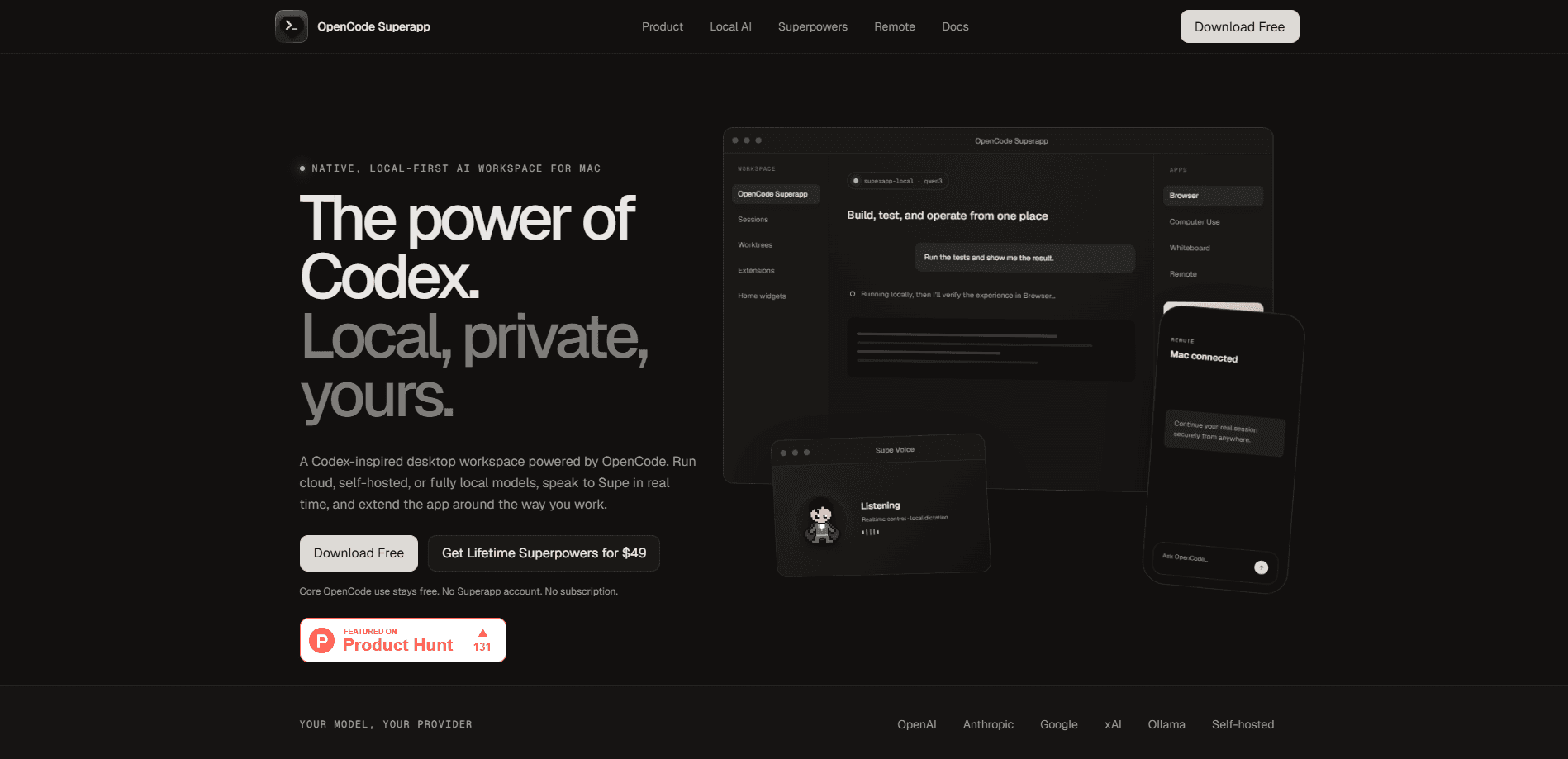
OpenCode Superapp is a native, local-first AI workspace for desktop machines that turns the OpenCode coding agent into something closer to a full app. You bring your own models, whether that's a cloud provider like OpenAI or Anthropic, a self-hosted endpoint, or local AI models running entirely on your machine through the built-in Ollama engine. Projects, files, Git, terminals, search and extensions all live in one window, and extras like voice control, browser automation and computer use ship free rather than behind a paywall.
About OpenCode Superapp
What Is OpenCode Superapp
OpenCode Superapp is a desktop application built around the open-source OpenCode runtime. Where the command-line version of OpenCode gives you an agent and a prompt, this AI coding workspace gives it a home: a native window on macOS, Windows or Linux with projects, parallel sessions, file browsing, Git tools, worktrees and terminals arranged so you can actually watch an agent work instead of staring at raw output.
The pitch is control. You keep provider credentials in your own local OpenCode configuration, and the app never asks you to create a Superapp account. If you want privacy, install the app-managed Ollama engine and point it at local AI models you already have stored. If you want raw speed from a frontier model, plug in a cloud key instead. Switching between them per task is meant to be normal, not a workaround.
There are limits worth knowing up front. It's desktop only, so there's no web version to open in a browser tab. No browser tab, no web app. The iOS and iPadOS companion is a public beta, and it pairs with the app on your Mac rather than running standalone. Remote access to a running session is a paid one-time purchase, not part of the free core. And because everything runs through your own providers, your output quality depends on the model and key you supply.
Getting Started
- Download the installer for your system from the official site and install it, or grab the TestFlight beta on iPhone and iPad.
- Launch the app and choose or create a project folder to work in.
- Connect a model provider. Add a cloud key in OpenCode settings, attach a self-hosted endpoint, or install the built-in Ollama engine for local models.
- Open a session and describe what you want built, tested or fixed, then watch the agent run tools, edit files and report back.
- Add extensions, skills or widgets once the basics feel comfortable, and publish your own Home widget if you want a custom layout.
Product Information
A quick look at OpenCode Superapp's pricing, supported platforms, and performance.
Best for
The users, tasks, and scenarios where this tool fits best.
Users
- Developers who want agentic coding on a desktop app instead of a terminal, with projects, Git and terminals in one native window.
- Privacy-minded coders who'd rather run models locally through Ollama than send code to a cloud provider.
- Tinkerers who enjoy shaping their tools, since extensions, skills, MCP services and custom Home widgets are all supported.
Tasks
- Writing and refactoring code across a real project
- Running tests and verifying results
- Automating desktop chores
Scenarios
- Working offline on a plane or in a locked-down environment where cloud calls aren't allowed, using local models.
- Continuing a long coding session from your phone while away from the desk, through the beta iOS companion and the optional Remote purchase.
- Keeping several threads going at once across parallel sessions while you review one and let another run.
Key features
Provider Freedom Across Cloud, Self-Hosted and Local
The app runs whatever OpenCode supports. That's the point. You can swap between a cloud model from OpenAI, Anthropic, Google or xAI, your own OpenAI-compatible endpoint, and a model living on your machine, choosing per task. Your credentials stay in your local OpenCode config, so nothing routes through a Superapp account. Few tools in this space let a local-first AI workspace mix cloud and on-device models this freely.
Built-In Local AI With Ollama
Instead of making you run a separate server, OpenCode Superapp ships an app-managed Ollama engine. It discovers models you already have in your local library and serves them over a private loopback endpoint. Removing the engine later leaves your model library untouched. That makes trying local AI a low-risk experiment.
A Real Desktop Workspace
This is where the Superapp part earns its name. Projects, parallel sessions, a file browser, Git tools, worktrees, terminals, search and configuration all sit in one window. No tab juggling. You stop switching between a terminal, an editor and a browser because the agent's work happens in the same place you review it.
Extensions, Skills and MCP Services
You can extend the workspace with commands, right-panel apps, Skills, MCP services, resources and local extension packages. That turns the app from a fixed tool into something closer to a small platform you assemble around the way you actually work. Add what you need. Leave the rest alone.
Build Your Own Home Widgets
You can ask the agent to create a Home widget, watch it in a live preview, and publish it once you're happy. It's a small thing that matters if you like your tools laid out a certain way, and it needs no separate development setup. Just describe it and ship it.
Browser Automation and Native Computer Use
The agent can inspect and operate a real web experience inside the in-app browser, and it can drive native desktop apps through guarded tools. Both are included free, which is unusual next to apps that gate automation behind higher tiers. Free here, not tier-gated.
Supe Voice and Local Dictation
Supe is the assistant you talk to in real time, and you can speak to it to create, message, monitor and open durable OpenCode tasks. Local dictation runs multilingual speech recognition on your computer, so you can compose prompts by voice without shipping audio to a third party.
A Workspace You Can Personalize
You get 21 app icons and can tune Supe with presets, colors, outfit details and placement. It's cosmetic, sure, but a tool you use daily should feel like yours rather than a generic shell.
Pros and cons
Pros
- Core OpenCode use and the local Superpowers stay free permanently, with no Superapp account and no subscription.
- Genuine provider choice, including fully local models through the bundled Ollama engine, which suits privacy-conscious and offline work.
- A proper native desktop workspace that keeps projects, Git, terminals and the agent's output in one window.
- Browser automation, computer use, dictation and voice are all in the free tier rather than upsells.
- Extensions, skills, MCP services and custom widgets make it adaptable instead of locked down.
Cons
- Desktop only, so anyone hoping to run it in a browser gets nothing, and the iOS companion is still a beta that needs a paired Mac.
- Remote access to a live session costs a one-time purchase, so the always-free claim only covers local work.
- Because you supply the models and keys, results vary a lot depending on what you connect, and there's no built-in model of its own.
Frequently asked questions
Yes. Core OpenCode use and the local Superpowers, including browser automation, computer use, dictation and Supe voice, are free permanently. You don't need a Superapp account or a subscription. The only paid piece is an optional one-time purchase for Remote access to a running session.
Related content
Explore related tools, skills, and articles for OpenCode Superapp.
OpenCode Superapp Alternatives
Forefront
Forefront · CodingForefront is a web platform for building with open-source AI. It lets you fine-tune leading open-source language models on your own data, evaluate how they perform, and run them through an API or export them to host yourself. Developers who want the convenience of a closed-source platform but insist on owning their models and data are the target audience here.

Startkit
StartKit.AI · CodingStartkit is a boilerplate for building AI SaaS and AI wrapper products. Think of it as an AI startup boilerplate with the boring parts already wired up: authentication, Stripe and Lemon Squeezy payments, usage limits, transactional email, and an AI API starter that talks to OpenAI, Anthropic, Groq, or Llama. You clone the repo, set your price, and start on the part of your product that people actually pay for. It's Next.js under React and Tailwind, so most of the boilerplate code already feels familiar.
Testim
Tricentis · CodingTestim is an AI-powered test automation platform for building and running end-to-end tests across web, mobile, and Salesforce applications. It leans on machine learning to keep tests stable when an interface changes, so teams spend less time fixing broken selectors. Not bad for an automated testing tool you can start using today. You create tests by recording actions in a browser, then optionally add JavaScript when you need more control. It's a solid pick for busy QA teams.