
OpenPilot
ibmshaikh · Coding · Productivity
OpenPilot is a free, MIT-licensed desktop AI agent that runs on your own model. Point it at an OpenAI-compatible API, open a folder, and it edits files, runs shell commands, and searches the web.
About OpenPilot
What Is OpenPilot
OpenPilot is an open-source AI agent harness for your laptop, built by a solo developer who publishes as ibmshaikh. It's a chat-first Electron app that runs entirely on your machine. There's no OpenPilot account, no subscription, and no hosted model to buy. You supply an API key and a project folder, and this local AI agent works inside that folder the way a junior developer would.
The point is ownership. Models change every few months, and a tool that hardcodes one provider ages badly. OpenPilot treats the model as a swappable part: paste a base URL, a key, and a model id, and the same chat, skills, and memory work with OpenAI, OpenRouter, a local Ollama server, or a gateway your company runs. The MIT license means you can read the tool loop, fork it, and ship your own build.
Three limits are worth knowing before you download it. The desktop build ships for Windows 10 and later on x64, with macOS versions announced but not out yet. Web research depends on a separate TinyFish key, so the agent stays offline for outside information until you add one. And output quality follows the model you connect, which means a small local model can scaffold a project but will struggle with a long refactor.
Getting Started
- Download the Windows installer or the portable executable from the official site, then launch the app.
- Open Settings, then Models, and paste your base URL, API key, and model id. Save it and pick the model in the composer.
- Choose a workspace folder. The agent gets filesystem and shell access inside that folder only.
- Optional: add a TinyFish API key so the web search and page fetch tools become available.
- Describe the outcome you want, then review each tool card before approving shell commands that touch sensitive files.
Product Information
A quick look at OpenPilot's pricing, supported platforms, and performance.
Best for
The users, tasks, and scenarios where this tool fits best.
Users
- Developers who already pay for an API
- Privacy-conscious teams
- People who want to audit their tools
- Solo makers on Windows
Tasks
- Scaffolding a project from a prompt
- Fixing a failing test
- Researching an unfamiliar library
- Repeating a house workflow
Scenarios
- A weekend side project
- A locked-down work laptop
- Comparing models on the same task
Key features
Bring your own LLM, switch it per chat
OpenPilot connects to any endpoint that speaks the OpenAI API, including OpenAI, OpenRouter, Ollama, LM Studio, and internal gateways. Each model entry holds a name, base URL, API key, and model id, so you can keep several configured and pick one at the composer. API keys go into Keychain on macOS and DPAPI on Windows, and nothing is sent to an OpenPilot server because the app has none.
File tools that work on a real folder
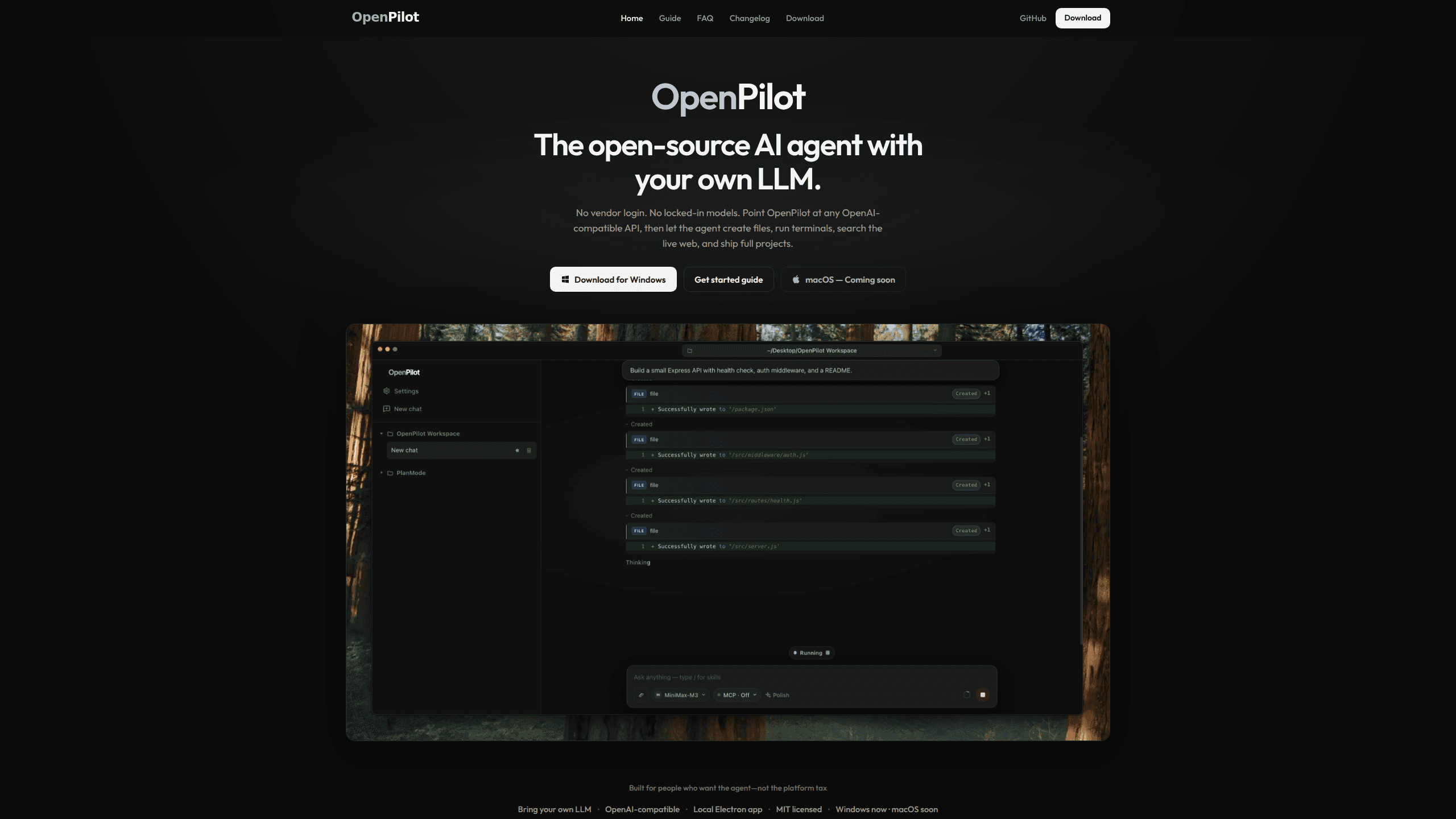
The agent reads, writes, edits, greps, and globs inside the workspace you choose. Ask for a full project and it builds the file tree in place: package.json, source files, routes, then follow-up edits. Every change appears as a tool card you can inspect, which makes a bad edit easy to catch before it spreads.
A real terminal, not a code block
Shell commands run for real, so the agent can install dependencies, start a dev server, run a test suite, and stream stdout back into the chat. Sensitive commands wait behind an approve or deny prompt. That approval step is the main guardrail: the agent has whatever access your user account has inside that folder.
Live web research through TinyFish
When the answer lives outside the repo, the web search and page fetch tools look up docs, changelogs, and error messages in real time. The agent then grounds its reply in the pages it read instead of guessing from training data. Without a TinyFish key the tools stay unavailable, and local file and terminal work is unaffected.
Skills and project memory
A skill is a reusable playbook the agent can load, invoked with a slash command in the composer. Project preferences live in AGENTS.md, so rules like "use pnpm" or "never commit .env" follow the repo rather than your memory. The agent can update that file when you ask it to remember something.
MCP servers, toggled per chat
Add a Model Context Protocol server in mcp.json, restart the app, and switch its tools on for the chat that needs them. This is how you connect a browser, a database, or an internal API without waiting for the core app to add an integration. Tokens and lifetime usage stay visible in the app, split by model.
Pros and cons
Pros
- Free and MIT licensed, with a public repo you can audit, fork, or repackage.
- No account and no vendor login, so setup is a download and an API key.
- Model choice stays open, including local servers, and switching costs one dropdown.
- Keys are stored in OS-level secure storage, and code never leaves the machine.
- File, shell, web, skill, and MCP tools sit in one chat, which cuts tab switching.
Cons
- Windows only for now: macOS builds are announced but not released, so Mac users have to wait or run from source.
- You bring the model and pay for it, so a heavy session can cost more than a flat-rate coding subscription.
- Web research needs a separate TinyFish account and key, and those tools stay dark without it.
- The project is young and maintained by one developer, so expect gaps in docs and integrations compared with funded rivals.
Frequently asked questions
OpenPilot is used to run an AI agent against a project folder on your own computer. You describe an outcome in chat, and the agent reads and edits files, runs terminal commands, looks things up on the web, and reports what it changed.
Related content
Explore related tools, skills, and articles for OpenPilot.
OpenPilot Alternatives

Base Code
Base44 (Wix) · Coding · ProductivityBase Code is a shared cloud development environment from Base44. Teammates describe changes to an existing GitHub codebase in chat, preview them live and send them back as pull requests.

Google EmbeddingGemma 2
Google DeepMind · Writing · Image · CodingGoogle EmbeddingGemma 2 is a 740M-parameter open model that turns text, code, images, audio, and video frames into vectors in one 768-dimension space, running on phones and laptops.

GitGlow
GitGlow · Coding · ProductivityGitGlow is a local-first desktop Git client that lets independent developers review their own code and their AI agents' changes in one place before shipping.