

OpenScience
Synthetic Sciences · Coding · Productivity
OpenScience is an open-source AI research workbench from Synthetic Sciences. It reads papers, writes and runs code, queries scientific databases and keeps each result's evidence in one project.
About OpenScience
What Is OpenScience
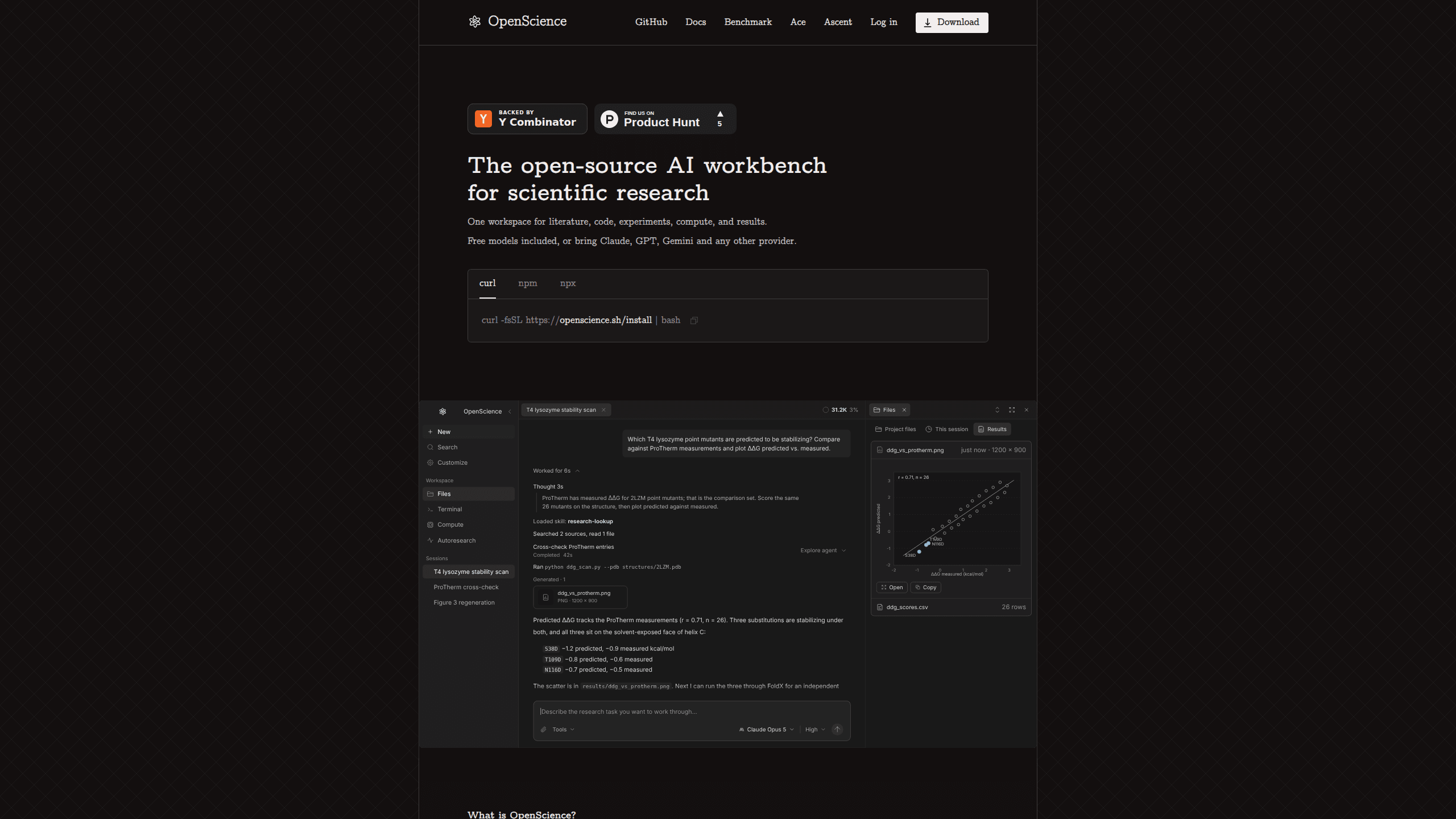
OpenScience is a workspace for running research tasks with an AI agent. You describe a question, point the agent at files or a dataset, and it searches the literature, writes Python or R, queries sources such as UniProt or PDB, and drafts the write-up. Synthetic Sciences, the company behind it, is backed by Y Combinator, describes the product as an AI co-scientist, and publishes the code under Apache 2.0.
Most AI for science tools assume one vendor's model and one hosted workflow. OpenScience starts from the other direction. Real analysis moves between a chat window, a notebook, a cluster terminal and a reference manager, and the thread from a figure back to the code that made it tends to disappear. OpenScience keeps projects, sessions, files, runs and saved results together, so a labmate can reopen the work months later and retrace how a number was produced. That is the practical side of reproducible research, and it is the reason the project keeps run history instead of only the final file.
Setup has a cost. You install a desktop app or a command line tool, and you arrange model access through your own key, a provider subscription, a local model or the paid Ace service. The documentation also asks users to read the methods and verify outputs before anything goes into a paper.
Getting Started
- Download the desktop app for macOS, Windows or Linux, or run npm install -g @synsci/openscience@latest and start the workspace from a project folder.
- Create a Synthetic Sciences account. First-run setup asks for one even when you plan to bring your own model keys.
- Choose model access in Customize → Models: Ace managed models, an API key from your provider, a ChatGPT or Claude sign-in, or a local model running on your hardware.
- Start a project and describe the task with three things: the input, the output you expect, and any limits. Attach data or reference files already in the project.
- Watch the run, check the code it executed and the sources it used, then export the report or continue in the same session.
The stronger first request names a file and a destination. Ask it to analyze data/measurements.csv, flag missing values, compare treatment groups, and save a plot plus a methods note in results/. That gives the research agent something concrete to verify against.
Product Information
A quick look at OpenScience's pricing, supported platforms, and performance.
Best for
The users, tasks, and scenarios where this tool fits best.
Users
- Graduate students and postdocs
- Computational biologists and chemists
- Research engineers and ML teams
Tasks
- Literature reviews with sources attached
- Dataset analysis and statistics
- Reproducing a published result
Scenarios
- A lab inherits a project from a student who graduated
- A group has a cluster but no in-house tooling team
- A paper draft needs a methods section
Key features
One Project for the Whole Research Loop
Each project holds sessions, uploaded files, generated files and saved results. A conversation keeps the agent's answers alongside the commands it ran, the files it read and the sources it cited. When a figure matters, you can trace it back to the session that produced it instead of hunting through old notebooks.
Model Access You Can Swap
OpenScience is model-agnostic. Ace offers a reviewed roster of 21 models from OpenAI, Anthropic, Google, xAI, Z.ai, DeepSeek, Qwen, Moonshot, MiniMax, Xiaomi, Meta and NVIDIA on managed routes. You can also plug in your own API key, reuse a ChatGPT Plus or Pro subscription, or run an open model locally. Switching routes doesn't require starting a new project.
42 Scientific Databases as Tools
UniProt, PDB, ChEMBL, PubChem and arXiv come bundled, along with 37 more sources, and the agent calls them as tools rather than asking you to paste results in. For structural work that means pulling a PDB entry, scoring mutants against measured values, and plotting the comparison in one pass.
371 Bundled Skills
The client ships with 371 skills covering biology, chemistry, physics, machine learning and scientific writing. A curated core handles the common research steps, and every skill file is readable and editable, so a lab can adapt a protocol to its own conventions or add one for an internal method.
Compute From Laptop to Cluster
The agent builds environments and can scale a job beyond the machine in front of you. Small analyses run locally; larger sweeps can go to a cluster or GPU host. That flexibility matters when a notebook prototype grows into something that needs hours of compute, and it avoids a rewrite at the handoff point.
Desktop, Browser and Terminal
The same workspace opens as a desktop app, in a browser after you start the CLI, or through a single terminal command for one-off requests. A researcher who lives in a shell and a collaborator who prefers a graphical file tree can work in the same project without exporting anything.
Pros and cons
Pros
- The code is open under Apache 2.0, so a lab can audit what the agent does, fork it, or run it without a vendor contract.
- Model choice stays in your hands, including local models for sensitive data and existing ChatGPT or Claude subscriptions you already pay for.
- The database list covers the sources most life science and chemistry projects actually cite, and they work as agent tools rather than manual lookups.
- Results keep their provenance: the generating code, inputs and run history stay attached to the artifact.
- Synthetic Sciences publishes benchmark results for Terminal-Bench Science, Terminal-Bench 4.0, BiomniBench-DA and its own OpenScience Bench, which gives you numbers to check rather than a vague claim.
Cons
- An account is required at first launch even for the open-source build, and signing in turns on session trace sharing by default. You can disable it per device, but the default deserves attention in clinical or industry labs.
- Setup assumes terminal comfort. Installing a CLI, choosing a model route and managing keys is more work than opening a chat app.
- Benchmark figures come from the vendor's own runs, and several use benchmarks the company designed. Independent replication is still thin.
- Model costs are separate from the software and vary by route, so a long agent session can cost more than expected unless you watch the wallet and set a cap.
Frequently asked questions
OpenScience is an open-source AI research workbench from Synthetic Sciences. It runs a research agent that reads papers, writes and executes code, queries scientific databases, and saves results with the evidence used to produce them. It works as a desktop app, a browser workspace or a CLI.
Related content
Explore related tools, skills, and articles for OpenScience.
OpenScience Alternatives

Base Code
Base44 (Wix) · Coding · ProductivityBase Code is a shared cloud development environment from Base44. Teammates describe changes to an existing GitHub codebase in chat, preview them live and send them back as pull requests.

Google EmbeddingGemma 2
Google DeepMind · Writing · Image · CodingGoogle EmbeddingGemma 2 is a 740M-parameter open model that turns text, code, images, audio, and video frames into vectors in one 768-dimension space, running on phones and laptops.

GitGlow
GitGlow · Coding · ProductivityGitGlow is a local-first desktop Git client that lets independent developers review their own code and their AI agents' changes in one place before shipping.