
OpusClip Captions
OpusClip · Writing · Video
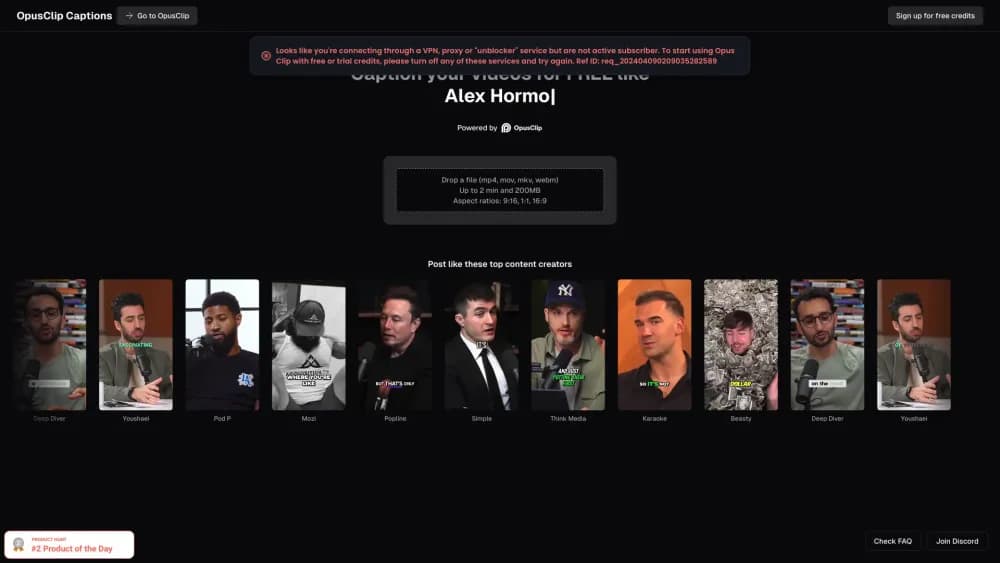
OpusClip Captions is an AI caption generator that listens to a video and writes animated, on-screen subtitles you can restyle, then export or post with the clip.
About OpusClip Captions
What Is OpusClip Captions
OpusClip Captions is the captioning side of OpusClip, the AI video clipping tool used by more than 20 million creators and businesses. It takes the audio from your video, transcribes what's said, and lays that text over the footage as animated captions already timed to the speech. You hand it a recording, and it hands back a clip where the words appear on screen without you typing a single timestamp.
The point is the time it saves. Writing subtitles by hand is slow, and most people watching short video do it with the sound off. Without captions, a clip loses those viewers in the first second. OpusClip Captions handles the transcribing pass and gives you an editor to clean up names, fix a word, or restyle how the text looks, so a clip goes out readable instead of raw.
Two limits are worth knowing. Caption accuracy tracks the audio: clean speech transcribes well, while heavy noise or thick accents can leave mistakes to fix. And the strongest caption controls, like speaker colors and custom fonts, sit on paid plans rather than the free tier.
Getting Started
- Create a free account at opus.pro with an email or a social login. The free tier works on monthly credits, so you can caption a clip before paying.
- Add a video. Upload a local file or paste a link from YouTube, Google Drive, Zoom, Vimeo, Twitch, or a public MP4 URL.
- Let the auto caption generator run. The tool transcribes the speech and places animated captions over the clip, timed to each line.
- Fix and style the captions. Correct any words it misheard, change the font, apply a template, and turn on keyword or emoji highlights.
- Export or post. Download the captioned clip up to 1080p, or publish straight to TikTok, YouTube Shorts, Instagram, and other connected accounts.
Product Information
A quick look at OpusClip Captions's pricing, supported platforms, and performance.
Best for
The users, tasks, and scenarios where this tool fits best.
Users
- Podcasters and interview hosts
- Social media creators
- Marketers and brand teams
- Coaches and educators
Tasks
- Adding captions to video without typing
- Styling subtitles to match a brand
- Captioning a talking-head clip
- Highlighting key words on screen
- Exporting captioned clips anywhere
Scenarios
- Posting an interview with subtitles
- Repurposing a weekly show
- Localizing a clip for another market
Key features
AI Caption Generation
The caption generator is the core of the tool. It listens to the audio and writes the on-screen text already timed to the speech, so you skip the step of placing every line by hand. OpusClip says the transcription runs across more than 20 languages, which matters if you post beyond one audience. You review the result rather than write it from scratch.
Animated Caption Templates
Captions come as animated templates with different fonts, colors, and motion, and you pick the style that matches the video. You can turn on auto emoji and keyword highlights so important words pop as they're spoken. Because these templates carry a feed's look, a consistent style is one choice away instead of a manual rebuild on every clip.
Speaker-Based Caption Colors
On paid plans, captions can be colored by speaker, so each voice in an interview or panel gets its own color. That turns a wall of text into a readable back-and-forth, where you can tell at a glance who's talking. For podcast and interview clips, it's one of the more useful caption controls.
Custom Fonts and Brand Templates
You can upload a custom font and build brand templates with your own colors and logo, then apply them to a batch of clips. The custom media and asset library lets you reuse those fonts and assets later. This is what makes captioned output workable for teams posting at volume, not just one-offs.
Caption Editor
A built-in editor lets you fix what the AI misheard, retime a line, or restyle the text without leaving the workspace. Auto censor for curse words is available on higher plans. Since no transcriber is perfect, a fast way to correct captions is what keeps the output publishable.
Reframing With Captions
Captions sit on top of OpusClip's AI reframe, which resizes wide 16:9 footage to vertical 9:16 and keeps a moving subject centered. Captions and framing arrive together, so you get a finished vertical short rather than a video plus a separate subtitle file. For talking-head and sports clips, that combination is what makes the result postable as-is.
Export and Publishing
You can export captioned clips up to 1080p, or send them to Premiere Pro and DaVinci Resolve on higher plans, and shareable project links let others review. A social media scheduler connects your accounts so a captioned clip can go live in one tap or queue for later. On the free tier, exports carry a watermark and a three-day limit.
Pros and cons
Pros
- Captions come generated and timed, so the slow transcription pass happens before you open the file.
- The caption editor makes fixing misheard words quick, which keeps rough audio publishable.
- Animated templates, speaker colors, and custom fonts cover everything from a personal feed to a brand account.
- Captions and vertical reframing land in the same export, so you skip stitching together two apps.
- Multi-language transcription means one clip can carry captions for more than one audience.
- The free tier lets you test the caption workflow on real clips before paying.
Cons
- The free tier runs on monthly credits and adds a watermark, so regular posting pushes you to a paid plan.
- Caption accuracy drops on noisy audio or heavy accents, which leaves cleanup work in the editor.
- The best caption controls, like speaker colors and custom fonts, are locked behind paid tiers.
- Exports are capped at 1080p, which may fall short if you need higher-resolution footage.
Frequently asked questions
OpusClip Captions is an AI caption generator that listens to your video's audio, transcribes the speech, and lays animated on-screen captions over the clip, timed to each line. You upload a file or paste a link, review the captions, restyle them, and export the captioned clip.
Related content
Explore related tools, skills, and articles for OpusClip Captions.
OpusClip Captions Alternatives

Google EmbeddingGemma 2
Google DeepMind · Writing · Image · CodingGoogle EmbeddingGemma 2 is a 740M-parameter open model that turns text, code, images, audio, and video frames into vectors in one 768-dimension space, running on phones and laptops.

MePersona
MePersona, Inc. · Writing · Productivity · MarketingMePersona is an AI unified inbox for creators. It learns your voice, drafts replies to fan messages from 12 platforms, and sends only what you approve.

Fluence
Yay Software (Yannick Huchard) · Writing · Voice & Language · ProductivityFluence is an Android app that reads PDFs, EPUBs, Word files and web articles aloud, follows each sentence as it speaks, and answers questions about the text on the phone itself.