

OutfitHuntr
ShopWiseGroup · Other
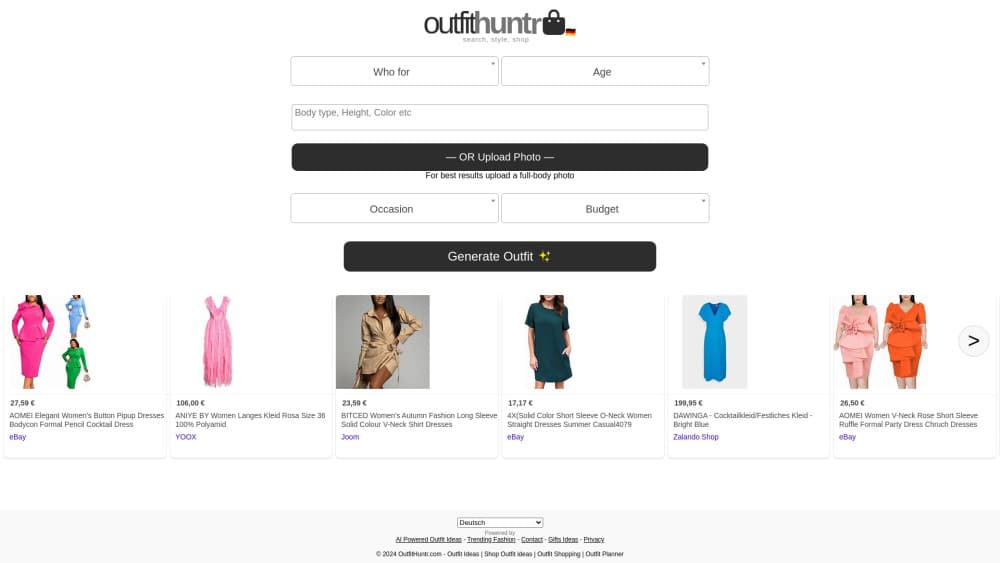
OutfitHuntr is a free AI outfit generator that turns your body type, budget, occasion and style into shoppable outfit ideas, plus a virtual try-on to preview each look.
About OutfitHuntr
What Is OutfitHuntr
OutfitHuntr is a browser-based AI stylist for the moment you stand in front of your closet with nothing to wear. You answer a short set of questions about who you're dressing, what the event is, and how much you want to spend. The tool returns complete looks, each one assembled from pieces sold by real brands and retailers, so you can shop the look instead of guessing at a shopping list.
The problem it solves is specific. Generic outfit inspiration tends to assume a body, a budget, and a climate that may not be yours. OutfitHuntr asks for body type, height, skin tone, and hair color up front, then filters results by occasion and price. Someone shopping for a job interview in a cold city gets a different answer than someone packing for a beach day.
The catch is that it dresses you from the catalog, not from your closet, so it works as a personal styling app for one-off events rather than a wardrobe system. Every look assumes you'll buy the pieces. There's no wardrobe upload, no saved profile, and no size fit data for individual retailers, so you still check measurements before checkout. The free, signup-free model also means your inputs aren't stored between sessions.
Getting Started
- Pick who the outfit is for: man, woman, boy, or girl, then set an age.
- Describe the body: body type, height, skin tone, and hair color. You can upload a full-body photo instead.
- Choose an occasion such as a wedding, a job interview, or a date night, add a style filter and a budget ceiling.
- Press Generate Outfit, then browse the results, download or share a look, or open the virtual try-on.
Product Information
A quick look at OutfitHuntr's pricing, supported platforms, and performance.
Best for
The users, tasks, and scenarios where this tool fits best.
Users
- People with a full social calendar
- Shoppers on a set budget
- Anyone who dislikes fashion rules
- Gift givers and parents
Tasks
- Deciding what to wear to a specific event
- Building a shopping list for a trip
- Previewing a look before buying
Scenarios
- The night before a wedding or interview, when there's no time to shop in person.
- Packing for a vacation with one suitcase and a fixed spend.
- A seasonal wardrobe reset, where you want new outfit ideas within a style you already like.
Key features
Personal Profile Inputs
The generator starts with four appearance fields: body type, height, skin tone, and hair color. Body type covers shapes from thin to big and tall, height runs short to tall, and skin tone spans fair to deep, which is more detail than most outfit generators ask for. Those answers steer both silhouette and color suggestions.
Photo-Based Generation
Instead of filling the form, you can upload a full-body photo and let the tool read your proportions. The site says it won't share the image, and it recommends a full-body shot for the best result. Blurry or cropped photos produce weaker matches, so a mirror shot in good light works better than a selfie.
Occasion Presets
Fifteen occasions are built in, including clubbing, a meeting, a job interview, casual, cocktails, cinema, wedding, birthday party, vacation, formal event, concert, date night, beach day, outdoor activity, and travelling. Each preset shifts the formality, fabric, and footwear expectations, so a concert look doesn't come back with a blazer.
Style and Budget Filters
Eighteen style tags let you set the aesthetic: athleisure, bohemian, classical, glam, grunge, hipster, minimalist, retro, romantic, sporty, smart casual, streetwear, trendy, vintage, plus hot and cold weather options. A separate budget field caps the spend, and leaving it empty lets the AI stylist range freely.
Shoppable Outfit Results
Every generated look lists the individual pieces with links to the retailer that sells them. This is the part that separates OutfitHuntr from a mood board: you can buy the exact shirt, not a similar one. Pieces come from mainstream brands and marketplaces rather than a single in-house label.
Virtual Try-On and Sharing
Each result has Download, Share, and Try it On buttons. Try it on places the outfit on your uploaded photo, which is the fastest way to check whether a color works on you. Download and Share are handy for group chats where friends vote on a look.
Pros and cons
Pros
- Free to use with no account, so you can test it on one event and walk away.
- Appearance inputs go beyond gender and size, which improves how relevant the outfit ideas feel.
- Fifteen occasion presets cover the events people actually search for.
- Results link to real products, turning inspiration into a shopping list you can act on.
- Virtual try-on adds a visual check that static outfit grids can't offer.
Cons
- No wardrobe upload, so it can't build looks from clothes you already own. You end up buying rather than remixing.
- No saved profile. Every visit means re-entering body details, which gets old if you use it weekly.
- Retailer links and stock change without notice, so a look you saved may lose a piece. Check availability before you commit.
- Attempts and output quality depend on the input photo. A poor full-body shot leads to suggestions that sit oddly on your frame.
Frequently asked questions
Yes. The generator runs in the browser at no cost and the site lists no paid plans, credits, or subscription tiers. You can generate outfits without entering payment details.
Related content
Explore related tools, skills, and articles for OutfitHuntr.
OutfitHuntr Alternatives

Odyssey 3
Odyssey · OtherOdyssey-3 is Odyssey's foundation world model. It simulates physics in real time, turns a prompt into an interactive environment, and adapts to robots, cars and games.

JarvisCore
Prescott Data · Coding · Productivity · OtherJarvisCore is an open source Python runtime where AI agents work as equal peers on an agent mesh, claim tasks from a shared ledger, and reach external services through a zero-trust broker.
Clef
Cloudflare · Business · OtherClef is Cloudflare's open-source decision model for Workers AI. It returns calibrated probabilities for typed questions, not generated text, so agents can classify, route, and act fast.