

Owlish
Chevvi · Marketing · Leaning
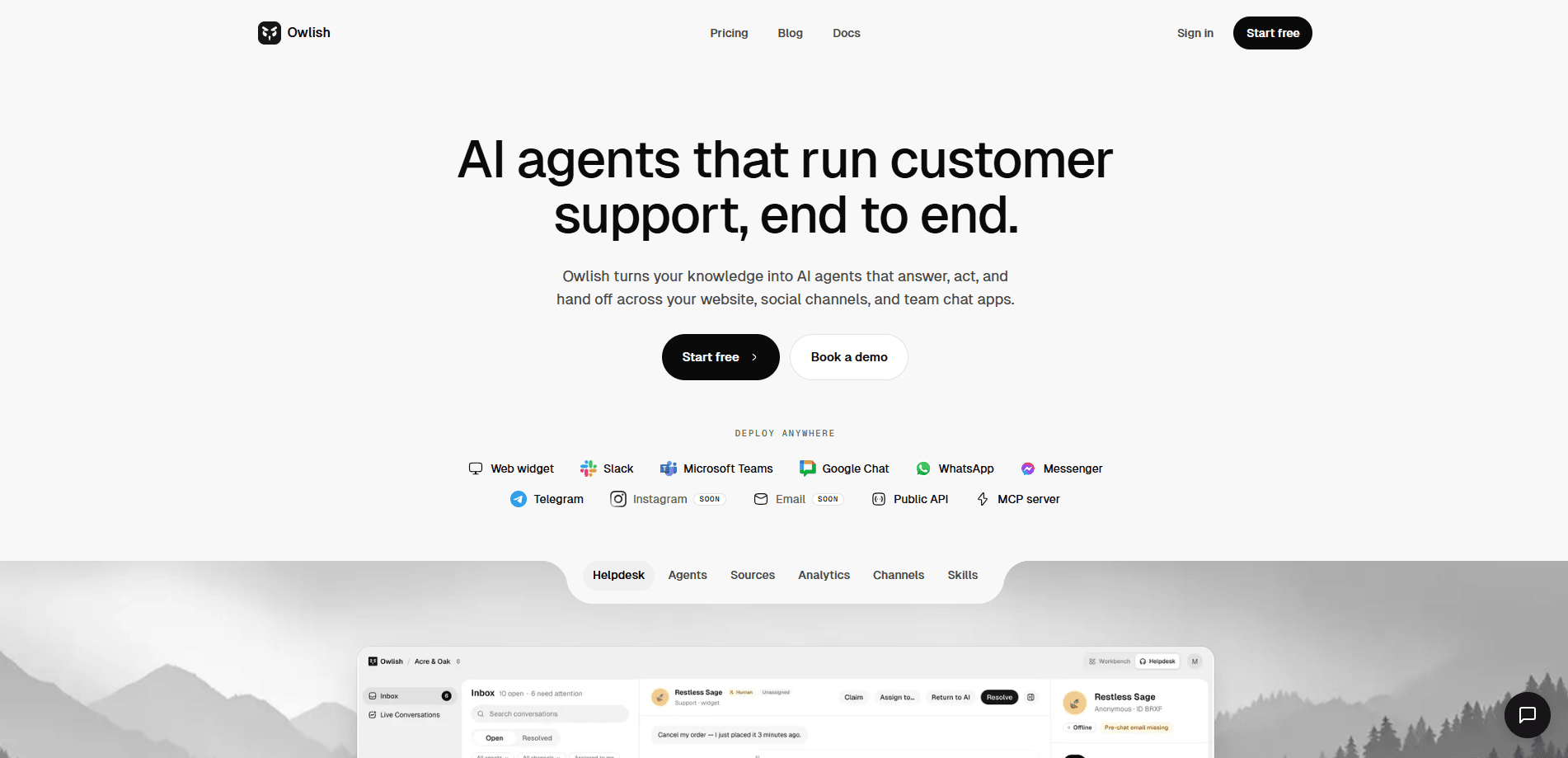
Owlish is a no-code AI customer support platform built by the Sydney studio Chevvi. It ingests your website pages, help docs, PDFs, and past tickets, then answers customer questions using only that content. Every reply can cite the exact source behind it. When the agent isn't sure, it routes the conversation to a human operator instead of guessing. Small and mid-sized support teams use it to deflect repetitive questions. No invented policies. No broken promises.
About Owlish
What Is Owlish
Owlish is an AI support agent platform, not a general-purpose chatbot builder. You feed it the content your team already writes, and it turns that content into a support agent that answers from those sources. The pitch is simple: grounded answers with citations, and a clean escape hatch to a person when the AI shouldn't decide alone.
The problem it targets is a familiar one. Chatbots that answer from thin air make up refund policies, promise things the company can't deliver, and hand operators a mess to clean up. Owlish treats those hallucinations as a defect rather than a quirk. If it can't find a source for an answer, it says so and escalates. That's the whole design. It shapes what the product is good at.
The biggest limitation is scope. The Free plan only ships a web widget with manual knowledge syncing and 7-day conversation retention. Slack, Teams, Google Chat, and the messaging channels (WhatsApp, Instagram, Messenger, Telegram, Email) start at the Growth tier. Teams that need multi-channel support from day one will pay more. Dedicated language controls are still on the roadmap, and the agent can already mirror the language a visitor writes in. That part works. Reporting on it doesn't.
Getting Started
- Create a free Owlish workspace with no card required, then name it after your brand.
- Add your knowledge sources: point Owlish at your website pages, upload help docs and PDFs, or import past tickets.
- Customize the agent's persona and branding so replies match your tone.
- Install the web widget snippet on your site, or connect Slack, Teams, and messaging channels if you're on Growth or above.
- Run test questions, open the cited sources behind each answer, and fix any gaps in your help content before going live.
Product Information
A quick look at Owlish's pricing, supported platforms, and performance.
Best for
The users, tasks, and scenarios where this tool fits best.
Users
- Small to mid-sized support teams that already maintain good help-centre content and want an AI agent that acts on it, not one that improvises.
- Solo founders and lean startups on the Free plan who need a basic web widget for a single support workspace.
- Agencies and consultancies selling managed AI support to clients. Full white-label delivery sits behind the separate Owlish Partners layer.
Tasks
- Deflecting repetitive questions like shipping times, refund policies, and account setup using answers pulled straight from your docs.
- Handing delicate or uncertain conversations to a human operator with the full transcript attached, so nobody has to re-explain the issue.
- Turning reviewed conversations back into better support knowledge, so a corrected answer never repeats its original mistake.
Scenarios
- A store gets a spike in "where's my order" questions after a sale and wants the agent to handle the routine ones while operators take the angry ones.
- A SaaS team fields the same onboarding questions all day and would rather point customers at cited help docs than type the same reply again.
- A support lead wants visibility into what customers actually ask and where the knowledge base has holes, using per-session sentiment and intent tags on the Scale plan.
Key features
Grounded, Source-Cited Answers
The agent only replies from content you've ingested, and each answer can point to the exact source it came from. Open any cited source to see what the AI used. If Owlish can't ground a reply in your content, it refuses or escalates rather than making something up. That's the core difference from a generic chatbot. It's what keeps the agent from inventing policies.
Human Handoff and Shared Inbox
When the agent is unsure, when a customer asks for a person, or when an operator wants to jump in, the conversation flows into a shared inbox. Operators can claim a chat, barge in mid-conversation, resolve it, or send it back to the AI. Handoff and the shared inbox start at the Growth tier. The Free and Starter plans can't escalate to a person through the platform.
Multi-Channel Deployment
The web widget ships on every plan, including Free. Slack, Microsoft Teams, and Google Chat arrive on Growth and above, along with WhatsApp, Instagram, Messenger, Telegram, and Email. WhatsApp, Instagram, and Messenger connect in one click. Telegram connects with your own bot. Discord is still on the roadmap, so teams that live there should wait.
Multilingual Replies
Owlish can follow whatever language a visitor writes in for normal grounded answers. That helps teams serving international customers without building separate agents. The catch? Dedicated language controls, locale reporting, and per-language routing aren't shipped yet. Managing a deliberately multilingual setup takes manual work for now.
Skills Beyond Q&A
Agents can call tools mid-conversation rather than only answering questions. Booking, ticket creation, and lookups are the kinds of actions on offer, and two skills ship today: human handoff and email escalation. The number of skills per agent scales with your plan, from one on Free up to fifteen on Scale. If your team books meetings, files tickets, or looks up order data mid-chat, this is the part that turns a Q&A bot into something closer to a teammate.
API and MCP Access
The Growth tier unlocks a REST API for managing your knowledge sources, plus an MCP server for use inside your IDE or other agent tools. That makes it possible to wire Owlish into a wider support workflow instead of treating it as a closed box. Smaller plans don't include API access. Growth is where the plumbing opens up.
Plan-Based Capacity Controls
Every tier sets hard limits on agents, monthly chat sessions, knowledge base size, team members, and skills per agent. Free covers 25 sessions and a single agent. Scale allows 3 agents, 1,000 sessions, and 40 MB of knowledge. You can add extra sessions, agents, seats, or knowledge capacity as add-ons on any paid plan.
Pros and cons
Pros
- Answers cite their sources, so you can verify what the AI told a customer instead of taking its word for it.
- Escalation to a human is built into the flow, with full transcript and context passed to the operator.
- The web widget is available on the free plan, so you can test grounded answers before paying anything.
- A REST API and MCP server on Growth open the door to custom integrations and in-IDE use.
- Per-conversation pricing avoids AI credit math, which makes budgeting for support volume easier to predict.
Cons
- Human handoff and the shared inbox are locked behind the Growth plan at $119/mo (annual), so cheap tiers can't escalate to a person.
- Dedicated language controls aren't shipped yet, so multilingual routing stays manual. The agent still mirrors a visitor's language, but there's no per-locale control.
- The Free plan caps you at 25 sessions a month and 0.5 MB of knowledge. That runs out fast for any real traffic.
- Discord and several other channels remain on the roadmap. Multi-channel coverage is incomplete today.
Frequently asked questions
It turns the content you already write (website pages, help docs, PDFs, past tickets) into an AI support agent that answers customer questions with cited sources. When it can't ground an answer, it escalates to a human instead of guessing. That's customer support automation without the guesswork.
Related content
Explore related tools, skills, and articles for Owlish.
Owlish Alternatives

ngram 2.0
ngram · Video · Marketingngram 2.0 is an AI video generator for teams. It turns a prompt, a screen recording, or a product URL into a narrated explainer, product demo, or AI avatar video, and every scene stays editable.

shippedit.me
Krawlup · Marketing · Businessshippedit.me now redirects to Krawlup, a web platform that audits SEO, AEO and page speed every week, then hands the fixes to AI coding agents over MCP.

MePersona
MePersona, Inc. · Writing · Productivity · MarketingMePersona is an AI unified inbox for creators. It learns your voice, drafts replies to fan messages from 12 platforms, and sends only what you approve.