

OwlU
Leanagilehungry Inc. · Writing · Productivity
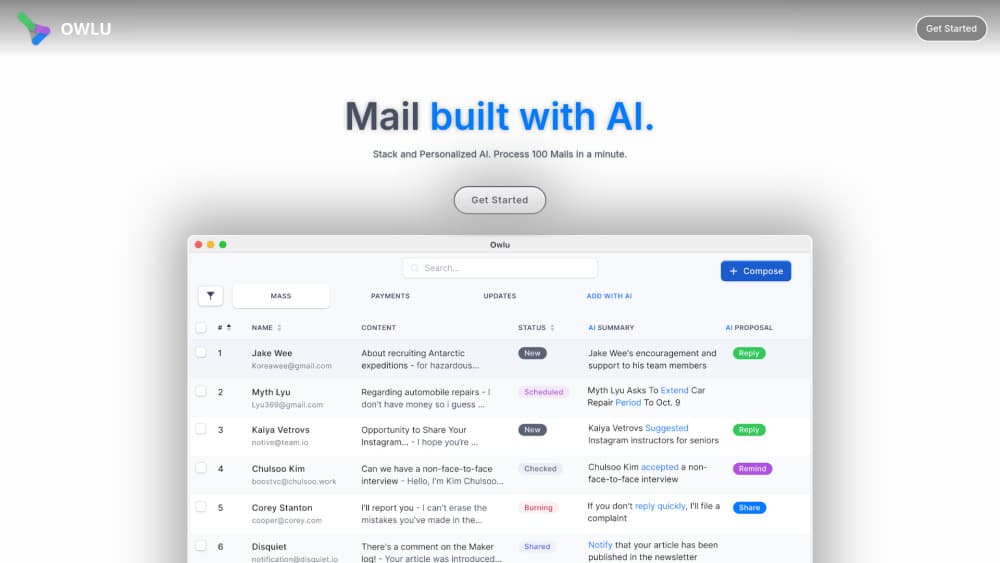
OwlU is a free AI email agent for solo pros, freelancers, and one-person founders. It summarizes incoming mail, drafts replies, and runs your own email automation rules on macOS and Windows.
About OwlU
What Is OwlU
OwlU is a desktop email client that puts an AI agent in charge of the busywork around your inbox. It reads the mail you receive, writes summaries, and prepares replies you can review before sending. Unlike a browser-based assistant, it runs as an app on your computer and connects straight to your existing accounts.
The product comes from Leanagilehungry Inc. and is aimed at people who handle their own email, not teams with a support desk. You connect Gmail, Outlook, or any company IMAP account, and OwlU handles the sorting and drafting in the background. The app is currently free, and the developer says it plans to move to a paid model later.
The biggest limitation is scope. OwlU is built for a single person or a very small operation, so heavy admin features lean on the newer Organizations & Teams tools rather than a mature enterprise setup. It also runs on macOS 15.0+ and Windows 10 (1809)+ only, with no mobile or web version.
Getting Started
- Download OwlU for macOS or Windows from the official site, then install it. Both builds ship the same features.
- Open the app and connect an account. Gmail and Outlook sign in with OAuth, company mail uses IMAP, and Naver accounts sign in with your ID.
- Set up an automation rule: pick the kind of mail that arrives and the action to take, such as summarizing it or drafting a reply.
- Review the agent's output in the inbox or the agent chat screen, then confirm or edit before anything sends.
- Add more rules and connect extra accounts as you settle into a routine.
Product Information
A quick look at OwlU's pricing, supported platforms, and performance.
Best for
The users, tasks, and scenarios where this tool fits best.
Users
- Solo professionals
- Small teams
- Users with mixed accounts
Tasks
- Triaging a full inbox
- Setting recurring mail rules
- Finding an old message
Scenarios
- Clearing a backlog after time off
- Running one-person client work
- Managing a shared business inbox
Key features
AI Summaries and Draft Replies
OwlU reads the mail you receive and writes AI email summaries at the thread level, so long conversations collapse into a few lines. It also drafts your reply, which you review and edit before sending. For anyone who checks mail between other work, this is the feature that saves the most time.
Rule-Based Workflow Automation
You set up email workflow automation once by describing the trigger and the action, and OwlU runs it from then on. The editor is node-based, integrates with your calendar, and keeps running in the background even when you are not watching. Approval cards show the real result of each step before anything is sent.
Agent Chat
A conversational screen lets you ask the agent to compose a message or find mail. It backs onto dedicated compose-confirm and find-mail screens, so you keep control of what goes out. Preset workflow cards suggest common setups for people who are not sure where to start.
Network Canvas
Network Canvas maps the people and organizations behind your mail and recommends contacts to keep in touch with. It supports filtering by sender and a quick action bar for sharing, reminders, and labels. The view was rebuilt with Metal rendering for smoother scrolling on macOS.
DataSheet
DataSheet turns scattered mail data into typed columns you can sort and export. It saves as CSV, supports one source feeding multiple rows, and can fan out a web search across entries. A per-node account picker lets different steps send from different addresses.
Custom and Self-Hosted Email
The setup wizard connects any custom-domain or company IMAP account, not just the big providers. Owlu-hosted mailboxes sit behind DNS domain-ownership verification. Real-time IDLE delivery keeps incoming mail current without manual refreshes.
Organizations and Teams
Shared mailboxes, shared addresses, and Owlu-hosted organization domains let a small team work from one setup. Member invites arrive as branded emails with a web landing page. This is the newest part of the product and is still catching up to the solo-focused core.
Local-First Mail Access
OwlU rebuilds email access on a direct IMAP architecture, so messages are fetched on your device and not stored on OwlU servers. A universal permission gate and reconnect banners make it clear which accounts are active. The app is signed, notarized, and verified by Gatekeeper.
Pros and cons
Pros
- Free to use right now, with no subscription required during the current period.
- Drafts and summarizes in the background, so reviewing beats writing from scratch.
- Connects Gmail, Outlook, and custom IMAP accounts, including self-hosted domains.
- Rule-based workflows run automatically after a one-time setup.
- Email is fetched on your device, with a stated zero-storage policy on the servers.
Cons
- No mobile or web version, so you need to be at a macOS or Windows machine to use it.
- The pricing plan is unsettled; the developer says a paid model is coming, and the price is not announced yet.
- Team features are newer than the solo workflows, so shared-inbox setups may feel less finished.
- AI summaries and drafts depend on the connected accounts, and usefulness drops when mail is short or routine.
Frequently asked questions
OwlU is a free AI email agent that runs as a desktop app for macOS and Windows. It summarizes the mail you receive, drafts replies, and automates recurring email tasks so you spend less time in your inbox.
Related content
Explore related tools, skills, and articles for OwlU.
OwlU Alternatives

Google EmbeddingGemma 2
Google DeepMind · Writing · Image · CodingGoogle EmbeddingGemma 2 is a 740M-parameter open model that turns text, code, images, audio, and video frames into vectors in one 768-dimension space, running on phones and laptops.

MePersona
MePersona, Inc. · Writing · Productivity · MarketingMePersona is an AI unified inbox for creators. It learns your voice, drafts replies to fan messages from 12 platforms, and sends only what you approve.

Fluence
Yay Software (Yannick Huchard) · Writing · Voice & Language · ProductivityFluence is an Android app that reads PDFs, EPUBs, Word files and web articles aloud, follows each sentence as it speaks, and answers questions about the text on the phone itself.