

PackPack
PackPack · Coding · AI Detection
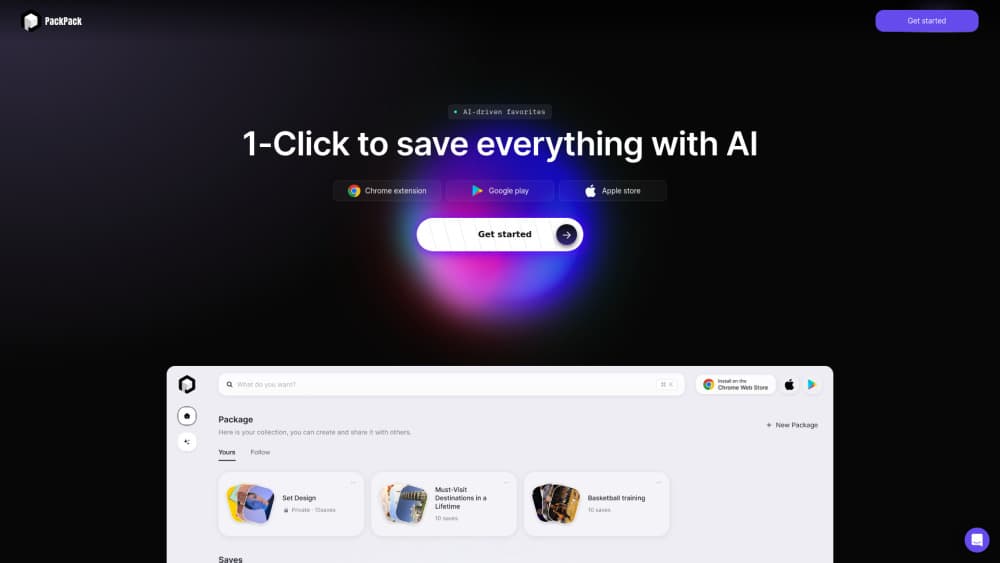
PackPack is an AI bookmark manager that saves pages, videos, images and social posts in one click, then summarizes them and answers questions about your collection.
About PackPack
What Is PackPack
PackPack is a bookmark manager built on a plain observation: saving a link takes a second, and finding the thing again takes an afternoon. You install the browser extension, click once on a page, and PackPack stores a cleaned copy of the content instead of a bare URL. Articles arrive without ads, sidebars or cookie banners, so the saved version reads like a page torn from a magazine.
The AI layer sits on top of that library. Each item gets an AI summary plus automatic tags, and you can ask a question in plain language, such as what a saved report said about vector databases, without recalling the title, the site or the date. Media gets the same treatment: social posts, images, PDFs and video pages all land in one list.
The catch is availability. As of October 2026, packpack.ai no longer serves a product page and the domain is listed for sale. Accounts created earlier may still work through the mobile apps, yet new sign-ups and billing are hard to reach. Treat this as a tool worth understanding rather than a service to buy today.
Getting Started
- Install the PackPack extension for Chrome or Edge, or download the iOS or Android app.
- Create an account and name the workspace that will hold your collection.
- Open any page, post or video and click the PackPack button once. The AI saves a clean copy and starts a summary.
- Add tags or move the item into a collection when the automatic labels miss the point.
- Use the search box to ask a question instead of typing a title, then reopen the source from the result.
Product Information
A quick look at PackPack's pricing, supported platforms, and performance.
Best for
The users, tasks, and scenarios where this tool fits best.
Users
- Students building a reading list for a thesis
- Designers and content creators
- Researchers with an existing read later habit
Tasks
- Collecting articles for a weekly newsletter
- Comparing product pages
- Keeping social posts
- Reviewing material before a meeting
Scenarios
- A long research project with hundreds of sources
- A shared reading list for a small team
- Weekend browsing that turns into Monday work
Key features
One-click saving for any content type
A single click stores a webpage, a video page, an image, a PDF, a social post or a block of selected text. PackPack keeps text and media in the same item, so a saved thread doesn't rot into a dead link. That range matters when most of what you save isn't an article.
Clean reading copies
The web clipper strips ads, sidebars, pop-ups and navigation before it stores the page. What comes back later is the article itself, with images in place and text you can select. Saved copies hold up after the original site redesigns or wraps the piece in a paywall.
AI summaries
Every item gets a short summary within seconds of saving. It sits above the full text, which makes a 40-item reading list skimmable in one sitting. You can still open the clean copy when a detail matters.
Questions across your library
The search box takes full questions rather than keywords. Ask what a saved report said about pricing, and PackPack returns matching passages with the source attached. This is where it pulls away from a folder-based bookmark manager.
Automatic tags and collections
PackPack reads the page and assigns topic tags without input from you. You can edit the tags, merge duplicates and move items into collections afterwards. Manual filing stays available, it just stops being the default.
Sync across browser and phone
The Chrome and Edge extensions, the web app and the mobile apps share one library. Save on a laptop in the morning, open the same item on a phone at night. Sync runs in the background, so there's no export step.
Pros and cons
Pros
- Saves the content, not only the link, so dead pages stay readable.
- Handles social posts, images and video pages that most bookmark managers ignore.
- AI summaries make a long reading list manageable in a short session.
- Question-style search works when you forget the title and the site.
- A free tier exists, which is enough to test the workflow before paying.
Cons
- The official site went offline and the domain is for sale as of October 2026, so new sign-ups and payments are unreliable.
- Summaries can lose nuance on legal, medical or technical text, and the details still need the source.
- The paid plan runs $4.99 per month on annual billing, which is steep for a bookmark tool with a small user base.
- No public API, which rules out custom automations and bulk imports from other tools.
Frequently asked questions
It saves web content and makes it findable later. You store a page, post, image or video with one click, then search the library with questions and read a clean copy instead of the ad-heavy original.
Related content
Explore related tools, skills, and articles for PackPack.
PackPack Alternatives

Base Code
Base44 (Wix) · Coding · ProductivityBase Code is a shared cloud development environment from Base44. Teammates describe changes to an existing GitHub codebase in chat, preview them live and send them back as pull requests.

Google EmbeddingGemma 2
Google DeepMind · Writing · Image · CodingGoogle EmbeddingGemma 2 is a 740M-parameter open model that turns text, code, images, audio, and video frames into vectors in one 768-dimension space, running on phones and laptops.

GitGlow
GitGlow · Coding · ProductivityGitGlow is a local-first desktop Git client that lets independent developers review their own code and their AI agents' changes in one place before shipping.